
 Need help?
Do you have a question about the hamilton safe 5000 series and is the answer not in the manual?
Guidance on selecting audio/video matrices, consoles, microphones, speakers, and video units for system setup.
Instructions and diagrams for mounting the audio and video matrix units in an accessible location.
Details the power supply ratings for various matrix models.
Illustrates the RJ-45 connector and its pinout for the Cat 5 Lane Speaker Driver Kit.
Step-by-step instructions for connecting wireless headset base units to audio consoles or adapters.
Instructions for installing original and current 5014 Wireless Adapters to audio consoles.
Details initial setup for CS540 and CS50/CS55 wireless headsets, including configuration dials and volume settings.
Guidance on fine-tuning audio volumes for wireless headsets using headset and matrix controls.
Instructions on how to switch between console and wireless headset modes on different console models.
Details on installing the Model 5512 handset, noting differences from the older 5012 model.
Step-by-step instructions for wall or side mounting the 5512 handset enclosure.
Details the wiring connections for the 5512 handset to the circuit board and matrix.
Instructions for mounting and connecting the 5012 Remote Handset, including power requirements.
Overview of 5570/5571 consoles, their features, compatibility, and intended use.
Instructions for connecting 5570/5571 consoles to the audio matrix using appropriate cables and power.
Overview of 5572/5573 in-wall audio units, their specifications, and compatibility guidelines.
Step-by-step instructions for installing the 5572/5573 in-wall audio units into electrical boxes.
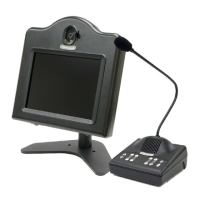
Steps for separating, connecting, and reassembling the 5550 Teller Video Unit components.
Instructions on powering on, adjusting height, and tilting the 5550 Teller Video Unit for optimal viewing.
Explanation of the buttons used to navigate the camera's on-screen display (OSD) menu for adjustments.
Guidance on connecting cables for the 5650 Teller Video Unit, including power and video interfaces.
Instructions for operating the 5650 Teller Video Unit, including power, height, and tilt adjustments.
Details the functions of buttons for navigating the monitor's on-screen display (OSD) menu.
Explains how to use the camera menu board buttons for adjusting camera settings.
Instructions for installing the 5517 Remote Video Unit in a post mount configuration.
Instructions for installing the 5517 Remote Video Unit in a side mount configuration.
Details on connecting various cables for the 5517 Remote Video Unit, including monitor, camera, and power.
Explains the function of buttons on the camera menu board for adjusting settings.
Steps for installing the 5617 Remote Video Unit using a post mount configuration.
Instructions for mounting the 5617 Remote Video Unit using a side mount configuration.
Guidance on wiring the 5617 Remote Video Unit, including audio, camera, and trigger wires.
Details the functions of the LCD menu board buttons for navigating settings.
Clarifies the use of the Video Power Control Kit vs. the Video Power Control Cable for pneumatic units.
Describes buttons for a menu board below the LCD screen for 5550/5517 units, including power status LED.
Explains button functions for a menu board at the top left of the unit, including input selection.
Details buttons for a menu board below the LCD screen with a green power LED indicator.
Explains menu navigation buttons on a board located on the back of the LCD screen.
Instructions for mounting the license plate camera and orienting it for viewing specific lanes.
Details features, switch numbers, and factory settings for the audio matrix dip switch pack.
Explains the function of TERM switches for terminating cable runs and t-tapping for CCTV signals.
Guidance on adjusting speaker and microphone gain pots on the audio matrix for optimal system volume.
Notes recommended speaking distance for console microphones and firmware differences.
Explains how to identify firmware revisions on 5501 Series consoles for audio adjustment.
Explains how to interpret lane key indicator lights and operate the 5501 Series Audio Console.
Provides important notes regarding 5501 console operation, system configuration, and sound quality.
Instructions on using colored stickers as lane indicators for 5501 Series consoles.
Explains the meaning of indicator lights on the audio console's lane keys.
Guides on operating the teller console for contacting customers, placing holds, and other functions.
Provides details on idle view behavior and auxiliary video display for teller consoles.
Explains the echo canceller feature, its learning modes, and potential issues affecting performance.
Details the background noise cancellation feature, its effects, and how to toggle it on/off.
Troubleshooting steps for systems that fail to initialize, involving power cycling and device isolation.
Guidance on checking power supplies, troubleshooting audio problems, and cable types.
Tips for troubleshooting video issues and wireless headset problems, including pairing and static.
Provides contact information for technical support on audio/video products.
Addresses weak incoming audio and suggests using an external microphone assembly.
Explains how to match outgoing volumes when mixing 5501 consoles with different firmware revisions.
Recommends Hamilton E0680 audio cable and details its specifications for customer lanes.
Lists recommended power supply sizes for different matrix models and their connector types.
Provides guidelines for substituting consoles within or between different series, noting lane compatibility.
Discusses replacing audio matrices with different models, including compatibility with video matrices.
Explains the omission of MIC DC switches on newer matrixes and their original purpose.
Describes the requirements for the auxiliary audio input, including signal level and connection types.
Addresses using longer console cables and provides guidance on type and maximum length.
Discusses premature failures, power issues, static electricity, and grounding as causes.
Suggests solutions for wind noise and weak deal drawer audio using external microphone assemblies.
Investigates cross-talk issues with IRT handsets and suggests matrix modifications and gain adjustments.
Troubleshoots wireless headset installation, including cable connections, adapters, and compatibility.
Addresses wireless headset static problems and suggests reset procedures for headsets and bases.
Explains variations in call tone behavior with wireless headsets based on console circuitry.
Discusses compatibility between different series of audio and video matrixes.
Specifies the requirements for auxiliary video input, including signal type and typical sources.
Troubleshoots teller monitors not locking onto lane cameras, focusing on matrix alignment and termination.
Diagnoses intermittent monitor lock-in or cycling issues, attributing them to termination switch settings.
Troubleshoots 5517 Remote Video Units where monitors are not working or always show the camera.
Troubleshoots monitors not displaying a picture, checking for 'No Signal' messages and input source.
Provides a solution for condensation on 5517 Remote Video Unit glass by adjusting foam insulation.
Lists part numbers for Hamilton Audio Consoles and related parts and accessories.
Lists part numbers for different types of Hamilton audio and video matrixes.
Lists part numbers for lane audio components, microphones, speakers, and cables.
Lists part numbers for headsets, handsets, and various teller/remote video units.
Lists part numbers for video accessories such as cameras, lenses, trims, and mounting brackets.
Lists part numbers for power supplies, control kits, switches, and distribution modules.
Displays photographs of Hamilton Audio Console models and their part numbers for identification.
Shows photographs of audio console parts and accessories with corresponding part numbers.
Displays photographs of various Hamilton Matrix models and their part numbers for identification.
Shows photographs of lane audio components, headsets, and handsets with part numbers.
Displays photographs of video units and accessories with their corresponding part numbers.
Shows photographs of power supplies and accessories with their part numbers for identification.
 General
| Manufacturer | Hamilton Safe |
|---|---|
| Category | Security System |
| Model Series | 5000 Series |
| Lock Type | UL Listed Group 2 Combination Lock |
| Body Material | Steel |
| Interior Dimensions | Varies by model (e.g., 14" H x 12" W x 12" D) |
| Exterior Dimensions | Varies by model (e.g., 20" H x 16" W x 16" D) |
| Weight | Varies by model (e.g., 150 lbs) |
| Relocking Device | Yes |
| Hinge Type | Heavy Duty Hinges |

 To Next Page