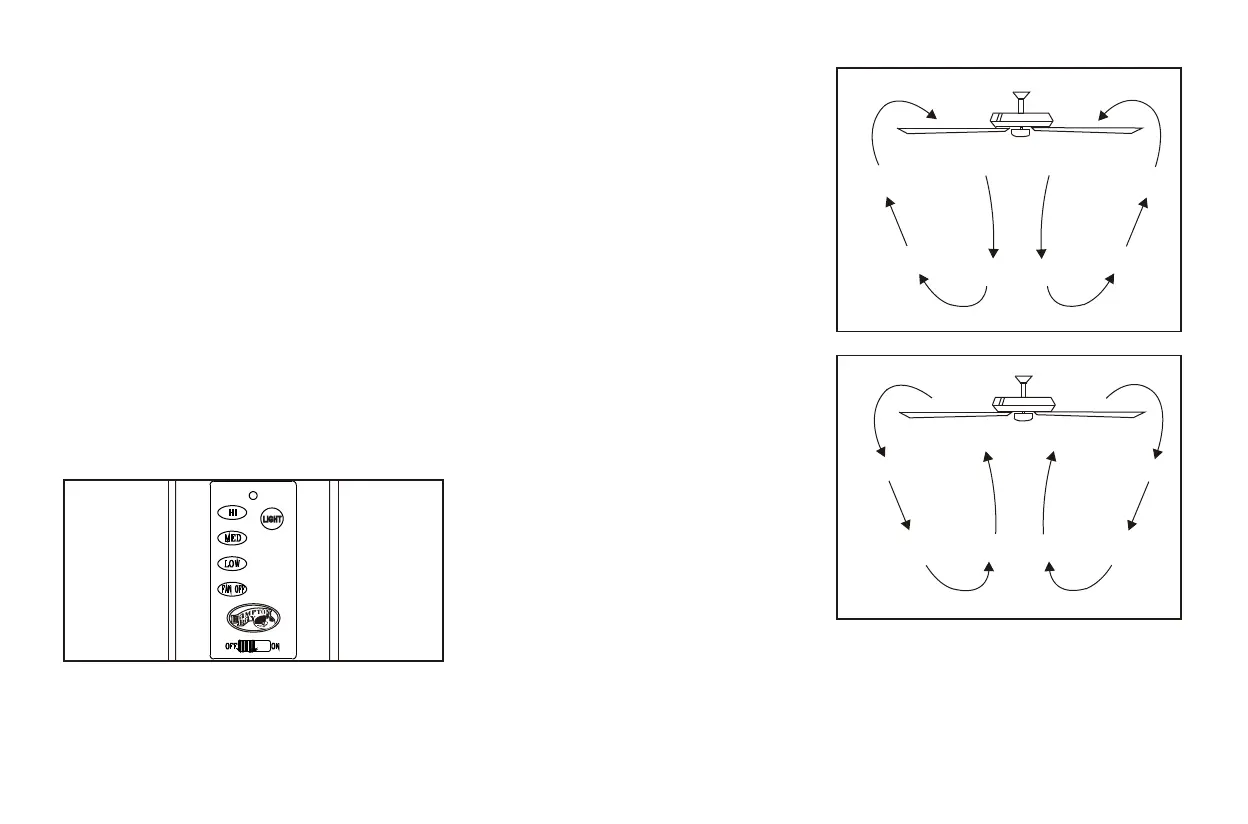
11. Operating Your Transmitter
Restore power to ceiling fan and test for
proper operation.
1. " LOW, MED, HI" buttons:
These three buttons are used to set the fan
speed as follows:
LOW= Low speed MED= Medium speed
HI= High speed
2. "FAN OFF" button:
This button turns the fan off.
3. The "LIGHT" button turns the light ON or
OFF and also controls the brightness setting.
Press and release the button to turn the light
ON or OFF. Press and hold the button to set
the desired brightness. The light key has an
auto-resume, it will stay at the same
brightness as the last time it was turned off.
4. "OFF-ON "Slide Button:
This button turns the power Off and On to
the Fan and Light(s).
The Reverse switch is located on the switch
housig. Slide the switch to the Left for warm
weather operation. Slide the switch to the
Right for cool weather operation.
Speed settings for warm or cool weather
depend on factors such as the room size,
ceiling height, number of fans, etc.
NOTE: Wait for fan to stop before changing
the setting of the slide switch.
Warm weather - (Forward) A downward air
flow creates a cooling effect as shown in
Figure 21. This allows you to set your air
conditioner on a higher setting without
affecting your comfort.
Cool weather - (Reverse) An upward airflow
moves warm air off the ceiling area as shown
in Figure 22. This allows you to set your
heating unit on a lower setting without
affecting your comfort.
Figure 20
TM
Figure 21
Figure 22




 To Next Page