
 Need help?
Do you have a question about the HanRongDa HRD-737 and is the answer not in the manual?
Describes power/sleep and button lock functions for device control and security.
Details audio output, power input, and antenna connections for versatile use.
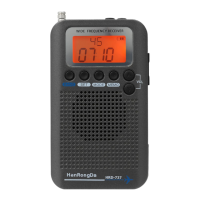
Explains the LCD display and all operational buttons for radio functions and settings.
Lists practical accessories like the carrying rope for enhanced portability.
Explains symbols related to frequency, time, and band units displayed on the LCD.
Describes symbols for lock, battery, alarm, and sleep modes shown on the display.
Details icons for band selection, memory, volume, and signal strength.
Instructions for turning the radio on/off, setting sleep timer, and using RSSI indicator.
Guide to locking/unlocking buttons to prevent accidental changes or shutdown.
Details on connecting external power via DC5V USB and battery charging process.
Information on connecting headphones and extending the telescopic antenna.
Explains two methods for adjusting volume: step-by-step and rapid adjustment.
Instructions for recalling stored memory stations using specific buttons.
Step-by-step guide to storing favorite radio stations into memory channels.
Details how to switch audio modes (MONO/ST) and step values for different bands.
Instructions for setting the clock and configuring the alarm function.
Enables or disables the squelch function to reduce background noise.
How to switch between radio bands and set alarm clock parameters.
Automatically searches and stores radio stations across frequency bands.
Explains step-by-step and quick frequency searching for desired stations.
Describes the orange backlight feature activated by button presses.
Information on receiving TV sound frequencies and potential interference.
Details frequency ranges, receiving sensitivities, and distortion degrees.
Lists product size, speaker, battery, and operating voltage specifications.
Provides advice on using the antenna for optimal reception of FM, AM, and SW broadcasts.
Advises on battery removal, low battery indicators, and avoiding physical damage.
Guidelines for storing the radio in suitable temperature and humidity conditions.
Warns against using chemical solvents for cleaning and disassembling the radio.
 General
| Frequency Range (FM) | 64-108 MHz |
|---|---|
| Frequency Range (AM) | 522-1620 kHz |
| AM Receiving Sensitivity | ≤1 mV/m |
| Signal to Noise Ratio | ≥50 dB |
| Maximum Output Power | 3W |
| Power Supply | DC 5V |
| Speaker | 3W |
| Battery | Lithium-ion rechargeable |
| Charging | USB |

 To Next Page