EasyManua.ls Logo

HanRongDa HRD-900 - User Manual

HanRongDa HRD-900
4 pages
Print Icon
To Next Page IconTo Next Page
Loading...
User Manual for HanRongDa HRD-900
Camping Radio with Flashlight and
SOS Alarm
Question and Answer IconNeed help?

Do you have a question about the HanRongDa HRD-900 and is the answer not in the manual?

Summary

Product Components

Loudspeaker

The primary audio output for the radio.

Flashlight;Warning Light

Integrated light source for illumination and signaling.

Torch On;Off

Control for the flashlight function.

Solar Panel

Panel for converting sunlight into electrical energy.

LCD Display

Liquid Crystal Display for showing information like time and frequency.

Volume Up Button

Increases the audio output volume.

Power;Sleep Button

Controls the radio's power state and sleep timer.

Wrist Clasp

Attachment point for a wrist strap for secure carrying.

Tuning Up Button

Adjusts the radio frequency upwards.

Band;Scan Button

Selects radio bands (AM/FM/SW) and initiates scan functions.

Hand Crank

Manual generator for charging the battery.

Tuning Down Button

Adjusts the radio frequency downwards.

Volume Down Button

Decreases the audio output volume.

Lock Button

Locks current settings to prevent accidental changes.

Charge Indicator Light

Indicates the charging status of the battery.

Telescopic Antenna

Extendable antenna for improved radio reception.

Output Power Port

Port for outputting power to external devices.

3.5 mm Headphone Jack

Standard jack for connecting headphones or external speakers.

Input Power Port

Port for external power input, e.g., AC adapter.

Battery Compartment

Location for installing the rechargeable battery.

Specifications

Radio Operation

Power On;Off and Sleep Timer

Instructions for powering the device and setting the sleep timer.

Broadcast Mode Selection

How to switch between AM, FM, SW1, and SW2 receiving modes.

Tuning and Scanning Methods

Details on fine-tuning, rapid search, and automatic station scanning.

Volume Control

Adjusting the audio volume level from 00 to 31.

Time Setting

Procedure for setting the current time on the LCD display.

Alarm Function

Steps to set, activate, and cancel the alarm.

Overview

The HanRongDa HRD-900 is a versatile camping radio equipped with a flashlight and SOS alarm, designed for emergency preparedness and outdoor use. This compact device integrates multiple functionalities to ensure users have access to information, light, and emergency signaling in various situations.

Function Description:

The primary function of the HRD-900 is to serve as a multi-band radio, capable of receiving FM, AM, SW1, and SW2 frequencies. This allows users to tune into a wide range of broadcasts, including news, weather updates, and entertainment, even in remote areas. Beyond its radio capabilities, the device features an integrated flashlight for illumination, a warning light for signaling, and an SOS alarm for emergencies. Powering these functions is a 2000mAh battery, which can be charged through multiple methods, including a hand crank and a solar panel, making it suitable for off-grid scenarios. The radio also includes an LCD display that shows time, frequency, and battery status, enhancing user convenience.

Important Technical Specifications:

  • FM Range: 64.0-108MHz
  • AM Range: 520-1710KHz
  • SW1 Range: 3.00-10.00MHz
  • SW2 Range: 10.00-18.00MHz
  • Power Consumption: 0.7W
  • Battery Capacity: 2000mAh
  • Dimensions: 12.7 x 6 x 3.6 cm

The device's compact dimensions make it highly portable, fitting easily into a backpack or emergency kit. The broad frequency ranges ensure comprehensive coverage for various radio broadcasts. The 2000mAh battery capacity provides a decent operating time, and the low power consumption of 0.7W contributes to extended battery life, especially when relying on alternative charging methods.

Usage Features:

The HRD-900 is designed for user-friendly operation with several intuitive features:

  • Power On/Off: To turn the radio on, press the Power button. Press it again to turn it off. Before initial use, ensure the 18650 battery is inserted correctly, observing positive and negative poles.
  • Band Selection: Press the "Band" button to cycle through AM, FM, SW1, and SW2 modes.
  • Tuning:
    • Fine-tuning: Short-press the "Tune +" or "Tune -" buttons to adjust the radio station with minimum step values (0.1MHz for FM, 0.005MHz for SW).
    • Rapid Search: Hold the "Tune +/-" buttons for 1 second to rapidly search for radio stations.
    • Automatic Scanning: Long-press the "Scan" button to initiate a full automatic scan. A flashing indicator in the upper left corner of the display will confirm scanning is in progress. After the scan, use the "M+" or "M-" buttons to select a station from memory.
  • Volume Control: Adjust the volume from 00 to 31 using the "Vol+" and "Vol-" buttons.
  • Sleep Timer: Long-press the "Sleep time" button. The LCD will display "90" (minutes). Press it repeatedly to cycle through different sleep times until "Off" is displayed to disable the timer.
  • Flashlight/Warning Light: The device includes a flashlight and a warning light, controlled by a dedicated "Torch On/Off" switch.
  • SOS Alarm: The SOS alarm function is available for emergency signaling.
  • Time Adjustment:
    • Hold the "Vol-" button for 1 second. The hours will flash.
    • Use "Tun+" or "Tun-" to adjust the hours.
    • Press "Vol-" again to switch to minutes.
    • Adjust minutes using "Tun+" or "Tun-".
    • Press "Vol-" again to confirm or leave the radio for 5 seconds to apply the time. The system uses a 24-hour format.
  • Alarm Adjustment:
    • Hold the "Vol+" button for 1 second. The hours will flash.
    • Use "Tun+" or "Tun-" to adjust the hours.
    • Press "Vol+" again to switch to minutes.
    • Adjust minutes using "Tun+" or "Tun-".
    • Press "Vol+" again to confirm or leave the radio for 5 seconds to apply the alarm time. A short beep and an alarm symbol in the lower left corner indicate the alarm is set.
    • To cancel the alarm, press "Vol+" again.
  • Lock Function: A "Lock" button prevents accidental button presses, useful during transport or storage.

Maintenance Features:

The HRD-900 incorporates features that facilitate its maintenance and ensure long-term usability:

  • Multiple Charging Options:
    • Hand Crank: The integrated hand crank allows for manual power generation, providing power even when no external power source is available. This is crucial for emergency situations.
    • Solar Panel: A solar panel on the device allows for charging using sunlight, offering a sustainable power source during prolonged outdoor activities.
    • Input Power (USB): The device can be charged via a standard input power port (likely USB, though not explicitly stated as such, it's a common interface for such devices), indicated by the "Input power" jack.
  • Battery Compartment: An easily accessible "Battery compartment" allows for replacement of the 18650 battery, extending the device's lifespan.
  • Charge Lamp: A "Charge lamp" indicates the charging status, providing visual feedback to the user.
  • Pull Rod Antenna: The "Pull rod antenna" can be extended for better signal reception and retracted for protection during storage or transport.
  • Wrist Clasp: A "Wrist clasp" enhances portability and helps prevent accidental drops.

The combination of robust radio capabilities, emergency features, and diverse charging options makes the HanRongDa HRD-900 a reliable tool for camping, hiking, and emergency preparedness. Its design emphasizes self-sufficiency and ease of use in challenging environments.
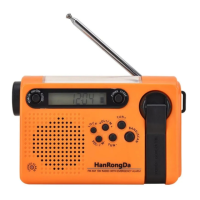
HanRongDa HRD-900 Specifications

General IconGeneral
BrandHanRongDa
ModelHRD-900
CategoryRadio
LanguageEnglish

Related product manuals