– 8 –
Operation instructions of remote
control
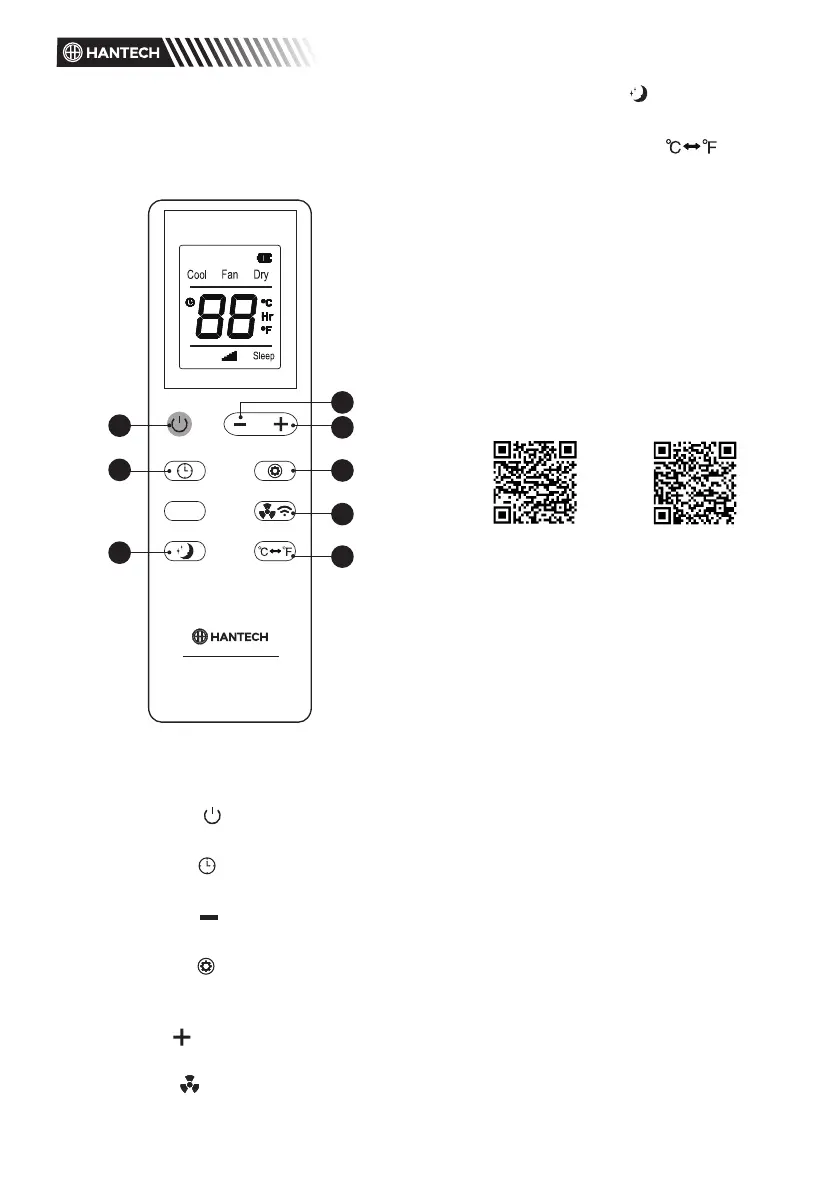
The remote control Panel is as
follows:
1
2
7
3
4
6
8
5
Instructions of key operation of the
high-quality remote control are as
follows:
1. Power: Press the key to turn on
or turn o the machine.
2. Timer: press the key to set
timing.
3. Down: press the key to reduce
temperature and timing set value.
4. Mode: press the key to
switch between cooling, fan,
dehumidifying mode.
5. Up: press the key to increase
temperature and timing set value.
6. Fan: press the key to select high,
low wind speed.
7. Sleep Mode: Press the key to
turn on the sleep mode.
8.
o
C &
o
F Change: Press to
change
o
C and
o
F display.
Information on the App “Smart Life
- Smart Living”
The Smart Life - Smart Living app is
available for android and iOS. Scan the
corresponding QR code to get directly
to the download.
NOTE:
Depending on the provider, there may
be costs involved in downloading the
app.
App StoreGoogle Play
Information on How to Use the App
This appliance allows you to operate
the appliance via your home network.
A prerequisite is a permanent Wi-Fi
connection to your router and the free
app “Smart Life - Smart Living”.
You can easily access all functions of
the appliance via the app. Since the
app constantly improved, we cannot
provide a more detailed description
here.
We recommend disconnecting the
appliance from the power supply when
you are away from home to prevent
unintentional switching on while you
are on the road!
System Requirement for Use of the App
iOs 8.0 or higher
Android 4.4 or higher
Commissioning via the App
1. Install the “Smart Life - Smart
Living” app. Create a user account.


 To Next Page
 Loading...