EasyManua.ls Logo

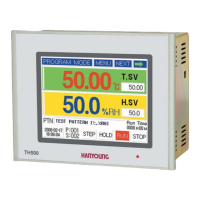
Hanyoung TH500 - User Manual

Hanyoung TH500
99 pages
Print Icon
To Next Page IconTo Next Page
Loading...
Manual
Programmable Temperature and Humidity Controller
th300_500_통합본_th300_500_통합본.qxp 19. 6. 26. 오후 1:32 페이지 2
Question and Answer IconNeed help?

Do you have a question about the Hanyoung TH500 and is the answer not in the manual?

Summary

1 Before Starting

1.2 Safety Information

Classifies alerts (Danger, Warning, Caution) and provides safety guidelines for operation and installation.

2 Installation Method

2.1 How to Install

Covers physical installation, panel cutout, dimensions, and suffix codes for TH500/TH300.

2.4 Connection Diagrams and Methods

Illustrates wiring for inputs, outputs, and communication, along with connection best practices.

3 Setting and Operating

3.2 Input Methods

Covers how to input numbers, Korean, English, and signs using various screens and keys.

3.4 Fix Control Operation

Guides on starting, stopping, and selecting modes for Fix control operation.

3.5 Program Control Operation

Explains how to select, set patterns, and run program control operations.

3.6 PID Auto Tuning

Explains the automatic PID tuning function for optimizing control performance.

5 Function Setting

5.2 Program Setting

Guides on setting up program patterns, segments, time signals, alarms, and repetition.

6 System Setting

6.4 PID Control Settings

Configures PID zones, tuning parameters (P, I, D, Hysteresis), and auto-tuning.

7 Simple Examples

7.4 Fix Control Operation Example

Guides on selecting, setting values, and operating the Fix Control mode.

7.5 Program Control Operation Example

Explains how to select, set patterns, and run program control operations.

8 Specifications

Summary

1 Before Starting

1.2 Safety Information

Classifies alerts (Danger, Warning, Caution) and provides safety guidelines for operation and installation.

2 Installation Method

2.1 How to Install

Covers physical installation, panel cutout, dimensions, and suffix codes for TH500/TH300.

2.4 Connection Diagrams and Methods

Illustrates wiring for inputs, outputs, and communication, along with connection best practices.

3 Setting and Operating

3.2 Input Methods

Covers how to input numbers, Korean, English, and signs using various screens and keys.

3.4 Fix Control Operation

Guides on starting, stopping, and selecting modes for Fix control operation.

3.5 Program Control Operation

Explains how to select, set patterns, and run program control operations.

3.6 PID Auto Tuning

Explains the automatic PID tuning function for optimizing control performance.

5 Function Setting

5.2 Program Setting

Guides on setting up program patterns, segments, time signals, alarms, and repetition.

6 System Setting

6.4 PID Control Settings

Configures PID zones, tuning parameters (P, I, D, Hysteresis), and auto-tuning.

7 Simple Examples

7.4 Fix Control Operation Example

Guides on selecting, setting values, and operating the Fix Control mode.

7.5 Program Control Operation Example

Explains how to select, set patterns, and run program control operations.

8 Specifications

Hanyoung TH500 Specifications

General IconGeneral
ModelTH500
Input TypeThermocouple, RTD
Control MethodPID Control, On-Off Control
Output TypeRelay
Display TypeLED Display
Temperature RangeAccording to sensor type
Accuracy±0.3% of F.S.
Power SupplyAC 100-240V, 50/60Hz
Operating Temperature50°C

Related product manuals