
 Need help?
Do you have a question about the Happymodel Mobula6 HDZERO and is the answer not in the manual?
Instructions for correctly installing propellers on CW and CCW motors for optimal flight performance.
This document describes the Happymodel Mobula6 HDZERO, a 1S 65mm HD whoop Frsky version, focusing on its setup, maintenance, and operational features.
The Mobula6 HDZERO is a compact, lightweight drone designed for indoor and outdoor flight, featuring HD video transmission. It utilizes a quad-X mixer configuration with specific propeller rotation directions for optimal flight stability. The drone is equipped with ESCs (Electronic Speed Controllers) that support DSHOT300 protocol and include features like motor stop, bidirectional DShot, and ESC telemetry. The flight controller is configured with default PID settings for roll, pitch, and yaw, and includes options for adjusting damping, D gains, and feedforward. It also incorporates a VTX (Video Transmitter) for real-time video feedback, with configurable bands, channels, and power levels. The device supports firmware updates for both the ESCs and the flight controller, ensuring it can be kept up-to-date with the latest performance enhancements and bug fixes. A "Flip over after crash" function is available to help recover the drone if it lands upside down.
To begin using the Mobula6 HDZERO, users must first ensure the propellers are correctly installed: CW propellers on M2 and M3 motors, and CCW propellers on M1 and M4 motors. The motor direction is reversed, which is a key configuration detail.
For ESC setup and firmware flashing, users need to download the BLHeliSuite software. The flight controller is connected to a computer via USB. It's crucial to check the COM port serial number in Device Manager; if it's above 255, it needs to be adjusted to ensure proper connection with BLHeliSuite. Within BLHeliSuite, users select "SILABS BLHeli Bootloader (Cleanflight)" and the correct serial COM port to connect. Firmware updates for the ESCs can be performed here, with the target firmware being "S-H-50" and the recommended BLHeli_s revision being JazzMaveric (16.80 BLS) to support RPM Filter. The BLHeliSuite interface allows for reading and writing ESC setup, checking ESC details, and flashing firmware.
The VTX channels can be switched in two ways. First, by connecting the battery and USB, then accessing the Video Transmitter tab in the Betaflight configurator to select the band and channel and save. Second, by disarming the drone and moving the transmitter sticks (THR MID + YAW LEFT + PITCH UP) to enter the OSD Menu, navigating to Features, then VTX SA to set the VTX Band and channel.
For flight controller firmware updates, several steps are required. Users need to install the latest STM32 Virtual COM Port Driver and the STM BOOTLOAD Driver (STM Device in DFU MODE). Betaflight configurator is then opened, and the firmware target "CRAZYBEEF4FR" and the desired firmware version are selected. The drone can be put into DFU Mode either by soldering the boot pad and plugging in USB, or by loading Betaflight firmware and hitting "flash," which will automatically put it into DFU Mode. After this, Zadig tools are used to replace the drivers from STM32 Bootloader to WINUSB Driver. Finally, the flight controller is reconnected to the computer, and Betaflight Configurator is used to load and flash the firmware.
The "Flip over after crash" feature is activated by setting one channel of the radio transmitter in the Mode tab of Betaflight configurator. The default switch for this function is AUX4 (Channel 8). This allows users to recover the drone by flipping it over if it lands upside down, without needing to physically retrieve it.
Regular maintenance involves checking and updating firmware for both the ESCs and the flight controller. The BLHeliSuite provides an interface to flash new ESC firmware, ensuring the drone benefits from performance improvements and bug fixes. Similarly, the Betaflight configurator, in conjunction with specific drivers and tools like Zadig, facilitates updating the flight controller firmware. This proactive approach to firmware management helps maintain the drone's optimal performance and stability.
The ability to adjust PID settings in Betaflight configurator allows users to fine-tune the drone's flight characteristics to their preference or to compensate for wear and tear on components. The VTX settings, including power levels, can also be adjusted, which is useful for managing heat and optimizing video range depending on the flying environment.
The detailed instructions for connecting to BLHeliSuite and Betaflight, along with the driver installation steps, are crucial for troubleshooting and maintaining the drone's electronic components. The emphasis on checking COM port numbers and using specific drivers highlights the importance of proper software and driver management for the longevity and functionality of the device.
 General
| VTX | HDZero Whoop Lite VTX |
|---|---|
| Wheelbase | 65mm |
| Frame Size | 65mm |
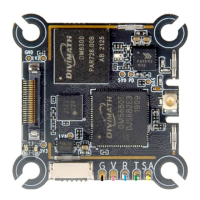
| Flight Controller | Happymodel F4 2G4 5A AIO FC |
| Motors | 0802 19000KV |
| Battery | 1S Lipo |
| Receiver | Built-in ExpressLRS 2.4GHz |
| Receiver Protocol | ExpressLRS |
| Flight Time | 3-5 minutes |
| FC | Happymodel F4 2G4 5A AIO FC |

 To Next Page