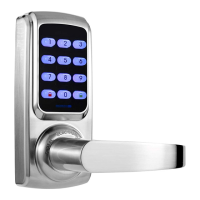
This document describes the HARFO HL20 series smart lock, a device designed to provide secure and convenient access control. The lock offers multiple methods of entry, including fingerprint, password, and a mechanical key, making it suitable for various residential and commercial applications.
Function Description:
The HARFO HL20 is a smart door lock that integrates advanced biometric and digital security features. It allows users to unlock doors using their unique fingerprints, a numerical password, or a traditional mechanical key for backup. The lock supports both administrator and general user profiles, enabling flexible management of access. It also includes features for restoring factory settings, switching between private and general modes, and managing administrator and general user fingerprints and passwords. The lock is designed for easy installation and comes with a commitment to after-sales service, including a 1-year warranty for all products.
Important Technical Specifications:
- Battery type: 4pcs 1.5v AA batteries.
- Working voltage: 4.5-6V (Low power alarm at 4.8V).
- Center distance: 60mm or 70mm (2-3/4" or 2-3/8").
- Door thickness: 40-55mm / 1.6"-2.2".
- Ways to open: Fingerprint, Password, Mechanical key.
- Fingerprint capacity: 90 (3 admin + 87 general).
- Password capacity: 10 (general).
- Latch type: Single latch.
- Environment: Working temperature: -10°C to 70°C; Humidity: 0%-95%.
- Initial password: 123456.
- Accessories: All kinds of screws and a spring (1 more to replace).
Usage Features:
- Multiple Unlock Methods: Users can choose between fingerprint, password, or a mechanical key for entry, offering flexibility and convenience.
- Administrator and General User Management: The lock distinguishes between administrator fingerprints/passwords and general user fingerprints/passwords. Administrators have full control over settings, including adding and deleting other users.
- Private/General Mode: The lock can be switched between private and general modes using a red/green switch on the battery cover. In private mode, only the admin fingerprint or backup key can unlock the door. In general mode, any user can unlock by password or fingerprint.
- Easy Fingerprint Enrollment: The process for adding administrator and general user fingerprints involves pressing the "set" button, releasing it, inputting a specific number (#1 for admin, #2 for general group 1, #3 for general group 2), and placing the finger on the fingerprint window multiple times until registration is successful.
- Password Management: Users can add 6-12 digit passwords. The process is similar to fingerprint enrollment, using "#4" for password input.
- Keep Unlocked Feature: The door can be kept unlocked by fingerprint or password by pressing the "0" button after unlocking. A long beep indicates that the lock will remain unlocked.
- Temporary Unlock: You can add any digits before and/or after your real password when unlocking, which can be a security feature to confuse onlookers.
- Installation Flexibility: The lock supports both 60mm and 70mm latches and is suitable for door thicknesses between 40mm and 55mm.
- Handle Direction Adjustment: The handle direction can be adjusted to suit left-hand or right-hand opening doors.
Maintenance Features:
- Factory Reset: To restore factory settings, install 3 batteries, then press the "delete" button on the last battery. When the buzzer sounds a long beep after about 5 seconds, release the "delete" button. If the buzzer sounds 2 short beeps, the operation failed. The initial password will be restored to 123456, and all administrator fingerprints and passwords will be deleted.
- Low Power Warning: The lock provides an alarm when the battery voltage drops below 4.8V, indicating that batteries need to be replaced. The lock can still be used about 50 times after the warning.
- Wrong Password/Fingerprint Alarm: Inputting a wrong password 3 times or a wrong fingerprint 6 times will lock the system for 3 minutes, accompanied by a long beep for more than 10 seconds.
- No Administrator Fingerprint Warning: If there is no administrator fingerprint, any fingerprint or initial password can unlock the door. After you unlock it, the lock will alarm, and the buzzer will sound 3 short beeps, with the keypad light flashing in red.
- Exceed System Capacity Warning: If the number of fingerprints exceeds 90 or passwords exceeds 10, the lock will alarm with 4 short beeps.
- After-Sales Service: HARFO offers a 1-year warranty on all products. For installation videos, FAQs, and more, users can visit the HARFO Amazon store at www.amazon.com/harfo or search "HARFO HL20" on YouTube. Technical support is available via email at harfoseller@hotmail.com.
- Safety Precaution: The manual emphasizes the importance of minding the drill bit during installation to avoid injury and damage to the lock.

 Need help?
 General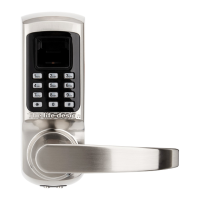

 To Next Page