EasyManua.ls Logo

Harman Kardon TD420 - User Manual

Harman Kardon TD420
11 pages
Print Icon
To Next Page IconTo Next Page
Loading...
since
CD
Transcription
Quality
Cassette
Deck
OWNER’S
MANUAL

Other manuals for Harman Kardon TD420

Question and Answer IconNeed help?

Do you have a question about the Harman Kardon TD420 and is the answer not in the manual?

Summary

Safety and Handling Precautions

Electrical Safety Warnings

Warnings regarding electric shock, opening the unit, and avoiding water or moisture.

Power Supply and Cord

Instructions for connecting the power supply and handling the power cord gently.

Installation and Moving Guidelines

Advice on proper placement, avoiding adverse environments, and moving the unit safely.

Unit Servicing

Prohibition of user servicing and advice to refer to qualified personnel to prevent hazards.

General Instructions and Features

Cleaning Procedures

Instructions for cleaning the unit using a soft, dry, or slightly damp cloth.

Controls and Displays Overview

Front Panel Controls

Identification and description of the numbered controls on the front panel.

Display Panel Indicators

Explanation of the various indicators, modes, and levels shown on the display panel.

Operating Instructions

Inserting and Playing Tapes

Steps for inserting a cassette, playing tapes with Dolby NR, and using Intro Scan.

Locating Tape Segments

Guidance on using Search buttons and the tape counter to find specific parts of a tape.

Recording a Tape

Detailed steps for recording, including Dolby NR, MPX Filter, Bias Fine Trim, and levels.

CD Sync Recording

Instructions for using the CD Sync feature to synchronize recording with a CD player.

Installation and Connectivity

Recording from CDs

Methods for recording entire discs or specific tracks using the CD Sync function.

Audio Connections

How to connect the deck's input/output jacks to your amplifier or receiver.

AC Power and Remote Control

Connecting to AC power and setting up external remote control operation.

Tape Head Maintenance

Procedures for cleaning and demagnetizing tape heads for optimal performance.

Tape Care and Protection

Guidelines for storing, protecting, and using audio cassettes to prevent damage.

Troubleshooting Guide

Common Operational Issues

Solutions for problems like no display, no sound, recording failures, and distorted audio.

Technical Specifications

Performance Metrics

Detailed technical data including frequency response, S/N ratio, THD, and dimensions.

Overview

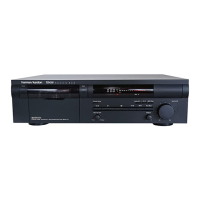
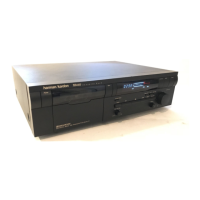
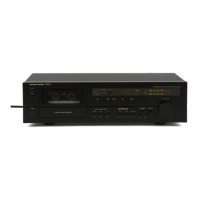
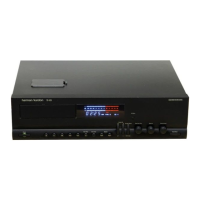
The Harman Kardon TD420 is a CD Transcription Quality Cassette Deck designed for high-fidelity audio recording and playback. It features a range of advanced technologies and user-friendly controls to ensure optimal performance.

Function Description:

The TD420 is engineered to produce high-fidelity recordings from compact discs and other high-quality sound sources, offering wide, flat frequency response, low noise, and low distortion. It supports both recording and playback of cassette tapes.

Important Technical Specifications:

  • Tape Speed: 1-7/8 i.p.s.
  • Heads: 2 (Hard Permalloy Record/Play Head Type)
  • Frequency Response (-20dB IHF std): 20Hz-20kHz +/-3dB with metal tape
  • Typical Large Signal Response (0dB): 20Hz-18kHz +/-3dB with Dolby C NR & metal tape
  • Wow-and-Flutter (NAB, WRMS): 0.05%
  • Wow-and-Flutter (DIN): 0.08%
  • Signal-to-Noise Ratio (Type II Tape):
    • Dolby NR off: 57dB
    • Dolby B NR on: 65dB
    • Dolby C NR on: 73dB
  • Total Harmonic Distortion (1kHz, metal tape, Dolby level): 1.0%
  • Channel Separation: 45dB
  • Channel Crosstalk: 70dB
  • Erase Ratio: 60dB
  • Bias Frequency: 105kHz
  • Fast Forward and Rewind Time (C-60): 90 seconds
  • Peak Reading Meter Range: -35dB to +8dB
  • Output Level (0dB, 10k Ohm load): 640mV
  • Input Sensitivity (0dB) Line: 45mV
  • Input Impedance Line: 22k Ohms
  • Dimensions (w x h x d): 17-3/8" x 5" x 12-5/8" (442mm x 126mm x 320mm)
  • Weight: 11.9 lbs./5.4 kg
  • Power Supply: Domestic 120 Volt AC outlets.

Usage Features:

  • Discrete Circuitry: For maximum design flexibility and highest possible performance, the playback circuitry uses discrete electronic components, not off-the-shelf integrated circuits.
  • Large Fluorescent Display: Function settings and signal levels are indicated in bright, clear alphanumerics and an easy-to-read format.
  • Advanced Ergonomic Design: Controls are engineered and positioned for simple, error-free recording and playback.
  • Dolby HX Pro: Special recording circuitry automatically monitors signal levels and adjusts bias in the presence of momentary high frequency peaks. This allows for recording at higher input levels (for better signal quality) without distortion. Dolby HX Pro operates automatically during recordings, and the resulting higher-fidelity tape can be played back on any cassette deck.
  • Dolby Noise Reduction (B/C): Activates Dolby Noise Reduction circuitry for playing or recording tapes, with selectable Dolby B or Dolby C.
  • MPX Filter: Used when recording FM stereo broadcasts with noise reduction to prevent interference.
  • Bias Fine Trim: Enables optimal wideband recordings by adjusting the bias setting for the specific tape in use. A test recording procedure is provided to find the ideal setting.
  • CD Sync Feature: Allows synchronization of recording with a Harman Kardon CD Player. When activated, the cassette deck controls the PLAY, PAUSE, and STOP functions of the CD player.
  • Music Search (Intro Scan, Search Forward/Reverse):
    • Intro Scan: Previews each segment on a pre-recorded tape by locating the beginning of recorded material and playing for 15 seconds before advancing to the next track.
    • Search Forward/Reverse: Rapidly locates the start of any desired segment on a pre-recorded tape.
  • Linear Time Counter: Indicates approximate tape position in minutes and seconds, maintaining elapsed time in Fast Forward and Rewind. Can be reset to 00:00.
  • Record Mute: Inserts blank space when recording.
  • Record Level and Balance Controls: Adjustable knobs for setting recording levels and balancing left and right channels.
  • Automatic Tape Type Detection: The cassette deck automatically determines the type of tape in use (Type I, II, or IV) and sets Bias/Equalization circuitry accordingly.

Maintenance Features:

  • Cleaning the Tape Heads: Tape heads must be cleaned periodically to remove tape particles. This can be done using a cotton swab dampened with isopropyl alcohol or a tape head cleaning kit. The TD420 includes an access hole on the top of the unit for easy cleaning.
  • Demagnetization: Tape heads and other internal parts gradually pick up magnetic fields, which can add noise to tapes. Periodic demagnetization using a battery-powered demagnetizer (in cassette form) is recommended.
  • Care of Tape:
    • Store cassettes in their cases, away from direct sunlight, excessive heat, and high humidity.
    • Avoid placing tapes near televisions or loudspeakers due to magnetic fields.
    • To prevent accidental erasure, remove the two square tabs on the cassette. These can be covered with adhesive tape to re-enable recording.
    • Do not use old cassettes with tape that no longer moves smoothly to prevent jamming and damage to the deck.
  • Troubleshooting Guide: A comprehensive chart is provided to help users identify and resolve common operating problems, such as no power, no sound, recording issues, or distorted playback.
  • Do Not Open the Cabinet: Except for routine maintenance, users are advised not to attempt to service the unit themselves to avoid fire, shock, and voiding the guarantee. Servicing should be referred to qualified personnel.

Harman Kardon TD420 Specifications

General IconGeneral
BrandHarman Kardon
ModelTD420
CategoryCassette Player
LanguageEnglish

Related product manuals