BASIC FUNCTION
22
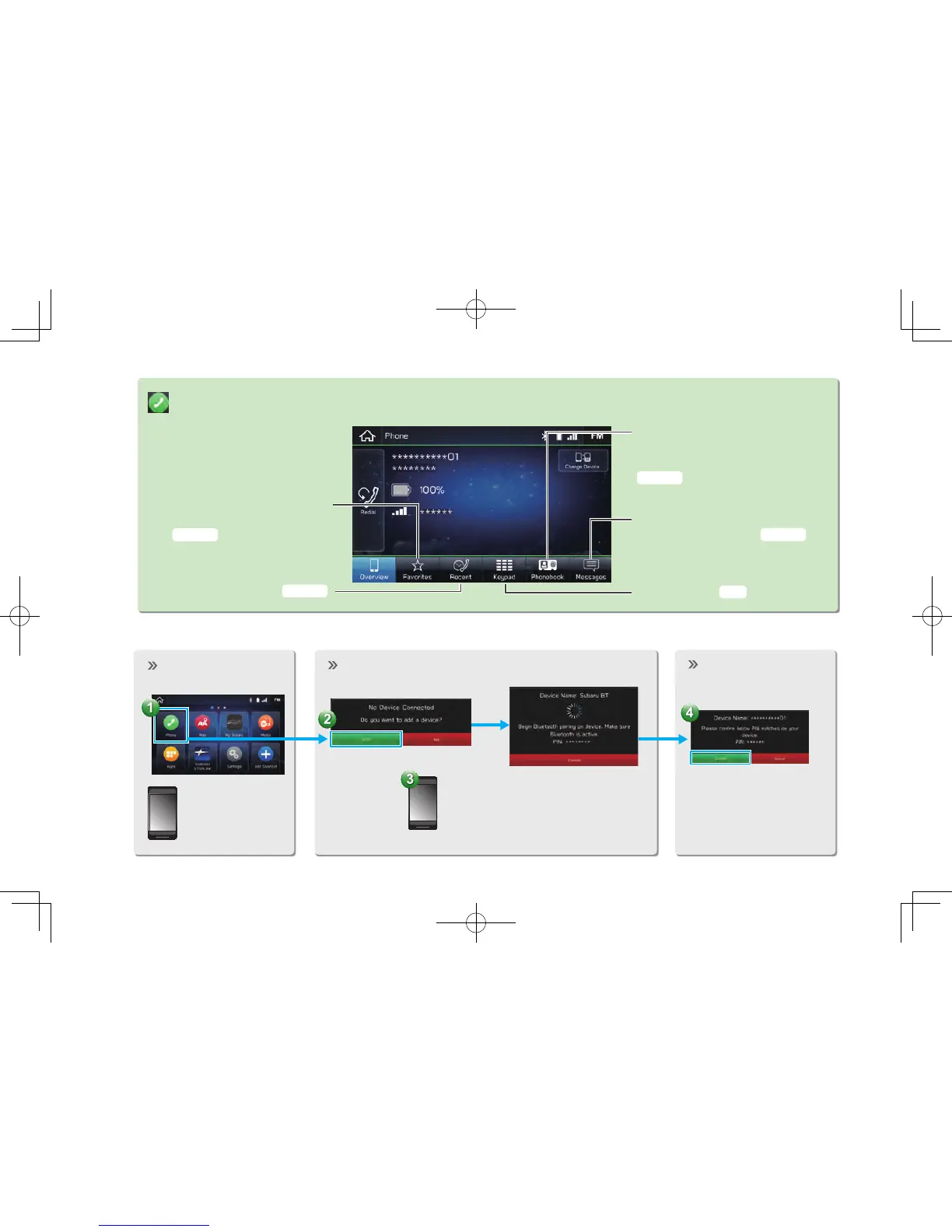
“Phone (Phone)” SCREEN
Call or send a text message
to a registered favorite
Call or send a text message
to a recent contact
Call or send a text message to
a contact in the phonebook on
the Bluetooth connected phone
Check or reply to
messages/place calls from
received message list
Directly input a number
to place a call
Display the “Phone
(Phone)” screen.
P.84,92
P.84,92
P.85,92
P.91,93
P.85
- Operation Flow: Pairing the System with a Bluetooth Phone/Device -
Prepare the
Bluetooth phone/
device to be
paired.
Operate the Bluetooth phone/device.
Turn the Bluetooth phone/device
Bluetooth function ON and select
“Subaru BT”. Hold NFC* compatible
devices near the audio system.
Register the
Bluetooth phone/
device.
If unable to pair, check
whether your Bluetooth
phone/device is compati-
ble with the system.
*: 8-inch with Navi system/8-inch system only



 To Previous Page