ALLURE
PRODUCT TOUR
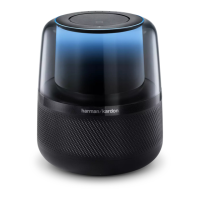
PLUG IN YOUR ALLURE
Top
Back Power adapter
Front
Volume
Microphone off
Microphone array
Action
Light ring
Bluetooth pairing
Power
Reset
Wi-Fi status
DOWNLOAD THE HK ALEXA SETUP APP
GET TO KNOW ALLURE
Microphone o / Micro désactivé / Mikrofon aus / マイクオ フ
Tap to turn off the microphones. / Appuyez pour éteindre les microphones. /
Antippen zum Ausschalten der Mikrofone. /
タップ して マイク をオ フに する 。
Action / Action / Aktion / 動作
Double tap to wake up Allure / Appuyez deux fois pour réveiller Allure. /
Doppelt antippen zum Aufwecken von Allure. /
2回タップしてAllureを起動します。
Tap to turn off the alarm and timer / Appuyez pour éteindre l'alarme et le minuteur. /
Antippen zum Ausschalten von Alarm und Timer. /
タップしてアラームとタイマーをオフにします。
Volume / Volume / Lautstärke / ボリューム
Tap or slide to adjust the volume. / Appuyez ou faites glisser pour régler le volume. /
Antippen oder Ziehen zum Einstellen der Lautstärke. /
タップまたはスライドしてボリュームを調節
Bluetooth
Tap to pair Bluetooth / Appuyez pour appairer en Bluetooth /
Antippen zum Koppeln über Bluetooth /
タップしてBluetoothペアリングをする
Light ring / Anneau lumineux / Leuchtring / ライトリン グ
The color of the light ring indicates what Allure is doing. When it is blue, Allure is ready for your requests.
La couleur de l'anneau lumineux indique ce que fait Allure. Lorsqu'il est bleu, Allure est prête pour vos demandes.
Die Farbe des Lichtrings zeigt die Aktion von Allure an. Wenn er blau leuchtet, ist Allure bereit für Ihre Anfragen.
ライトリングの色はAllureの状 況を示しています。ブルーの場 合、
Allureは指示に対応する準備ができています。
+/–
Download and run the free app in your phone or
tablet. Opening the app will start the setup
process.
Téléchargez et exécutez l'application gratuite sur
votre téléphone ou tablette. L'ouverture de
l'application démarrera le processus de
configuration.
Laden Sie die kostenlose App auf Ihr
Smartphone oder Tablet. Beim Öffnen der
Anwendung wird der Einrichtungsvorgang
gestartet.
スマ ホま たはタ ブレ ットに 無 料 のア プリを ダ ウ
ン ロ ー ド して 操 作 し ま す 。ア プ リ を 開 く と 設 定
プロ セスが 開 始されます。
During setup, you will connect Allure to the Internet and the Alexa Voice Service. Wi-Fi network and
Amazon account need for the setup.
Pendant la configuration, vous connecterez votre Allure à Internet et au service vocal d'Alexa. Un
réseau Wi-Fi et un compte Amazon sont requis pour la configuration.
Während des Setups müssen Sie Allure mit dem Internet und dem Alexa-Sprachdienst verbinden.
Für die Einrichtung ist ein WLAN-Netzwerk und ein Amazon-Konto erforderlich.
設定中、AllureをインターネットとAlexa Voice Serviceに接続します。設定にはWi-Fiネットワ
ークとAmazonアカウントが必要です。
GET TO START WITH ALLURE
Ask amazon Alexa / Demandez Amazon Alexa / Fragen Sie Alexa von Amazon / Amazon Alexa尋ねよう
Use your voice to ask for music, news and more - just ask Alexa.
Utilisez votre voix pour demander de la musique, des infos et plus - il vous suffit de le demander à Alexa.
Benutzen Sie Ihre Stimme, um nach Musik, Nachrichten und mehr zu fragen - fragen Sie einfach Alexa.
声をかけて音楽をか け てもらったり、ニュースを聞いたり、様々なことをA lex aに頼むだけ で出来ます。
HK Alexa Setup

 Need help?
 General



 To Next Page