>10S
Bluetooth pairing
Mic mute/unmute
Power connector
Light up when active
The Google Assistant
setup
AirPlay setup
For AirPlay 2 only users, Link Music can be setup using the
Apple Home app.
Apple home
GOOGLE HOME
1. Open the Home app, tap , then tap Add Accessory.
2. Tap Don’t have a Code or Can’t Scan, then tap the speaker.
3. Wait for your speaker to be added.
Give your speaker a name and choose a room where it's located.
4. Tap Done.
Download the Google Home app and set up your Link Music.
top & front
Press >2s to activate
your Google Assistant
Press to stop audio, timer,
alarms and responses

 Need help?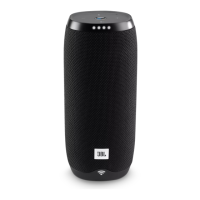






 To Next Page
 General