
 Need help?
Do you have a question about the Harman JBL Live Pro 2 TWS and is the answer not in the manual?
Instructions for fitting and positioning earbuds for optimal performance.
Steps to pair the earbuds with a device via Bluetooth.
Instructions for quick pairing on compatible Android devices.
Using both earbuds simultaneously for stereo sound.
Using a single earbud for mono audio playback.
Enabling simultaneous connection to two devices.
Explains tap and hold gestures for various functions.
How to activate and use Google Assistant or Alexa.
Activating the feature to automatically play or pause audio.
Customizing ambient sound awareness settings.
Setting up Google Assistant or Amazon Alexa via the app.
Personalizing touch controls for left and right earbuds.
Adjusting audio profiles using the app's equalizer.
Examples of voice commands for hands-free operation.
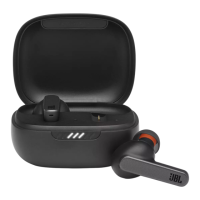
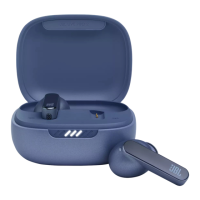
The JBL Live Pro 2 TWS is a pair of true wireless stereo earbuds designed to provide a personalized and high-quality audio experience. These earbuds offer a range of features aimed at enhancing user convenience, sound control, and connectivity, making them suitable for various daily activities, from listening to music to managing calls and interacting with voice assistants.
At its core, the JBL Live Pro 2 TWS functions as a personal audio device, delivering sound wirelessly from a connected source. The "True Wireless Stereo" (TWS) designation means that each earbud operates independently, allowing for flexible usage in either stereo (both earbuds) or mono (single earbud) mode. This flexibility is particularly useful for users who need to remain aware of their surroundings or prefer to extend battery life by using one earbud at a time.
The earbuds are equipped with active noise cancellation (ANC), a key feature that helps to block out external distractions, allowing users to immerse themselves fully in their audio. Complementing ANC are "Ambient Aware" and "TalkThru" modes. Ambient Aware allows some ambient sound to pass through, keeping users aware of their surroundings, which is beneficial for safety in urban environments or when needing to hear announcements. TalkThru mode further reduces music volume and amplifies external voices, enabling quick conversations without needing to remove the earbuds. These ambient sound control features are customizable through the dedicated JBL Headphones app, giving users granular control over their listening environment.
Connectivity is a strong suit of the JBL Live Pro 2 TWS, featuring Bluetooth for wireless pairing with devices. A notable inclusion is "Multi-Point Connection," which allows the earbuds to be simultaneously connected to two different devices, such as a smartphone and a tablet. This feature streamlines the process of switching between audio sources, for example, transitioning from watching a video on a tablet to answering a call on a phone without re-pairing. The earbuds also support Google's Fast Pair technology for Android devices, simplifying the initial setup and connection process.
The earbuds integrate with voice assistants, including Google Assistant, Amazon Alexa, and Siri, providing hands-free control over various functions. Users can activate their preferred voice assistant through customizable tap gestures, enabling commands for music playback, calls, scheduling, and more, all without touching their phone. This hands-free capability extends to "Hands-Free Voice Control," particularly for Android users, allowing them to issue commands like "Ok Google" to manage playlists, control noise cancellation, check schedules, or set alarms.
The JBL Live Pro 2 TWS is designed for intuitive and convenient daily use. The "Quick Start Guide" emphasizes the importance of a proper fit for optimal sound and comfort. The earbuds come with different sizes of ear tips (S/M/L), and users are guided to try them out to find the best fit. The JBL Headphones app includes a "Check My Best Fit" feature, which likely uses audio feedback to help users determine if their earbuds are correctly seated for the best audio performance and noise isolation. The manual advises turning the earbuds when slotted in the ears to find the most optimal wear position, ensuring they are worn correctly during testing.
"First Time Use" is straightforward: simply open the charging case, and the earbuds are ready for pairing. The "Power On & Connect" process is facilitated by Fast Pair for Android 6.0+ devices, where a pop-up on the phone screen prompts users to connect. For other devices, users can manually select "JBL LIVE PRO 2 TWS" from their Bluetooth settings.
Control over audio playback and features is managed through touch gestures on the earbuds. The manual outlines a system of taps and holds for various functions:
These controls are highly customizable through the JBL Headphones app, allowing users to assign specific functions to different tap gestures on either the left or right earbud. For example, users can configure a double-tap on the left earbud to activate Google Assistant and a double-tap on the right earbud to skip tracks.
"Auto Play/Pause" is another intelligent feature, where the earbuds automatically pause audio when removed from the ears and resume when put back in. This conserves battery and ensures users don't miss any part of their audio. This feature, along with "VoiceAware" (which controls how much of your own voice you hear during calls), can be managed and adjusted within the JBL Headphones app. VoiceAware allows users to adjust the balance between their voice and ambient sound during calls, enhancing call clarity and comfort.
While the manual doesn't explicitly detail cleaning or physical maintenance, the design implies standard care for true wireless earbuds. Regular cleaning of the ear tips and earbud surfaces is generally recommended to maintain hygiene and optimal sound quality. The charging case serves as a protective enclosure for the earbuds when not in use, safeguarding them from dust, minor impacts, and loss.
"Power Off" is achieved by simply placing the earbuds back into their charging case and closing the lid. This action not only turns off the earbuds but also initiates charging, ensuring they are ready for the next use.
For troubleshooting or to restore the earbuds to their original settings, a "Factory Reset" option is available. This process typically involves a specific sequence of taps and holds on the earbuds while they are in the charging case, as indicated by the manual (TAP × 2, HOLD (5s)). A factory reset can resolve various connectivity or performance issues by clearing all previous pairings and settings.
The JBL Headphones app is a central hub for managing and maintaining the earbuds' performance. It allows users to:
By providing these customization and control options through the app, JBL empowers users to optimize their listening experience and address minor issues, effectively serving as a maintenance tool for the earbuds' software and settings. The continuous updates to the app and firmware (though not explicitly mentioned in this manual, common for such devices) would also contribute to ongoing performance improvements and bug fixes, extending the usable life and enhancing the functionality of the JBL Live Pro 2 TWS.
 General
| Brand | JBL |
|---|---|
| Model | Live Pro 2 TWS |
| Type | True Wireless Stereo (TWS) |
| Driver Size | 11 mm |
| Frequency Response | 20 Hz - 20 kHz |
| Impedance | 16 Ohm |
| Bluetooth Version | 5.2 |
| Bluetooth Frequency | 2.402 GHz - 2.480 GHz |
| Bluetooth Transmitted Modulation | GFSK, π/4 DQPSK, 8DPSK |
| Wireless Range | 10 m |
| Battery Life (Earbuds) | 10 hours |
| Battery Life (with Case) | Up to 40 hours |
| Charging Time | 2 hours |
| Music Playtime with BT and ANC on | 8 hours |
| Music Playtime with BT on and ANC off | 10 hours |
| Water Resistance | IPX5 |
| Active Noise Cancellation | Yes |
| Bluetooth Profiles | A2DP, AVRCP, HFP |
| Quick Charge | 15 minutes for 4 hours |
| Voice Assistant | Yes |
| Colors | Black, White |
| Microphone Sensitivity | -38dBV/Pa |
| Bluetooth Transmitter Power | <10dBm |




 To Next Page