PLEASE NOTE
• Never immerse the appliance, plug or power cord in water.
• Never use corrosive or scouring cleaning agents or sharp objects (such as knives
or hard brushes) to clean the appliance.
Removing waste from the dust receptacle
1. Remove the plug from the wall socket.
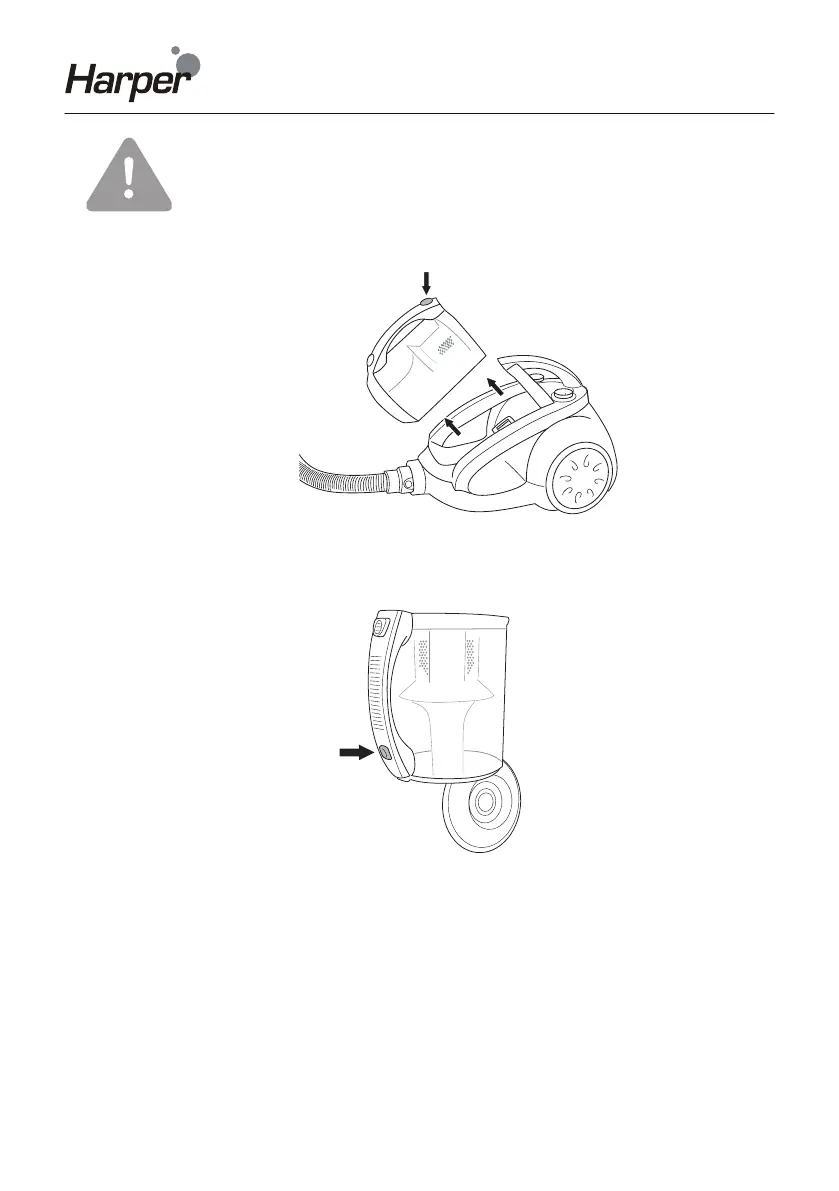
Figure 10 Removing waste from the dust receptacle
2. Remove the hose.
3. Remove the dust receptacle by pressing the release button on the dust receptacle
(see Figure 10) and pulling on the receptacle, and hold it above a waste-bin.
Figure 11
4. Press the button in the handle to open the bottom flap (see Figure 11).
5. If so required, use your hand to remove any waste sticking to the receptacle.
6. Close the bottom flap, and press until it clicks into place.
7. Fit the dust receptacle onto the appliance, and click it into position.
Cleaning or replacing the filter
For best results clean or replace the filter after every second or third use of the vacuum
cleaner, or more frequently if the filter is visibly blocked.
NOTE Clean the filter regularly to avoid that the filter becomes clogged and the
engine overheated.



 To Next Page