Use
Try your new Comp compressor module on any kind of input source. Use it
on vocals, drums, acoustic or electric guitars, keyboards etc. etc. Discover
what a well-crafted no nonsense compressor design can add to your arsenal
the same way 100's of legendary engineers did using Harrison consoles
through the decades.
Set the Comp ratio very low and the release very fast and use the Comp as
a 'leveler' to transparently reduce the level of the loudest parts so the track
has a more consistent level, or to allow the initial sound to be passed
through at full volume while reducing the 'body' of the sound slightly.
By providing full control of Treshhold, Release, Ratio and the Makeup
output level the Comp is the perfect 'no nonsense' compression tool to
bring loud signals down while allowing the quieter signals to sound just as
loud giving that 'nearby' or 'in-your-face' effect.
Enjoy!
- 5 -
-
44 -
- 3 -
Introduction
Welcome to the Harrison family of 500 series modules and thank you
for your purchase of the Comp (compressor) module. All Harrison 500
series modules are compatible with the API 500 format rack systems.
The Comp will be a tremendous asset to your studio workflow and
recording process.
The Comp includes a classic circuit design that provides warm yet
extremely accurate results. This compressor design uses state of the art
component technologies while preserving the sound quality found on
100’s of hit records produced over the decades.
With your new Comp module your recordings will instantly add that
punch and smoothness that only comes with high performance analog
circuit design along with decades of experience in professional audio
product design and development.
The Comp will allow you to artistically manipulate the dynamic content
of a signal. This type of control can make a vocal sound more
consistent, or increase the 'room' sound of a drum mix, or accentuate
the attack of a snare drum.
This module has been specifically designed to operate in a 500 format
rack such as the API lunch box or equivalent. In common with many
such modules, the nominal input / output operating level is +4 dBu.
Thank you!
The Harrison Team
Comp Controls
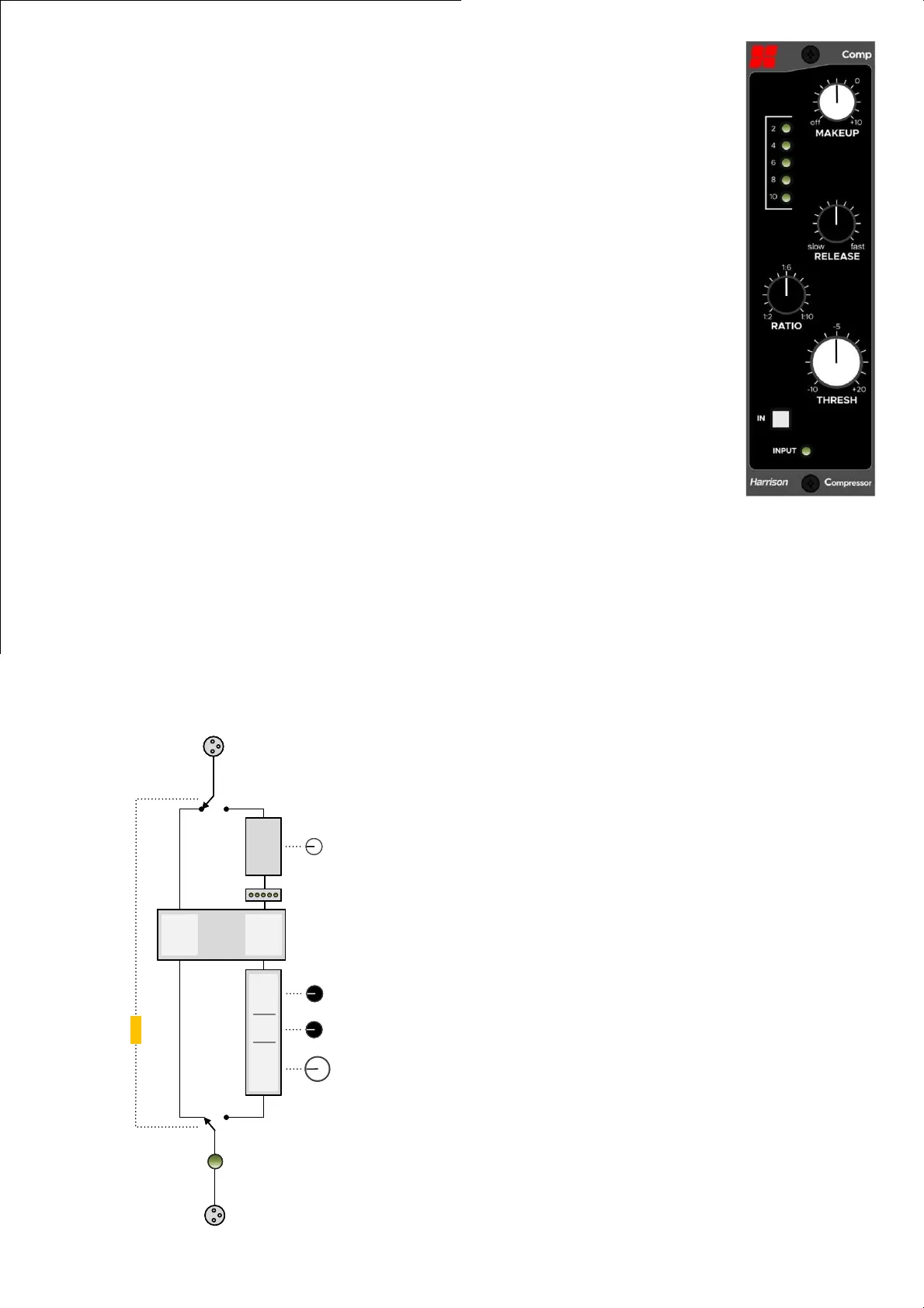
Makeup Knob: this knob increases the
output level, post-compressor. Since a
compressor normally reduces the volume
of a signal, it is desirable to raise the
overall level, post-compression. This extra
gain is disabled when you disable the
compressor, which allows you to compare
the compressed and uncompressed (dry)
signal at a comparable volume.
Gain Reduction Meter: this meter
indicates the amount of gain-reduction
being applied indicated by 2dB of gain
reduction per LED.
Release Knob: this knob adjusts the speed
at which the compressor will return to
unity gain, if compression was occurring
and now the input signal sinks below the
threshold.
Ratio Knob: increase this knob to increase
the effect of the Compressor processing.
Threshhold Knob: turn the threshold knob
down to meet the average signal level.
IN Switch: use the IN switch to toggle the
compressor in and out of circuit for a/b
comparison.
Block Diagram
Rear xlr
Input
LED
Rear xlr
Gain
Reduction
VCA
0dB
VCAThreshold Ratio Release Makeup
IN
Rear xlr
Input
LED
Rear xlr
Gain
Reduction
VCA
0dB
VCAThreshold Ratio Release Makeup
IN
2 -
-
4 -


 To Previous Page
 Loading...