5 – English
ASSEMBLY
OPERATION
WARNING:
Donotusethisproductifitisnotcompletelyassembled
orifanypartsappeartobemissingordamaged.Useof
aproductthatisnotproperlyandcompletelyassembled
orwithdamagedormissingpartscouldresultinserious
personalinjury.
WARNING:
Do not attempt to modify this product or create
accessoriesorattachmentsnotrecommendedforuse
withthisproduct.Anysuchalterationormodificationis
misuseandcouldresultinahazardousconditionleading
topossibleseriouspersonalinjury.
Ifanypartsaredamagedormissing,pleasecall1-800-776-5191forassistance.
WARNING:
Donotallowfamiliaritywiththisproducttomakeyou
careless.Rememberthatacarelessfractionofasecond
issufficienttoinflictseriousinjury.
WARNING:
Alwaysremovethebatterypackfromtheproductwhen
youareassemblingparts,cleaning,orwhennotinuse.
Removingtheseenergysourceswillpreventaccidental
startingthatcouldcauseseriouspersonalinjury.
WARNING:
Theradioisnotwaterproof.Donotsubmergeinliquid.
Failure to heed this warning could result in serious
personalinjury.
NOTICE:
Alwaysrefertothemanualforanydevicerecommended
for use as an attachment or accessory. Proper use
ofanydevice,whenattachedtotheradio,isthesole
responsibilityoftheoperator.Improperusemaydamage
thedeviceortheproduct.
WARNING:
Thisradioiscapableofproducingsoundlevelsthatcan
bedangeroustolong-termhearing.Listeningtomusic
athighvolumeforanyperiodoftimecancausenoise-
inducedhearingloss. Thehigherthevolume,theless
timerequiredbeforeyourhearingcouldbeaffected.
APPLICATIONS
Youmayusethisproductforthefollowingpurposes:
ListeningtoFM/AMradio,MP3players,andotheraudio
devices
ChargingUSBcapabledevices
StreamingaudiofromBLUETOOTH
®
enableddevices
INSTALLING/REMOVING BATTERY PACK
See Figure 2, page 9.
To install battery pack:
Placethebatterypackintheradio,aligningtheribon
thebatterypackwiththegrooveinthebatteryport.
Make surethe latches on the battery pack snap into
placeandthebatterypackissecuredtotheradiobefore
beginningoperation.
Depressthelatchestoremovethebatterypack.
NOTE: Alwaysremovebatterypackfromradiowhennot
in use.
For complete charging instructions, see the operator’s
manualsforyourbatterypackandcharger.
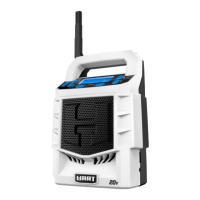
FOLD-DOWN FLEXIBLE ANTENNA
To decrease interference or electrical noise, extend the
antennaormovetheradiotoahigherelevation.Theantenna
foldsdownandoutofthewaywhennotinuse.
LCD DISPLAY
WhenabatterypackisinstalledandtheradioisintheON
position,theLCDdisplaywillshowthefrequency,mode,
andsettings.
NOTE: TheillustrationsoftheLCDdisplayshowninthis
manualareonlyexamplesofthefrequenciesyoumaysee
onyourradioandarenottheexactfrequenciesthatyou
may choose to listen to.
MENU NAVIGATION BUTTONS
See Figure 3, page 9.
Usethemenunavigationbuttonstoturntheradioonand
off,controlthevolume,changefrequencies,togglebetween
modesandsetthetime.
TURNING THE RADIO ON AND OFF:
Press the powerbuttontoturntheradioONandOFF.
Whentheradioisonandabatterypackisinstalled,thebattery
symbolwillbeshownintheLCDdisplay.Ifthebatterycharge
islow,aflashinglowbatteryindicatorwillbedisplayed.


 To Next Page
 Loading...