EasyManua.ls Logo

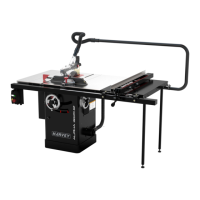
HARVEY HW110LC-36 - User Manual

HARVEY HW110LC-36
41 pages
Print Icon
To Next Page IconTo Next Page
Loading...
Revision A 2020-03-01
INSTRUCTION MANUAL
Original Instructions
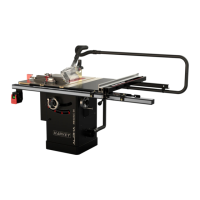
10″ Cabinet Table Saw
MODEL:HW110LC-36

Questions and Answers

  • D
    David CarterAug 12, 2025
    Why my HARVEY HW110LC-36 Saw will not start?
    • D
      Daniel OrtizAug 12, 2025
      If your HARVEY Saw won't start, there are several potential causes: * The saw might not be plugged in. Ensure the saw is properly plugged in. * A fuse may have blown, or a circuit breaker tripped. Replace the fuse or reset the circuit breaker. * The cord could be damaged. In this case, have the cord replaced by a certified electrician.
  • N
    Nathan CurryAug 15, 2025
    How to fix HARVEY Saw that makes unsatisfactory cuts?
    • A
      andreahallAug 16, 2025
      If your HARVEY Saw is making unsatisfactory cuts, consider these potential causes and solutions: * The blade may be dull. Replace the blade. * The blade might be mounted backward. Turn the blade around. * There could be gum or pitch on the blade. Remove the blade and clean it with turpentine and steel wool. * You might be using the incorrect blade for the job. Change the blade to the appropriate type. * Gum or pitch on the table could be causing erratic feed. Clean the table with turpentine and steel wool.
  • T
    Taylor HowellAug 20, 2025
    Why does the overload on my HARVEY Saw kick out frequently?
    • L
      lynnryanAug 20, 2025
      If the overload protection on your HARVEY Saw is kicking out frequently, here are some possible reasons and solutions: 1. The extension cord might be too long or the gauge size too small. Replace it with an adequate size cord. 2. You may be feeding stock too fast. Try feeding the stock more slowly. 3. The blade could be in poor condition (dull, warped, or gummed). Clean or replace the blade. 4. Blade binding may be occurring due to a misaligned rip fence. Check and adjust the rip fence. 5. Warped wood can cause blade binding. Select another piece of wood. 6. Low house current can be a factor. Contact your electrical company.
  • T
    Tony James Jr.Aug 23, 2025
    What to do if my HARVEY HW110LC-36 vibrates excessively?
    • K
      Katherine HowardAug 23, 2025
      If your HARVEY Saw vibrates excessively, consider the following: * The table may not be securely mounted to the cabinet stand. Tighten all mounting hardware. * The stand could be on an uneven floor. Reposition the saw on a flat, level surface. * The saw blade might be damaged. Replace the blade. * The V-Ribbed belt could be bad. Replace the V-Ribbed belt. * The V-Ribbed belt may not be tensioned properly. Adjust the V-Ribbed belt tension. * Improper motor mounting can cause vibration. Check and adjust the motor mounting. * Loose hardware can be the culprit. Tighten all nuts, bolts, and set screws.
  • B
    Brian MckenzieAug 27, 2025
    Why the blade on my HARVEY HW110LC-36 does not come up to speed?
    • S
      Samuel SmithAug 27, 2025
      If the blade on your HARVEY Saw does not come up to speed, consider these potential issues: * The extension cord might be too light or too long. Replace it with an adequate size extension cord. * There could be low house current. Contact your electric company. * The motor may not be wired for the correct voltage. Refer to the motor and/or nameplate for wiring instructions.
  • A
    Andrew SharpAug 31, 2025
    How to adjust HARVEY HW110LC-36 for accurate 45 and 90 rip cuts?
    • W
      wagnervernonAug 31, 2025
      If your HARVEY Saw does not make accurate 45 and 90 degree rip cuts, check the following: * The positive stop(s) may not be adjusted properly. Check the blade with a square and adjust the positive stop. * The tilt angle pointer might not be set correctly. Check the blade with a square and adjust the pointer to zero.
  • D
    David PatelSep 3, 2025
    What to do if material pinches blade when ripping on my HARVEY HW110LC-36 Saw?
    • K
      Kelsey DorseySep 3, 2025
      If the material pinches the blade when ripping on your HARVEY Saw, here's what to check: * The rip fence may not be aligned with the blade. Check and adjust the rip fence. * The wood may be warped. Select another piece of wood.
  • S
    Shelly TorresSep 7, 2025
    What causes material to bind on the splitter of my HARVEY Saw?
    • R
      Robin BlairSep 7, 2025
      If the material binds on the splitter of your HARVEY Saw, the splitter may not be aligned correctly with the blade. Check and align the splitter with the blade.

Summary

Foreword

Warranty Information

Machine Description

3.1 Technical Parameters

Technical specifications for North American market.

3.2 Features Identification

Identifies key components of the table saw.

3.3 Optional Equipment

Lists available accessories like sliding table and overhead guard.

3.4 Intended Use

Specifies the proper applications and limitations for the machine.

3.5 Requirements of Electrical Power

Details voltage, phase, and power requirements for the motor.

Safety Regulations

4.1 General Safety Instructions

General safety precautions for operating the machine.

4.2 Table Saw Safety Instructions

Specific safety guidelines for table saw operation.

4.3 Residual Risks

Lists potential hazards and necessary precautions.

4.4 Safety Equipment

Describes required safety equipment like push blocks.

Installation of the Machine

5.1 Transportation of Machines

Guidelines for safely moving and storing the machine.

5.2 Unpacking

Steps for unpacking the machine and checking for damage.

5.3 Contents

Lists all parts included in the machine's packaging.

5.4 Installation Procedures

General setup, pallet removal, handwheel, and extension wings.

5.4.4 Install the rail and extension table

Steps for installing the rail and extension table.

5.4.5 Post the tape scale use the pointer window

How to set up the tape scale and pointer windows for the fence.

5.4.6 Install the switch

Instructions for installing the power switch assembly.

5.4.7 Install the blade

Detailed steps for mounting the saw blade onto the arbor.

5.4.8 Install the blade guard

How to correctly attach the blade guard assembly.

5.4.9 Extraction system

Instructions for connecting a dust collection system.

5.4.10 Motor cover installation

Steps for fitting the motor cover.

5.4.11 Miter gauge installation

Guide for installing the miter gauge.

5.4.12 Electrical installation

Procedures for safe and correct electrical wiring.

Adjustment

6.1 Adjusting the Rip Fence

How to align the rip fence for accurate cuts.

6.2 Aligning the Table T-slot Parallel with the Blade

Steps to ensure the T-slot is parallel to the saw blade.

6.3 Adjusting the 45° and 90° Positive Stops

Calibrating the blade tilt angle stops.

6.4 Aligning the Riving Knife with Blade

Ensures the riving knife is correctly aligned with the saw blade.

Operations

7.1 Electrical Operation

How to operate the machine's power switch and safety lock.

7.2 Blade Elevation and Tilting Adjustment

Adjusting blade height and tilt angle using handwheels.

7.3 Crosscutting

Techniques and safety for making crosscuts.

7.4 Ripping

Techniques and safety for making rip cuts.

Maintenance

8.1 Lubrication

Lubrication procedures for motor gears and trunnions.

8.2 Cleaning

Cleaning instructions for the table surface and cabinet.

8.3 Changing Belt

Steps for replacing the V-ribbed drive belt.

Trouble Shooting

Exploded View and Parts List

Certificates

HARVEY HW110LC-36 Specifications

General IconGeneral
BrandHARVEY
ModelHW110LC-36
CategorySaw
LanguageEnglish

Related product manuals