EasyManua.ls Logo

Hasbro I-TURTLE - Page 4

Hasbro I-TURTLE
8 pages
Print Icon
To Next Page IconTo Next Page
To Previous Page IconTo Previous Page
Loading...
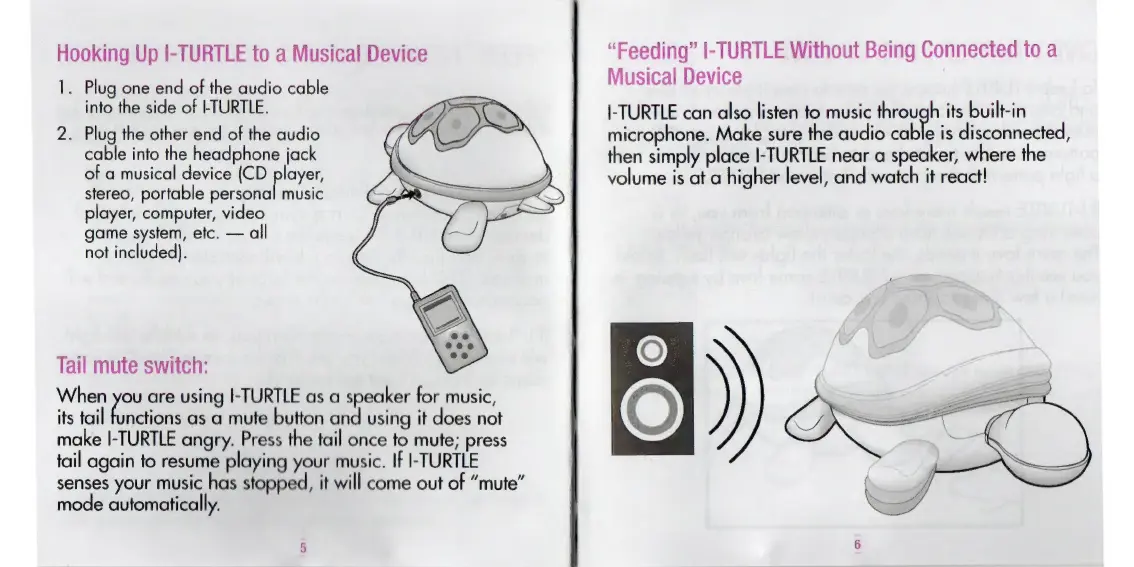
Hooking
Up
I-
TURTLE
to
a
Musical
Device
1.
Plug
one
end
of
the
audio
cable
into
the
side
of
I-TURTLE.
2.
Plug
the
other
end
of
the
audio
cable
into
the
headphone
jack
of
a
musical
device
(CD
player,
stereo,
portable
personal
music
player,
computer,
video
game
system,
etc.
all
not
included).
Tail
mute
switch:
When
you
are
using
I-TURTLE
as
a
speaker
for
music,
its
tail
functions
as
a
mute
button
and
using
it
does
not
make
I-TURTLE
angry.
Press
the
tail
once
to
mute;
press
tail
again
to
resume
playing
your
music.
If
I-TURTLE
senses
your
music
has
stopped,
it
will
come
out
of
"mute
mode
automatically.
n
“Feeding”
I-TURTLE
Without
Being
Connected
to
a
Musical
Device
I-TURTLE
can
also
listen
to
music
through
its
built-in
microphone.
Make
sure
the
audio
bo
is
disconnected,
then
simply
place
I-TURTLE
near
a
speaker,
where
the
volume
is
at
a
higher
level,
and
watch
it
react!

Related product manuals