40
H4D
True Focus
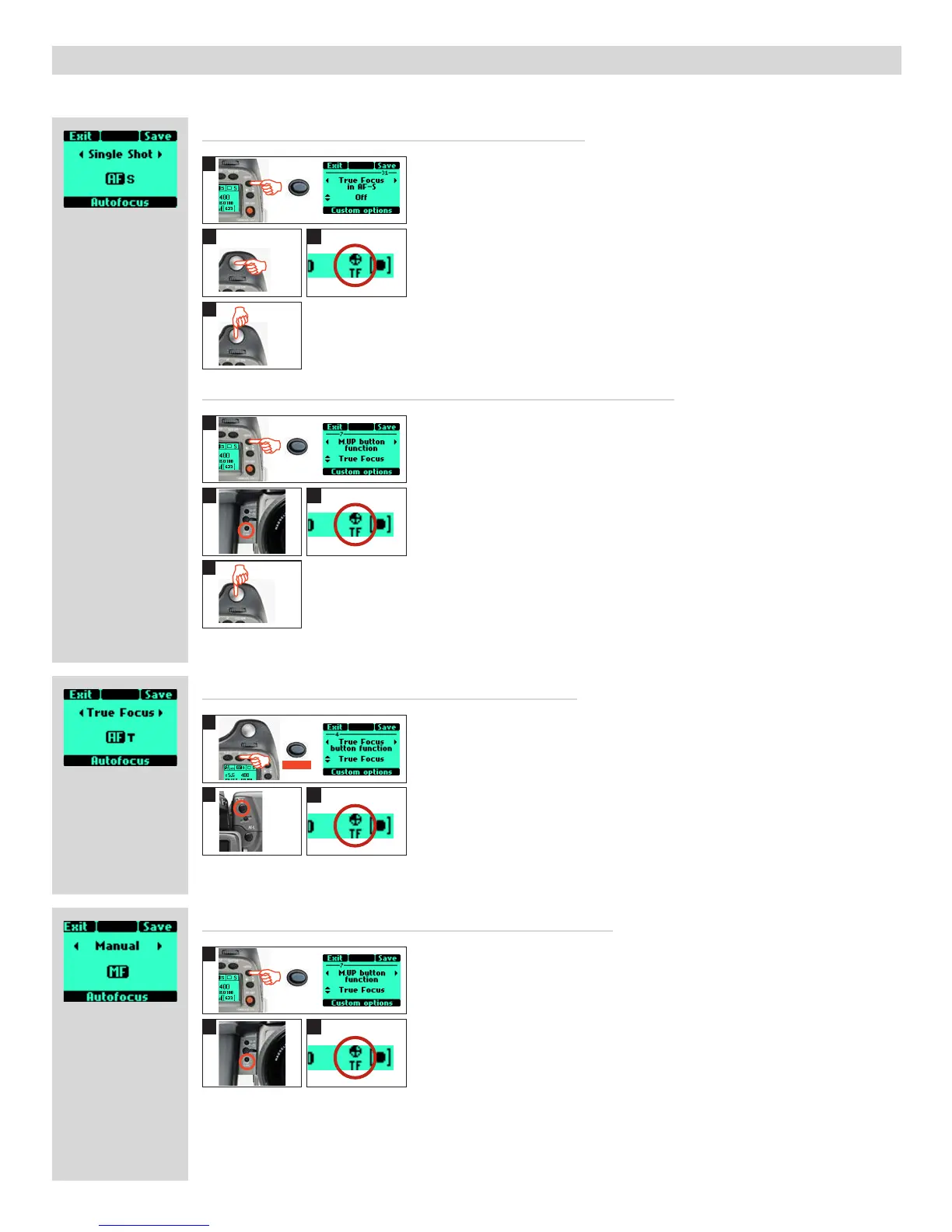
True Focus can be used in combination with other autofocus settings to achieve various functions.
2
2
2
3
3
3
3
4
4
2
1
1
1
1
Temporarilyactivatedbyaselected'User'button–Autofocusretained
Activatedbyaselected'User'button–Manualfocusretained
ActivatedbyTrueFocusbutton–Autofocusdeactivated
Activatedbyshutterreleasebutton–TrueFocusretained
In this mode the autofocus function is effectively converted into the True Focus func-
tion.Thatis,focusissetbyhalf-pressingtheshutterreleasebutton.Remember,
though, that the True FocusfunctionisretaineduntilturnedoinCustomOptions.
1. In Custom Options, select # 31 (True Focus in AF-S) with the front control wheel.
Select 'ON' with the rear front control wheel. Save.
2. Aim camera at important area in subject and half-press the shutter release button.
3. Wait for the True Focus icon to appear (in the viewfinder) and the audio confirmation
signal.
4. Maintain the half-press and recompose the picture. Press fully to expose. The True Focus
icon disappears from the viewfinder. True Focus function is retained.
In this mode the True Focusfunctionisactivatedbypressinganassignedbutton.This
producesa'one-shot'settingwherethecamerarevertstoitsoriginalAutofocussetting
aftercapture.UsefulifyouwanttoquicklyswitchbackandforthbetweenTrue Focus
andnormalAutofocus.WorkswithorwithoutaCustom Options #31 setting.
1. In Custom Options, select the desired button to reassign with the front control wheel
(M.UP button in this example). Select 'True Focus' with the rear control wheel. Save.
2. Aim camera at important area in subject and press the selected button (the grip display
now indicates AF-T mode).
3. Wait for the True Focus icon to appear (in the viewfinder) and the audio confirmation
signal.
4. Recompose the picture and press shutter release button (camera does not re-focus
because it is temporarily in AF-T mode). The True Focus icon disappears from the view-
finder. Camera reverts to AF-S.
Note that camera reverts to AF-S if the focusing ring on the lens is moved.
In this mode the True Focusfunctionisactivatedbypressinganassignedbutton.This
producesa'one-shot'settingwherethecamerarevertstoitsoriginalManual focus
settingaftercapture.Pressingtheshutterreleasebuttonwillnotresetthefocus.Useful
when many shots are required with the same focus setting.
1. In Custom Options, select the desired button to reassign with the front control wheel
(M.UP button in this example). Select 'True Focus' with the rear control wheel. Save.
2. Aim camera at important area in subject and press the selected button.
3. Ensure that the True Focus icon appears in the viewfinder.
Recompose the picture and press shutter release button. The True Focus icon disappears
from the viewfinder. Camera reverts to AF-S.
Note that the True Focus adjustment is applied to all following captures until the True
Focus button is pressed again (when a new adjustment is made).
In this mode the True Focus function is activated by pressing the True Focus button.
Normalautofocusisde-activated,therefore,pressingtheshutterreleasebuttonwill
notresetthefocus.Usefulwhenmanyshotsarerequiredwiththesamefocussetting.
1. Press AF button. Select 'True Focus' with the front control wheel. Save.
2. Aim camera at important area in subject and press True Focus button.
3. Wait for the True Focus icon to appear (in the viewfinder) and the audio confirmation
signal. Recompose the picture and press shutter release button.
Note that the True Focus adjustment is applied to all following captures until True
Fo
cus button is pressed again (when a new adjustment is made).
1
/2 !
MENU
MENU
MENU
On
AF












 To Next Page