
 To Next Page

B
brendahendricksJul 30, 2025
What to do if I cannot remove the lens from my Hasselblad Film Camera?
- TTerry CarrJul 30, 2025
If you cannot remove the lens from your Hasselblad Film Camera, depress the lens release button while turning the lens.

What to do if I cannot remove the lens from my Hasselblad Film Camera?
If you cannot remove the lens from your Hasselblad Film Camera, depress the lens release button while turning the lens.
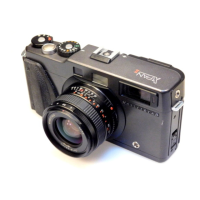
Why doesn't my Hasselblad XPAN II Film Camera react when I press the release button?
If your Hasselblad Film Camera doesn't react when you press the release button, it might be because the mode selector is in the 'OFF' position. Set the mode selector to 'ON'. Alternatively, the batteries may be omitted or exhausted. Try inserting new batteries.
Why is my whole film under/overexposed with my Hasselblad Film Camera?
If the whole film is under or overexposed on your Hasselblad Film Camera, it could be due to a manual film speed (ISO) set incorrectly. Make sure to set the manual film speed (ISO) correctly. Another cause might be that the exposure compensation is not set at zero; in that case, set it to zero.
What to do if new film has not wound on to first frame on Hasselblad XPAN II?
If the new film hasn't wound onto the first frame in your Hasselblad Film Camera, it might be because the film tip was incorrectly positioned before closing the camera back. Ensure you correctly position the film tip before closing the camera back. It could also be because the ISO setting is set to DX position with a non-DX coded film cassette. Try using a DX coded film cassette.
Initial steps for setting up and operating the camera, including strap and battery installation.
Step-by-step guide for mounting and dismounting Hasselblad bayonet-fitting lenses.
How to switch between standard 35mm and panoramic formats using the selector knob.
Instructions for setting film speed manually or via DX code for accurate exposure.
Detailed steps for loading 35mm film cassettes into the camera correctly.
Overview of the exposure counter and automatic/manual exposure control.
How to adjust exposure settings for specific lighting or subject conditions.
Solutions for common operational problems like camera unresponsiveness or film loading issues.
 General
| Film Format | 35mm |
|---|---|
| Exposure Metering | Center-weighted average metering |
| Focus | Manual Focus |
| Type | Rangefinder Film Camera |
| Image Format | 24 x 65 mm |
| Lenses | 45mm f/4, 90mm f/4 |
| Shutter Type | Focal-plane shutter |
| Exposure Modes | Aperture Priority, Manual |
| ISO Range | 25 - 3200 |
| Viewfinder | Optical, with parallax correction |
| Flash Sync | 1/125 sec |
| Power | 2 x CR2 batteries |