• 12 •
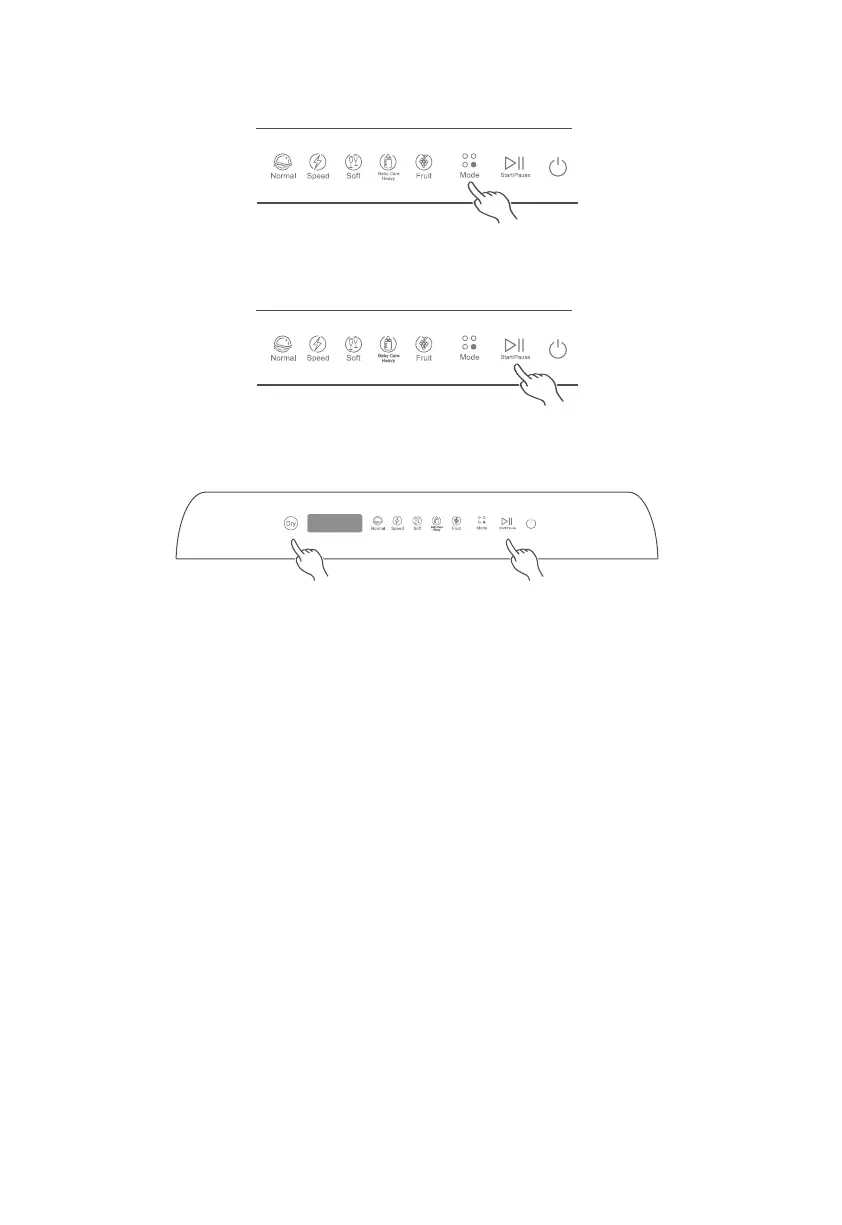
6. Press the Mode button repeatedly to select the desired wash cycle. The options are: Dry, Normal, Speed,
Soft, Baby Care/Heavy, and Fruit. Refer to the wash cycle table for details.
7. When a wash cycle is selected, the corresponding indicator will illuminate.
8. Press the Start/Pause button to start the wash cycle.
9. If needed, press the Dry button either before or after a wash cycle is started, or when the wash cycle is
finished to add an extra 60 minutes of air-drying and 72 hours of intermittent ventilation for storage.
10. To pause the dishwasher, press the Start/Pause button. The button will flash until it is pressed again to
resume the wash cycle.
NOTE: The Dry mode cannot be paused or canceled during operation of air-drying and intermittent circulation.
If you want to cancel the drying, press and hold the Power button for 3 seconds to turn off the dishwasher.
Changing the Wash Cycle
The wash cycle cannot be changed during washing. If you want to change the wash cycle, please follow these
steps to re-select a wash cycle:
1. Press the Start/Pause button to pause the wash cycle.
2. Press and hold the Power button for 3 seconds to turn off the machine.
3. Press and hold the Power button for 3 seconds to turn on the machine and start a new wash cycle. See
“Starting a Wash Cycle” for instructions.
NOTE: Before the selection of a wash cycle, the detergent may have already been released and the appliance
may have already drained the wash water. It is then required to refill the water tank if water is supplied from the
tank, and the detergent dispenser must be refilled. See “Detergent Use” for instructions.


 To Next Page
 Loading...