KEY FOB PAIRING (purchased separately)
H
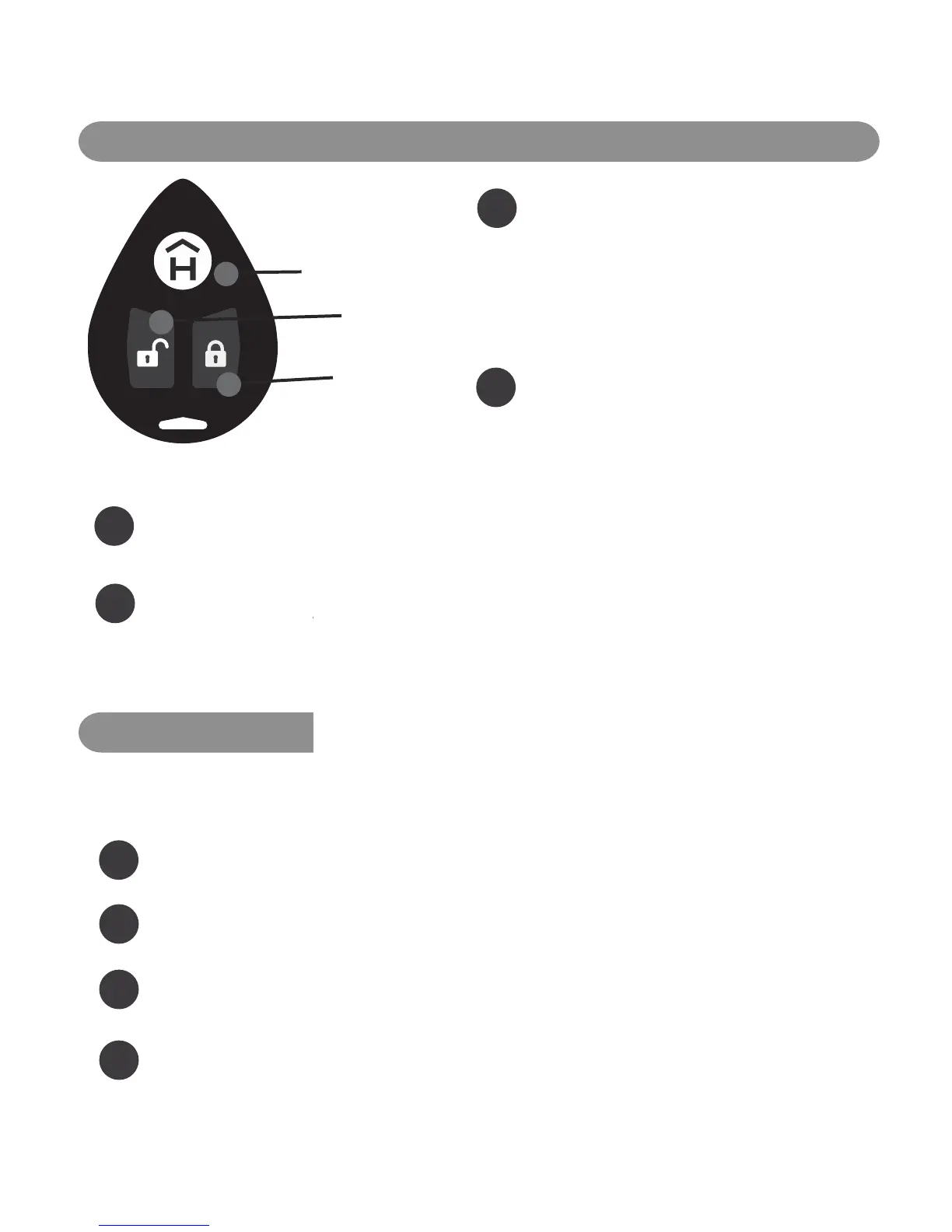
LED Status Indicator
I
Unlock Button
J
Lock Button
1
Touch the key fob against the HAVEN
Connect Status Indicator LED ( A ) and press
and hold the key fob lock button ( J ) for 5
seconds until the Key Fob LED Status
Indicator ( H ) illuminates and blinks white.
Continue holding button ( J ).
2
While still holding the key fob lock button,
press and release the HAVEN Admin Button
( B ) and when it starts blinking white, release
the lock button ( J ) on the key fob.
3
Both lights should blink together and you will hear a beep to signify that the pairing was
successful.
4
If you do not hear the beep and your key fob does not function or flashes red, you will need to
hold the HAVEN Admin Button ( B ) for about 10 seconds to reset (LED will flash green) and then
start the process over again. (Note: resetting the HAVEN through manual reset also disconnects any
synced phone applications that will need to be re-keyed via the mobile application).
KEY FOB RESET
When a HAVEN Key Fob needs to be cleared of its paired connection to HAVEN Connect, it must go
through a reset process.
1
Hold Lock Button for 4 Seconds - On the enrolled key fob, hold down the lock button ( J ) for
approximately 5 seconds.
2
Wait for Flashes - A short series of flashes will appear, momentarily stop and then reappear.
3
Fob Restarts - The fob will then automatically restart. Upon powering back up, an alternating
series of green, red, blue and white flashes indicate that the fob is powered on.
4
Ready for New Enrollment - The key fob has been successfully reset and the preexisting
enrollment has been cleared.
Need help? Contact us at support@havenlock.com
7 HAVEN CONNECT


 To Next Page