Need help?
Do you have a question about the Havis DS-DELL-600 Series and is the answer not in the manual?
Key safety warnings and cautions for installation and operation, including airbag zones and power sources.
Manufacturer's declaration of product compliance with EMC and RoHS directives.
Statement regarding FCC Class B device compliance and user modifications.
Details the power input requirements and compatible power supply types for different series.
Provides physical dimensions, weight, and environmental operating conditions.
Lists components included in the HWK-0036 hardware kit and required installation tools.
Identifies key parts of the docking station such as latch handle, bumpers, and connectors.
Details the power cable specifically for certain DS-DELL-600 series models.
Describes the mic/speaker and USB 2.0 ports on the front of the docking station.
Details rear ports for DS-DELL-601/602 series, including Ethernet, USB 3.0, DisplayPort, VGA, Serial, and Power Input.
Details rear ports for DS-DELL-607/608 series, including Ethernet, USB 3.0, Serial, and Power Input.
Identifies antenna locations labeled A (WIFI) and B (CELLULAR) on the bottom.
Identifies antenna locations labeled A (WIFI) and B (CELLULAR) on the tablet interface.
Instructions for attaching the mounting bracket to a motion device using specific screws.
Guidance on using zip ties to strain relieve and route cables to the front of the docking station.
Steps for securing the docking station to the mounting bracket using pan head screws.
Instructions for creating a service loop and tying off cables for intended motion.
Ensure the docking station is unlatched by pulling the latch handle forward.
Align tablet alignment sockets with docking station posts and lower into the station.
Pivot the tablet top into the station and apply pressure until an audible click confirms latching.
Lock the docking station with the supplied key for theft deterrence.
If locked, unlock the docking station using the supplied key.
Pull the latch handle to release the latch hooks while holding the tablet.
Rock the tablet top forward and carefully lift it out of the docking station.
Details LPS-138 90W Power Supply and LPS-206 Power Supply Mounting Kit.
Lists DS-DA-218 Desktop Stand, DS-DA-316 Power Cable, and DS-DA-501 Replacement Keys.
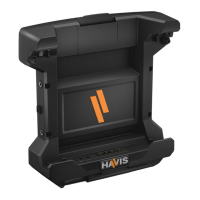
The Havis Docking Station for Dell Latitude Rugged 12 Tablet, part of the DS-DELL-600 Series, is designed to provide a secure and functional mounting solution for Dell Latitude Rugged 12 tablets. This owner's manual covers various models including DS-DELL-601, DS-DELL-601-2, DS-DELL-602, DS-DELL-602-2, DS-DELL-603, DS-DELL-603-2, DS-DELL-604, DS-DELL-604-2, DS-DELL-605, DS-DELL-605-2, DS-DELL-607, DS-DELL-607-2, DS-DELL-608, and DS-DELL-608-2.
The Havis Docking Station serves as a robust interface for the Dell Latitude Rugged 12 Tablet, enabling port replication, secure mounting, and power delivery. It is designed for use in various environments, including vehicles, offices, and other settings where secure and accessible tablet integration is required. The docking station facilitates easy docking and undocking of the tablet while providing access to essential ports and maintaining the tablet's functionality.
 General
| Brand | Havis |
|---|---|
| Model | DS-DELL-600 Series |
| Category | Tablet Accessories |
| Language | English |


 To Next Page