The Havis Docking Station for Dell Latitude Rugged 12 Tablet, part of the DS-DELL-600 Series, is designed to provide a secure and functional mounting solution for Dell Latitude Rugged 12 tablets. This owner's manual covers various models including DS-DELL-601, DS-DELL-601-2, DS-DELL-602, DS-DELL-602-2, DS-DELL-603, DS-DELL-603-2, DS-DELL-604, DS-DELL-604-2, DS-DELL-605, DS-DELL-605-2, DS-DELL-607, DS-DELL-607-2, DS-DELL-608, and DS-DELL-608-2.
Function Description
The Havis Docking Station serves as a robust interface for the Dell Latitude Rugged 12 Tablet, enabling port replication, secure mounting, and power delivery. It is designed for use in various environments, including vehicles, offices, and other settings where secure and accessible tablet integration is required. The docking station facilitates easy docking and undocking of the tablet while providing access to essential ports and maintaining the tablet's functionality.
Important Technical Specifications
- Dimensions: 11.5" (29.2 cm) H x 11.3" (28.7 cm) W x 4.0" (10.2 cm) D.
- Weight: 4.88 lbs (2.21 kg).
- Operating Environment: -29° C to 63° C (-20° F to 145°F).
- Storage Environment: -40° C to 85° C (-40°F to 185° F).
- Mounting Pattern: VESA 75.
- Power Supply Input:
- For DS-DELL-601, 601-2, 602, 602-2, 607, 607-2, 608, 608-2: External Power Supply (LPS-138 DC-DC) providing 19.5V DC-In.
- For DS-DELL-604, 604-2, 605, 605-2: Internal Power Supply (DS-DA-316 Cable) providing 10-17 VDC.
- Port Replication Capability:
- Forward Facing Ports (All models except DS-DELL-603 & DS-DELL-603-2): Mic/Speaker, USB 2.0.
- Rear Ports - Advanced Electronics (DS-DELL-601, 601-2, 602, 602-2): Ethernet RJ45, 2x USB 3.0, DisplayPort, VGA, 2x Serial, Power Input (19.5 VDC IN).
- Rear Ports - Advanced Electronics With Internal Power Supply (DS-DELL-604, 604-2): Ethernet RJ45, 2x USB 3.0, DisplayPort, VGA, 2x Serial, Power Input (Vehicle 10-17 V DC IN).
- Rear Ports - Standard Electronics (DS-DELL-607, 607-2, 608, 608-2): Ethernet RJ45, 2x USB 3.0, 2x Serial, Power Input (19.5 VDC IN).
- Rear Ports - Standard Electronics With Internal Power Supply (DS-DELL-605, 605-2): Ethernet RJ45, 2x USB 3.0, 2x Serial, Power Input (Vehicle 10-17 V DC IN).
- Antenna Identification (DS-DELL-601-2, 602-2, 603-2, 604-2, 605-2, 607-2, 608-2): Downward Facing Antennas for WiFi and Cellular.
Usage Features
- Installation:
- Remove the Mounting Bracket from the packaging.
- Install the Mounting Bracket to a motion device (not included) using four 1/4"-20 x 5/8" long button head screws (Hardware Kit Item 3). Torque screws to 80 in-lbs (9.0Nm) ± 10%.
- Install all necessary cables, using zip ties (Hardware Kit Item 1) for strain relief and routing them to the front of the Docking Station.
- Place the Docking Station onto the Mounting Bracket, guiding the mounting bracket locators into the mounting guides.
- Secure with four 1/4"-20 x 3/8" long pan head screws (Hardware Kit Item 4). Torque screws to 80 in-lbs (9.0 Nm) ± 10%.
- Create a service loop with the cable bundle to prevent tension on connectors and allow for intended motion.
- Tie off cables onto a stationary part of the mounting system (not included).
- Docking Operation:
- Ensure the Docking Station is unlatched by pulling the Latch Handle forward.
- Hold the tablet in landscape orientation, angled toward the Docking Station. Lower the tablet into the bottom of the Docking Station, aligning the tablet Alignment Sockets with the Docking Station's Alignment Posts.
- Pivot the top of the tablet into the Docking Station and apply light rearward pressure to the top center of the tablet until an audible click indicates it's latched.
- For theft deterrence, secure the tablet by locking the Docking Station with the supplied key (Hardware Kit item 2).
- Caution: Do not force the tablet onto the docking station. If resistance is met, check alignment. Do not dock the tablet backward, as this will damage the screen, tablet electronics, and docking station electronics.
- Undocking Operation:
- If previously locked, unlock the Docking Station using the supplied key.
- While holding the tablet with one hand, pull the Latch Handle on top of the Docking Station until the Latch Hooks release.
- Once unlatched, grab both sides of the tablet, rock the top forward, and carefully lift it out of the Docking Station, top end first.
- Precautions:
- Do not place metal objects or liquid containers on top of the Docking Station.
- In case of malfunction, immediately unplug the Power Supply and remove the tablet.
- Use only the specified Power Supply (LPS-138 or equivalent) or Internal Power Supply cable (DS-DA-316) with Internal Power Supply Docking Stations.
- Do not connect cables into ports other than those specified.
- Avoid leaving the Docking Station in high-temperature environments (greater than 85°C, 185°F) for extended periods.
- WARNING: Never stow or mount the docking station directly in a vehicle airbag deployment zone. Do not use the computer while driving.
- For DS-DELL-601, 601-2, 602, 602-2, 607, 607-2, 608, 608-2 models, do not connect directly to a vehicle voltage source. These require a certified, automotive-grade, Dell-approved 90W power source (Havis Part Number LPS-138 or equivalent) with a continuous, regulated 19.5VDC output. Failure to comply will void the warranty.
- For DS-DELL-604, 604-2, 605, 605-2 models, the power cable shipped with the docking station (DS-DA-316) must be used, which includes a 15AMP protection fuse.
- For models equipped with a bundled power supply (DS-DELL-602, 602-2, 608, 608-2), refer to the supplied Lind Power Supply Reference Guide.
Maintenance Features
- The manual emphasizes proper installation and cable management to ensure longevity and functionality. Using zip ties for strain relief and creating service loops for cables helps prevent damage from tension and movement.
- The use of thread locking adhesive on fasteners is recommended for secure installation.
- Replacement keys (DS-DA-501) are available for the locking mechanism.
- Havis offers related accessory products such as the LPS-138 90W Power Supply, LPS-206 Power Supply Mounting Kit, DS-DA-218 Desktop Stand, and DS-DA-316 Power Cable, which can aid in the maintenance and extended use of the docking station.
- FCC Class B device compliance: Any changes or modifications not expressly approved by Havis, Inc. could void the user's authority to operate the equipment.

 Need help?
 General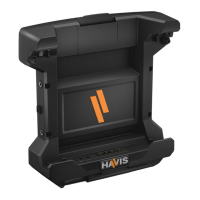

 To Next Page