Controller Mounting and Installation
Controller and Bracket Mounting
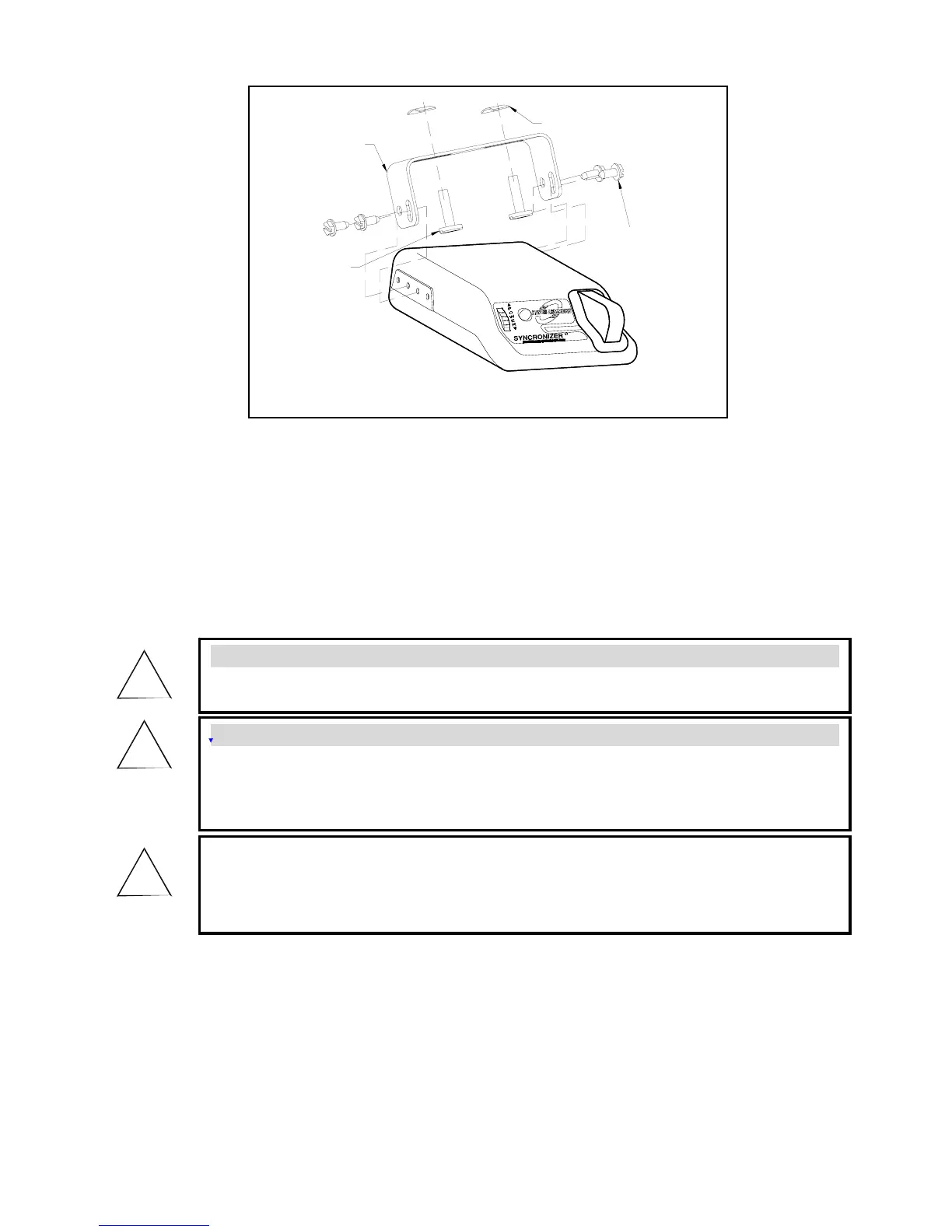
1. Install the mounting bracket to a solid surface under the tow vehicle dash or other suitable location in
the tow vehicle using the two machine screws and fasteners provided. Tighten until snug. See Figure
2 – Acceptable Mounting Angles and Figure 3 – Attachment of Mounting Bracket.
2. Insert four of the self tapping screws provided through the mounting bracket holes and into the
desired controller anchor holes. Tighten until snug.
3. Mount in a location which allows the driver to easily apply the manual override and to see the
digital display.
Tinnerman Nut
Self
Tapping
Screws
Pan Head
Machine
Screw
Mounting
Bracket
Figure 3 – Attachment of Mounting Bracket
WARNING:
• All four controller wires must be connected properly for the controller to operate
correctly.
• Failure to properly connect all four wires can cause loss of trailer brakin
g.
• Improper wiring will destroy the controller and void the manufacturer’s warranty.
WARNING:
• Use of longer screws than those provided can damage the unit and cause loss of
braking.
CAUTION:
• Care must be taken to ensure that the mounting surface is rigid enough to prevent
excessive vibration.
• Excessive vibration may result in poor performance.
!
!
!


 To Next Page
 Loading...