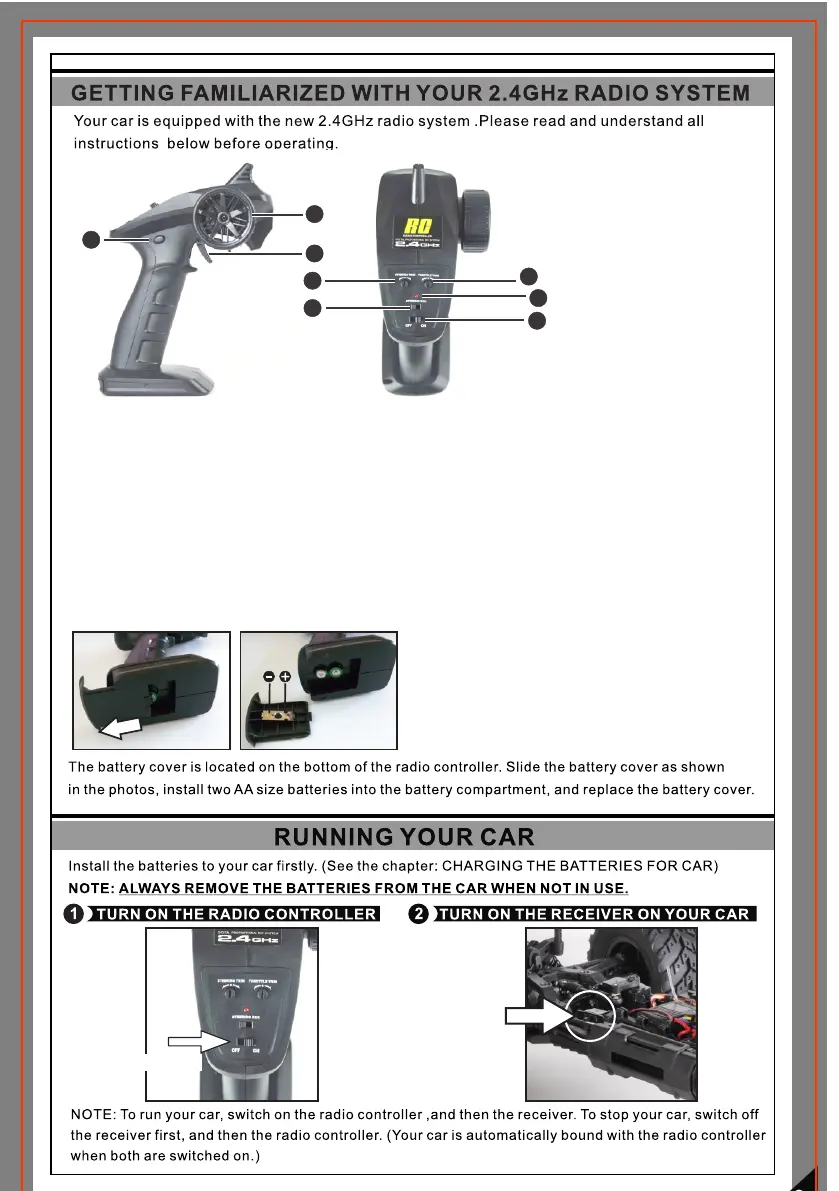
1) Steering Wheel
2) Trigger
3) Steering Trim
4) Throttle Trim
5) Steering Reverse Switch
6) Power Indicator
7) Power ON/OFF
8) AUX. Button
(This button is disabled for
the car)
1
2
4
7
6
3
5
8
Steering Wheel: It proportionally operate the right and left steering control of the model.
Battery Case: It requires 2pcs of AA size batteries.
Power Switch: It is applied to turn ON/OFF the radio controller.
Steering Trim: It is applied to adjust the centre trim of the steering channel.
Steering Reverse: It allows you to switch the directions of the steering servo travel.
Power Indicator: When the radio controller is turned on, LED flashes sharply which indicates
that the radio controller is seeking the receiver's signal and binding is in process. When the
power is enough, LED is solid on. When the power is not enough, LED will have two flashes in
turn.If it is the case, you are required to replace with the new batteries.
Slide the battery cover as shown in the
photos, install two AA size batteries into
the battery compartment, and replace the
battery cover.
( NOTE: Do not insert the batteries with
incorrect polarities.)
Power Switch



 To Next Page