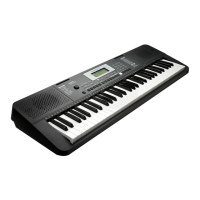
The Kurzweil KA70 is a digital stage piano designed for both beginners and experienced musicians, offering a range of features for performance, practice, and recording.
Function Description:
The KA70 serves as a versatile musical instrument, capable of producing a wide array of sounds, providing accompaniment, and facilitating music learning and creation. Its core function is to emulate the sound and feel of an acoustic piano while offering the flexibility of a digital instrument. It includes features for playing various voices, styles, and songs, as well as recording user performances. Advanced functionalities like MIDI control, scale tuning, and DSP effects enhance its capabilities for diverse musical applications.
Important Technical Specifications:
- Keyboard: 88 keys with touch response, providing a dynamic and expressive playing experience similar to an acoustic piano.
- Polyphony: 128 notes, allowing for complex musical passages without note drop-out.
- Voices: 20 exceptionally realistic preset voices, covering a range of piano, organ, guitar, bass, and string sounds.
- Styles: 50 piano styles across various musical genres, offering automatic accompaniment.
- Songs: 60 preset piano songs for appreciation and learning.
- Demos: 2 demo songs to showcase the instrument's capabilities.
- Tempo: Adjustable range from 30 to 280 beats per minute.
- Speakers:
- 4ohm 10W x 2
- 8ohm 20W x 2
- Dimensions: 1365(W) x 366(D) x 137(H) mm.
- Weight: 10.7 Kg.
- Power Supply: DC IN 12V/2000mA.
- Connectors:
- DC IN
- PHONES (2 standard 1/4" phone jacks for private listening)
- AUX IN (for connecting external audio sources like MP3/CD players)
- AUX OUT (for connecting to external audio equipment like amplifiers or mixing consoles)
- USB (for connecting to a computer for MIDI data transfer)
- SUSTAIN (for connecting a sustain pedal)
- MIDI OUT (for connecting to external MIDI IN devices)
- UNIT PEDALS (for connecting a unit pedal with Soft, Sostenuto, and Sustain functions).
Usage Features:
Panel Description: The front panel features a NIXIE TUBE Display for parameter and value display, along with various buttons and controls for intuitive operation. These include:
- Power Switch and Volume Knob: For turning the instrument on/off and adjusting master volume.
- DEMO/MIDI MODE Button: To start/stop demo playback and toggle MIDI mode.
- Tempo Buttons (TEMPO -/+): To decrease/increase tempo values.
- Metronome Button: To turn the metronome on/off.
- START/STOP Button: To start/stop song or style playback.
- FILL A/B Button: To insert fill-in patterns in accompaniment.
- RECORD Button: To enter record mode.
- PLAY/STOP Button: To play back recorded songs.
- VOICE, STYLE, SONG Buttons: To switch between respective modes.
- -/NO and +/YES Buttons: To decrease/increase parameter values or confirm/cancel operations.
- TRANSPOSE Button: To adjust the transpose setting.
- DUET, LOWER, TWINOVA, SCALE, HARMONY Buttons: To activate/deactivate specific functions (accessed via SHIFT).
- VOICE DIRECT SELECT Buttons: For quick selection of preset voices.
- PITCH BEND Wheel: For pitch variations.
- PHONES 1 and 2: Headphone jacks.
Connections:
- Headphones: Two headphone jacks allow for private practice. Jack 2 mutes internal speakers.
- Audio Equipment: AUX OUT connects to amplifiers or sound systems. AUX IN allows external audio sources (MP3/CD players) to play through the KA70's speakers.
- Footswitch: A sustain pedal (optional) can be connected for natural sustain effects.
- Unit Pedal: An optional unit pedal provides Sustain, Sostenuto, and Soft pedal functions, simulating a real piano.
- Computer/MIDI Device: USB allows data transfer with a PC, enabling recording performances and playing MIDI files. MIDI OUT connects to external MIDI IN devices, allowing the KA70 to act as a MIDI controller.
Quick Start:
- Power On/Off: Simple power switch operation.
- Playing Demo Songs: Access 2 built-in demo songs via the DEMO button.
- Playing Voices: Select from 20 realistic voices using the VOICE button or direct select buttons.
- Playing Styles: Choose from 50 accompaniment styles using the STYLE button, with auto-accompaniment triggered by left-hand chords.
- Recording: Record up to 5 user songs, with options to select voice, style, and tempo before recording. Playback and deletion of user songs are also supported.
Advanced Use:
- Playing Voices: Detailed selection and layering of voices, including an Upper Voice and Dual Voice function for simultaneous sounds.
- Split Keyboard (Lower Function): Splits the keyboard into two sections with different voices for each hand.
- Split Point: Customizable split point for Dual and Lower functions.
- Voice Demo: Playback of voice demos.
- Touch Sensitivity: Adjustable touch response (Off, Soft, Medium, Hard) to control volume dynamics based on playing strength.
- Transpose: Shifts the overall pitch of the instrument up or down in semitone increments.
- Tune: Fine-tunes the overall pitch in 1-cent increments.
- Pedal Resonance: Simulates the reverberation of an acoustic grand piano when the sustain pedal is pressed.
- Metronome: Provides a steady beat with adjustable tempo, time signatures (0, 2-9), and sound types (normal, human voice).
- Playing Accompaniment: Detailed control over style selection, start/stop, fill-in patterns (A/B variations), and accompaniment volume.
- Tempo: Adjustable tempo for styles, songs, metronome, and duet functions, with quick-set and direct input options.
- DSP Effect:
- Reverb: 5 types (Room, Hall, Church, Delay, Pan Delay) to add ambiance.
- Chorus: 5 types (Chorus 1-3, Flanger, Rotary) for depth.
- EQ: 5 types (Standard, Modern, Rock, Classic, Jazz) to control frequency gain.
- Duet: Automatically adds harmony effects based on left-hand chords, with 32 preset duet types and customizable split points.
- Harmony: Adds harmony effects to performances with 3 preset types (1+5, Octave 1, Octave 2).
- Scale Tuning System: Offers 6 different scale types (Pythagorean, Pure Major, Pure Minor, Meantone, Werkmeister, Kirnberger) beyond equal temperament, allowing for diverse musical expressions.
- TWINOVA: Divides the keyboard into two areas with the same pitch and voice, with adjustable octave and split point.
- Beep Tone: Toggles the prompt tone on/off.
- MIDI Function: Comprehensive MIDI implementation, allowing the KA70 to act as a master or subordinate device. Supports MIDI OUT for transmitting note on/off, voice change, control data, and more. Features 3 independent MIDI controllers with adjustable commands, data, and channels.
Maintenance Features:
- Cleaning: Clean only with a soft, dry cloth. Avoid paint thinners, solvents, cleaning fluids, or chemical-impregnated wiping cloths.
- Handling: Do not apply excessive force to switches or controls. Prevent foreign objects from entering the instrument. Disconnect all cables before moving.
- Power-off Protection: User song data is preserved even when the instrument is powered off.
- Automatic Shutdown: The keyboard automatically shuts down after 30 minutes of inactivity to save energy (can be disabled).
- Restore Factory Setting: A function to revert all settings to their default factory state and delete all recorded data. This is performed by holding specific buttons during power-on.
- Troubleshooting Guide: Provides solutions for common issues like "pop" sounds, no sound, mobile phone interference, wrong notes, and computer recognition problems.

 Need help?
 General

 To Next Page