1. Switch off your TV/Receiver and remove any existing HDMI (ARC)
connection.
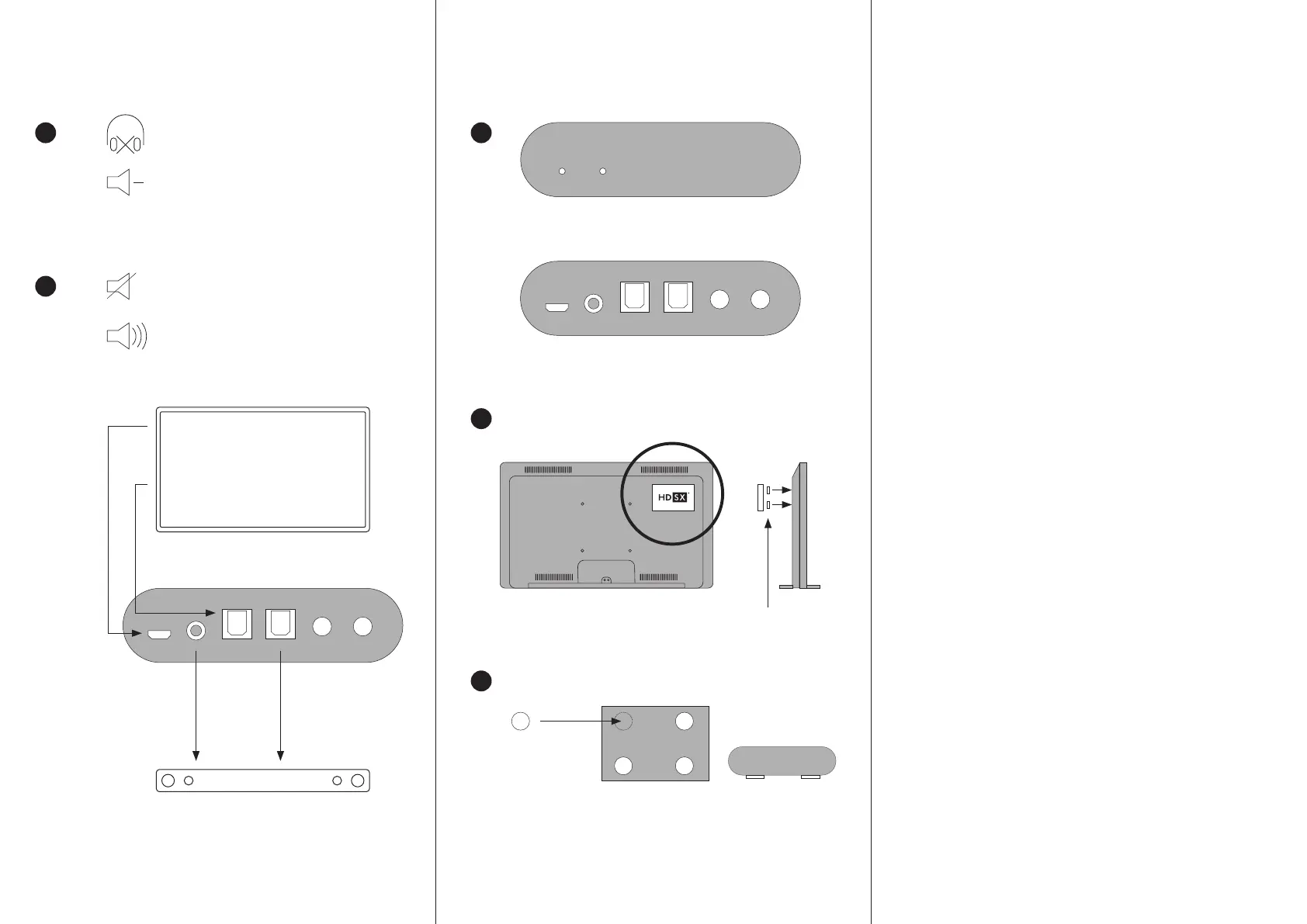
2. Using the USB cable supplied, connect a USB socket on your TV to
the USB POWER 5V socket [1].
3. Connect the Toslink output of your TV or/and receiver, usually called
„Digital Audio Out“, to the TOSLINK IN socket [3] using the Toslink
cable supplied (please remove the protective caps at both ends
before use).
4. Connect the audio input of the speaker/headphone system of your
choice to the audio outputs TOSLINK [4] or/and ANALOG [2].
Recommendation: Turn off internal sound effects on the connected
system.
5. For example, you can operate a headphone amplifier via the analog
output [2] in addition to a soundbar via the digital output [4], so that
you can listen via loudspeakers and headphones in parallel.
6. Attach the unit to the back of your TV using the self-adhesive Velcro
straps provided or stick the rubber feet provided to the bottom of the
unit and place it next to your TV.
7. Switch on your TV and mute its internal speakers if you are using a
soundbar or other external speakers. If you are using headphones,
you can leave the internal TV speakers switched on to listen in paral-
lel through its speakers.
8. In the sound settings of your TV or/and receiver, set its (digital)
sound output format to PCM/stereo. Recommendation: Switch off
internal sound effects. When using a receiver, we recommend setting
its output volume to 95% so that our device gets enough input level.
9. Turn down the volume of the speakers connected to the unit. Do not
put on headphones connected to the unit until you have activated the
HDSX TV Sound Optimizer via one or both switches [5] and [6]. If the
LED lamps [7] and [8] on the front light up blue, both signal paths
are active in parallel.
10. Since the HDSX TV Sound Optimizer immediately detects and optimi-
ses volume levels that are too low, the volume may increase conside-
rably depending on the audio material heard when it was activated.
11. If the HDSX TV Sound Optimizer is activated, set your desired volume
level once on the external sound system and then enjoy the new
freedom of watching TV.
12. If you have chosen the HDSX TV Sound Optimizer Model S, you will
experience great cinema in your headphones thanks to
HDSX.headphone Surround Sound.
[7]
LED ON =
HDSX active
[8]
LED ON =
HDSX active
[5]
HDSX
ON/OFF
[1] [2] [3] [4] [6]
HDSX
ON/OFF
Self-adhesive Velcro straps*
Bottom view
Rubber feet*
3
4A
4B
QUICKSTART
COMMISSIONING
Turn down the volume
TV or/and
receiver menu/sound settings:
(Digital) Audio Out = PCM Stereo
Recommended volume
level on receiver = 95%.
POWER supply
via USB from TV
Turn OFF TV speakers
Using Headphones:
Keep TV speakers turned ON (optional)
ANALOG OUT to
Soundsystem / Headphone
Analog In
If your TV does not have a „Digital Audio Out/Toslink“ with PCM signal, we
recommend using an „Analogue to Digital Toslink“ converter to connect the
analogue output of your TV to our unit.
TOSLINK OUT to
Soundsystem / Headphone
Toslink In
Soundbar
Take off your headphones
1
2
TOSLINK
TOSLINK
ANALOG
ANALOGTOSLINK
OUT
TOSLINK
IN
POWER ANALOG
OUT
* included in delivery
TV Digital Toslink
Audio Out to TOSLINK IN



 To Previous Page
 Loading...