EasyManua.ls Logo

HEADRUSH Pedalboard - Operation and Controls; Main Screen Interface

HEADRUSH Pedalboard
30 pages
Print Icon
To Next Page IconTo Next Page
To Previous Page IconTo Previous Page
Loading...
8
Operation
This chapter describes the HeadRush Pedalboard’s functions.
Main Screen
Overview
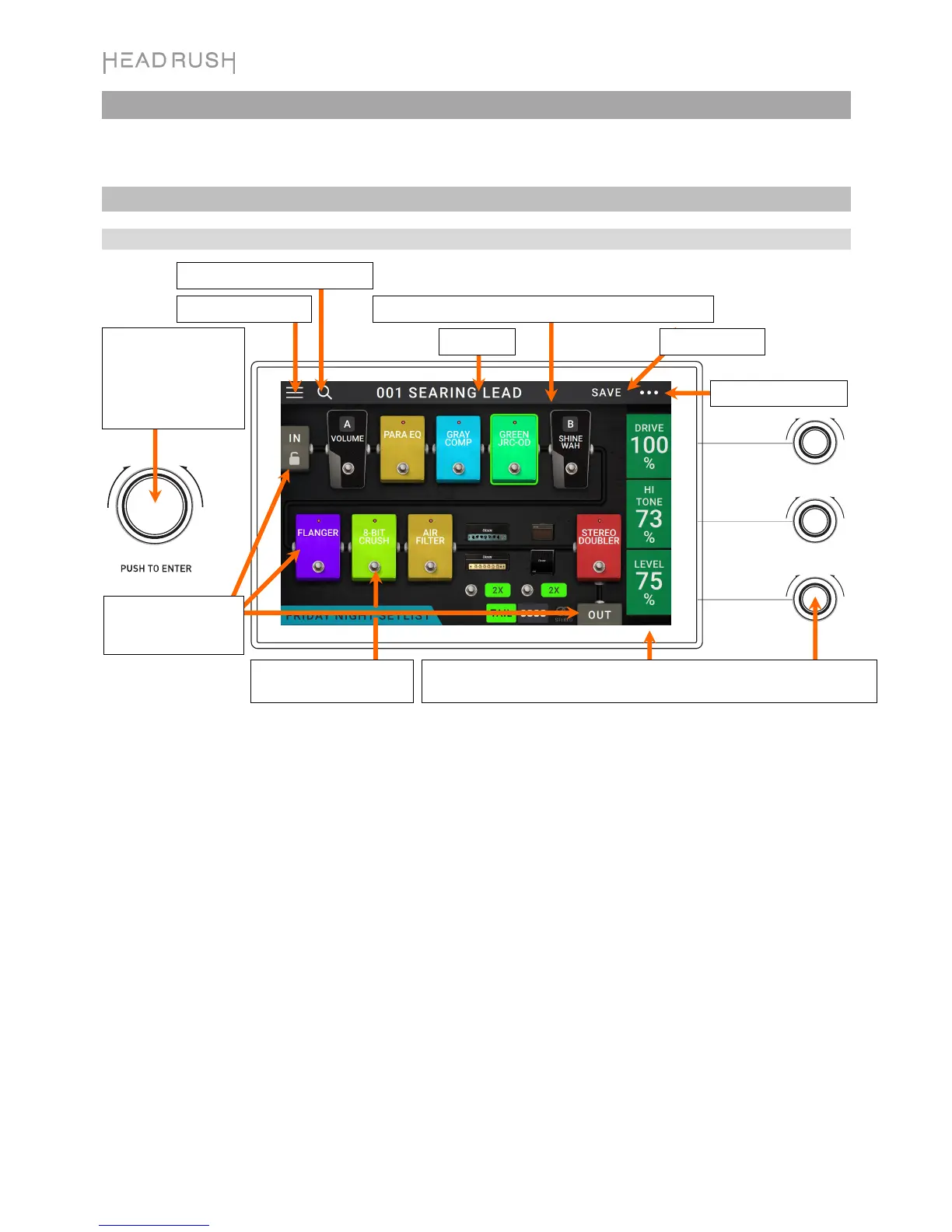
Tap and drag this bar downward to view list of rigs.
Rig name.
Double-tap a model,
In, or Out to show its
parameters.
Turn the parameter knobs to adjust these parameters. When a model is
selected, tap anywhere in this column to show the next three parameters.
Tap to save rig.
Turn encode
r
to move
through selectable
items onscreen or to
adjust parameters.
Press encoder as an
Enter
command.
Tap its
f
ootswitch to
activate or deactivate it.
Tap to view setlists.
Tap to search for rigs by name.
Tap for more options.

Other manuals for HEADRUSH Pedalboard

Related product manuals