Need help?
Do you have a question about the HEADSOUND H5 and is the answer not in the manual?
Diagram and labels detailing the structural components of the earbuds.
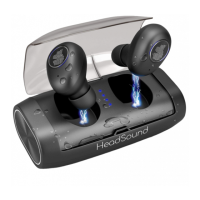
Diagram and labels detailing the structural components of the charging case.
Instructions for turning the earbuds on and off using the main buttons.
Explanation of automatic sleep mode when earbuds are in the case.
Functions for play, pause, next, and previous song control.
Functions for answering, hanging up, and redialing calls.
How to adjust volume up or down using button combinations.
Procedure to activate Siri or other voice assistants.
The HeadSound H5 is a pair of true wireless earbuds designed for a seamless audio experience, offering both music playback and call management. This user manual provides comprehensive instructions for pairing, charging, and utilizing the various functions of the earbuds and their accompanying charging case.
The HeadSound H5 earbuds are primarily designed for wireless audio playback and hands-free communication. They connect to your main device (e.g., smartphone, tablet) via Bluetooth, allowing you to listen to music, podcasts, and other audio content without the need for physical cables. Each earbud is equipped with a power on/off button, an indicator light, and a microphone, enabling individual control and clear voice transmission during calls. The accompanying charging case serves as both a protective storage unit and a portable power bank for the earbuds, ensuring they are always ready for use.
To begin using your HeadSound H5 earbuds, first remove them from the charging case. The earbuds are designed to automatically power on and pair with each other. Once they are paired with each other, you will need to enable Bluetooth on your main device and search for "H5 HeadSound" to establish a connection.
Should you encounter any pairing issues, there are two methods to troubleshoot. The primary method involves taking both earbuds out of the charging case, double-clicking both earbuds simultaneously, and then placing them back into the case. After a brief moment, remove them again, and they should re-pair successfully.
For some H5 earbuds, an alternative troubleshooting method exists. First, turn off both earbuds and remove "H5 HeadSound" from your device's Bluetooth list. Then, press and hold both main buttons on the earbuds for at least 10 seconds until their indicator lights flash blue/red twice. After this, place the earbuds back into the charging case. After two seconds, remove them, turn on Bluetooth on your device, find "H5 HeadSound," and attempt to pair again.
Upon receiving your HeadSound H5 earbuds, it is recommended to fully charge the charging case using the provided USB charger. Ensure that both earbuds are correctly seated in their respective slots within the charging case for proper charging. The charging case indicates a full charge when all four LED lights are blue. When the earbuds themselves are fully charged, their individual indicator lights will glow bright blue. During the charging process, the earbud indicator lights will be bright red. A notable feature of the charging case is its substantial capacity, which allows it to also be used as a power bank to charge other devices.
The HeadSound H5 earbuds feature multi-functional buttons that allow for various controls:
To activate your warranty for the HeadSound H5, you can either scan the provided QR code or visit the website: https://headsoundglobal.com/warranty. This ensures you are covered for any potential issues with your device.
The HeadSound H5 contains a built-in lithium battery. To ensure safe operation and longevity of the product, it is crucial to adhere to the following safety guidelines:
The package includes 2 Bluetooth Earbuds, 1 Charger Case, 1 USB Charging Cable, and 3 Ear cups, providing everything you need to get started and customize your fit.
 General
| Frequency Response | 20Hz - 20kHz |
|---|---|
| Impedance | 32Ω |
| Cable Length | 1.2m |
| Connector | 3.5mm |
| Sensitivity | 110dB |

 To Next Page