INTRODUCTION
1
English
2
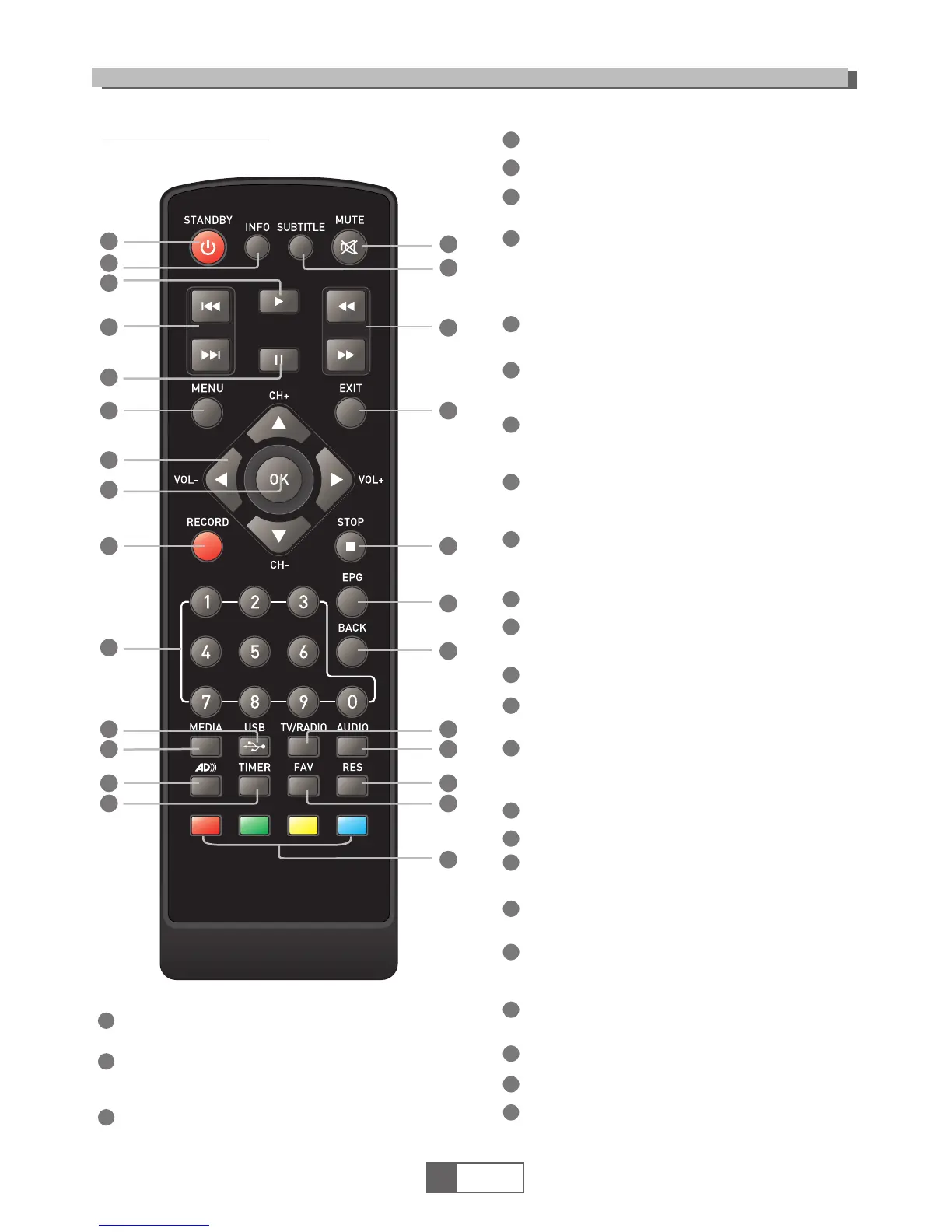
STANDBY
(Switches receiver on and off)
26
8
9
11
10
12
13
15
14
4
5
6
7
16
17
18
19
20
21
22
23
24
25
1
2
3
Remote control
1
2
3
4
5
6
15
18
19
12
20
21
22
7
8
9
10
11
13
14
16
17
23
24
26
25
AD (Turn off/on the Audio Description)
BACK
(Switch to last channel)
Previous/Next
STOP
TIMER
(Timer wake-up)
EXIT (Exit from menu)
RES (Switch HDMI resolution)
INFO
(Press to see tuned channel information )
PLAY (Starts playing selected file)
PAUSE (Pauses replay or starts TimeShift)
Menu
(Opens or closes the menu display)
Number keys
(Select programs by number
and enter numerical values)
Cursor/CH+,-/VOL+.-
(Cursor: Navigation keys used to
navigate menus and items)
(CH+/-: Channel Up and Down
(VOL+/-:Volume Up and Down)
OK key
(Confirms a selection within menu)
RECORD
(Records the tuned TV program
to your USB storage device)
USB
(Enters USB menu when storage
device connected)
MEDIA
(Enters Media Player menu
when storage device connected)
MUTE (Switch sound off or on)
SUBTITLE (Engage or disengage Closed
Caption Subtitles where available)
REV (Rewind through file playing, x 2 to x 24)
FWD
(Fast forward through file playing, x 2 to x 24)
EPG
(Opens the Electronic Program Guide Menu)
TV/RADIO
(Select audio only Radio services where
available)
AUDIO
(Selects sound mode and track menu)
FAV (Open the Favorites list)
RED/GREEN/YELLOW/BLUE keys
(Access Interactive and Submenu functions)



 To Next Page