EasyManua.ls Logo

Health Mate HM-8200 - User Manual

Health Mate HM-8200
5 pages
Print Icon
To Next Page IconTo Next Page
Loading...
1
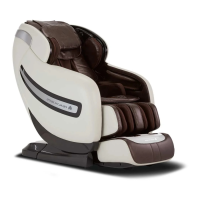
User manual 4D massage chair HM-8200
Remote control
On/Off: Press the on/off button to start the massage chair; the massage chair will
now place itself in standby mode. Select an automatic or manual massage program
from the menu; the massage device will first detect the shoulder height and then
start the massage. To turn the chair off, press the on/off button again, the massage
chair will now turn off and return to its original position. The control panel will shut
down in 3-5 seconds.
Menu: It is possible to set and view all the massages using the menu button. Some
settings can also be adjusted here. This includes the air cushions, foot roller, time of
the desired massage and language; there is also a stop function to stop the chosen
massage. The user can choose between all the different massage functions here.
Press this button again to return to the home page.
Timer: The standard massage time is set to 20 minutes. The duration of the massage
can be adjusted in 10-minute increments by pressing this button. The time at the top
right will change each time this button is pressed. When the time is up, the massage
chair will turn itself off and return to its original position.
Hot rocks: Press this button to start the “Quick relax program”. This is a massage
program lasting eight minutes. Press again to stop the massage.
Navigation: The direction button has four options: up, down, left and right. The menu
button allows the user to press up or down to choose a massage. The user presses
left or right to access the previous or next menu. The up and down button can also be
used to adjust the massage position in acupuncture point tracking. When being used
as music controls, the left and right buttons skip to the previous and next track. The
up and down buttons adjust the volume. The volume increases by one bar every two
times the button is pressed.
OK: Press the OK button to confirm the menu selection and move to the next menu.
Reducing the angle of the backrest: Pressing this button will decrease the angle of
the backrest. When the button is released, both the backrest and the leg support will
stop moving. The text, “Chair posture adjusting…” will appear on the controller
Question and Answer IconNeed help?

Do you have a question about the Health Mate HM-8200 and is the answer not in the manual?

Summary

Remote Control Functions

On;Off Button

Starts or stops the massage chair, places it in standby mode, and detects shoulder height before starting.

Menu Button

Accesses and adjusts massage settings like air cushions, foot roller, time, and language. Also stops the massage.

Timer Button

Sets massage duration in 10-minute increments. The chair automatically stops when time is up.

Hot Rocks Button

Starts the 'Quick relax program', an eight-minute massage. Press again to stop.

Navigation Controls

Buttons for moving through menus, adjusting position, volume, and skipping music tracks.

OK Button

Confirms menu selections and proceeds to the next menu option.

Backrest and Leg Support Adjustment

Decreases backrest angle; stops movement upon release. Also controls leg support lifting/lowering.

4 D Intensity Control

Increases or decreases massage intensity during manual mode. Indicated by stripes on screen.

Air Intensity Control

Adjusts the intensity of air cushions in automatic massages, indicated by stripes.

Roller Function

Adjusts the force of the foot unit massage, offering softer massage or stopping the function.

Automatic Mode Selection

Starts one of six automatic massage functions, cycling through them with repeated presses.

Manual Mode Selection

Selects manual massage programs like Kneading, Tapping, Shiatsu, and others.

Air Massage Options

Offers four types of air pressure massages: Full Body, Shoulder & arm, Lower back & seat, Leg & foot.

Weightless Position

Cycles through three weightlessness positions, including sleeping mode and default.

Advanced Functions & Settings

Acupuncture Point Tracking

Detects shoulder and acupuncture points for massage adjustment, indicated on screen.

Generation of Negative Ions

Turns on the air filter function via the OK button, indicated by a green leaf icon.

Warmth Function

Activates back and foot heating, displaying a thermometer and allowing intensity adjustment.

Speech Recognition

Allows voice commands to control massage functions like starting specific massages or shutting down.

Settings Menu (Timer & Language)

Adjusts massage duration (10-50 min) and selects language (English, Dutch, French).

Overview

The HM-8200 is a 4D massage chair designed for comprehensive relaxation and therapeutic benefits, controlled via a remote and featuring speech recognition.

Function Description

Remote Control: The chair is operated primarily through a remote control.

  • On/Off: A single press initiates standby mode, followed by an automatic shoulder height detection and the start of a selected massage program. A second press turns off the chair and returns it to its original position, with the control panel shutting down in 3-5 seconds.
  • Menu: This button allows access to all massage functions and settings, including air cushions, foot roller, massage duration, and language. It also provides a stop function for ongoing massages and allows selection from various massage functions. Pressing it again returns to the home page.
  • Timer: The default massage time is 20 minutes, adjustable in 10-minute increments by pressing this button. The selected time is displayed at the top right of the screen. Upon completion, the chair automatically turns off and returns to its original position.
  • Hot Rocks: Initiates an 8-minute "Quick relax program." Pressing it again stops the program.
  • Navigation: Features up, down, left, and right buttons. In the menu, up/down selects massages, while left/right navigates between menus. During acupuncture point tracking, up/down adjusts the massage position. When used as music controls, left/right skips tracks, and up/down adjusts volume, increasing by one bar every two presses.
  • OK: Confirms menu selections and moves to the next menu.
  • Reducing the angle of the backrest: Decreases the backrest angle. Releasing the button stops movement of both the backrest and leg support. "Chair posture adjusting..." appears on the display. This function requires a massage to be in progress.
  • Increasing the angle of the backrest: Increases the backrest angle. Releasing the button stops movement of both the backrest and leg support. "Chair posture adjusting..." appears on the display. This function requires a massage to be in progress.
  • Lifting the leg support: Lifts the leg support. Releasing the button stops movement. "Chair posture adjusting..." appears on the display. This function requires a massage to be in progress.
  • Lowering the leg support: Lowers the leg support. Releasing the button stops movement. "Chair posture adjusting..." appears on the display. This function requires a massage to be in progress.
  • 4D- and 4D+: Used during manual massage to decrease or increase massage intensity. Stripes behind the icon on the start screen indicate the number of presses.
  • Air Intensity: Adjusts the intensity of air cushions after selecting an automatic massage. Stripes behind "Intensity" on the start screen indicate the number of presses.
  • Roller: Adjusts the force of foot unit massages. One press provides a softer massage; a second press stops it.
  • Automatic Mode: Initiates one of six automatic massage functions: "Soft," "Power," "Stretch," "Vitality," "Normal," and "Sports." Repeated presses cycle through these programs, displayed at the top left of the screen. There is also a "Special" mode with six additional functions: "Therapy," "Recovery," "Relaxation," "Healing," "Sleeping," and "Slimming."
  • Manual Mode: After turning on the chair, this button selects a manual program, displayed at the top of the start screen. Repeated presses cycle through "Kneading," "Knocking," "Tapping," "Kneading & knocking," and "Shiatsu."
  • Air Massage: Offers four air pressure massage options: "Full Body," "Shoulder & arm," "Lower back & seat," and "Leg & foot."
  • Weightless Position (Zero-G): The chair has three weightlessness positions. The first press activates level 1, the second activates level 2, the third enters sleeping mode, and the fourth returns to the default position.

Usage Features

General Operation:

  • Upon power-on, a short buzzer sounds, and the LCD screen displays the home screen, entering standby mode after 2-3 seconds.
  • The menu button provides comprehensive management of massage functions and settings.
  • Generation of negative ions: Pressing the "OK" button when the chair is on activates the air filter function, indicated by a green leaf on the remote's home screen.

Automatic Massage Programs:

  • A shortcut to automatic massages is available at the bottom left of the screen. Pressing one of these buttons starts a program, and subsequent presses cycle through them.
  • Alternatively, automatic programs can be selected via the menu. The cursor defaults to "Automatic massage." Press OK to enter the mode and choose from "Soft," "Power," "Stretch," "Vitality," "Normal," "Sports," or the "Special" mode with its six additional programs.
  • The first time an automatic program is used, the chair performs acupuncture point detection, displaying "Acupuncture point tracking..." A buzzer sounds five times upon completion, followed by shoulder position detection. If the position is incorrect, the up/down navigation button can be used to adjust it, with "Acupuncture point adjusting..." displayed. This adjustment is only available for automatic massages.

Manual Massage Programs:

  • A shortcut to manual massages is available at the bottom left. Pressing it starts a program, and subsequent presses cycle through them.
  • Manual programs can also be selected via the menu. Select "Manual" using the navigation button, then press OK. Options include "Mode," "Position," "Width," "Speed," "4D," and "Footrest." Select a function, press OK to open the next menu, and then choose the desired massage or use the left arrow to return to the overview.
  • During a manual massage, pressing the menu button returns to the home screen. The up/down button can then adjust the massage position, with "Massage position adjusting..." displayed.

Air Pressure Adjustment:

  • Access via the menu: select "Airbag," then choose between "Position" and "Intensity." Select the desired function, press OK, and then select the desired function again.

Roller Adjustment:

  • Access via the menu: select "Roller." Options are "Level 2," "Level 1," and "Stop."

Warmth Function:

  • Access via the menu: select "Heating," then "Back ON" to activate back heating. Foot heating can be activated similarly. A thermometer icon appears at the top right of the home screen when heat is active. The intensity can be adjusted here.

Speech Recognition Function:

  • The speech recognition sensor is located on the left at ear level. Users can issue commands to control the chair.
    • "Turn on speech recognition mode" activates the function.
    • "Voice Off" deactivates it.
    • "Massage chair shutdown" turns off the chair.
    • "Chinese Massage," "Pain Relief," "Body Stretch," "Experience," "Relaxation," and "Zero Gravity Start" initiate specific programs.
  • The chair provides voice replies to confirm commands, such as "Speech recognition has been opened" or "Chinese Massage has been opened for you."

Settings:

  • Access via the menu: select "Settings."
  • Timer: Choose massage durations of 10, 20, 30, or 50 minutes. The chair automatically powers off when the time is up.
  • Language: English, Dutch, and French are available.

Stop Button:

  • Immediately stops the ongoing massage.

Important Technical Specifications

  • 4D Massage: The chair features 4D massage capabilities, allowing for adjustment of intensity during manual massages.
  • Weightlessness Positions: Three distinct Zero-G positions for enhanced relaxation.
  • Shoulder Height Detection: Performed automatically for full massages to customize the experience. For "Partial" and "Fixed point" massages, this detection is not required.
  • Acupuncture Point Tracking: Automatically detected during the first use of an automatic program, with manual adjustment available.
  • Air Filter Function: Activated via the OK button, indicated by a green leaf icon.

Maintenance Features

  • No specific maintenance features are detailed in the provided text. However, the automatic shoulder height detection and acupuncture point tracking suggest a self-calibrating or adaptive system that optimizes performance for individual users.

Health Mate HM-8200 Specifications

General IconGeneral
BrandHealth Mate
ModelHM-8200
CategoryMassager
LanguageEnglish

Related product manuals