14 | EN
5.4 Storage between applications
After the treatment unplug all cables and electrodes and put them
into the storage case and store in a cool and dry location. Refer to the
VDIHW\QRWHVIRUHQYLURQPHQWDOVWRUDJHFRQGLWLRQV
5.5 Maintenance
7KHUHDUH QR VHUYLFHDEOH SDUWVE\WKHXVHUV ΔQ D FDVHRIGDPDJH
SOHDVHFRQWDFWWKHPDQXIDFWXUHU7KHIROORZLQJPDLQWHQDQFHDFWLYL
ties are recommended and should be considered for safe working.
Frequency %\ZKRP 0DLQWHQDQFHDFWLYLW\
Prior to
each use
User Check housing, cables and electrodes
for damages. In case of damage,
contact the manufacturer or an
authorized dealer
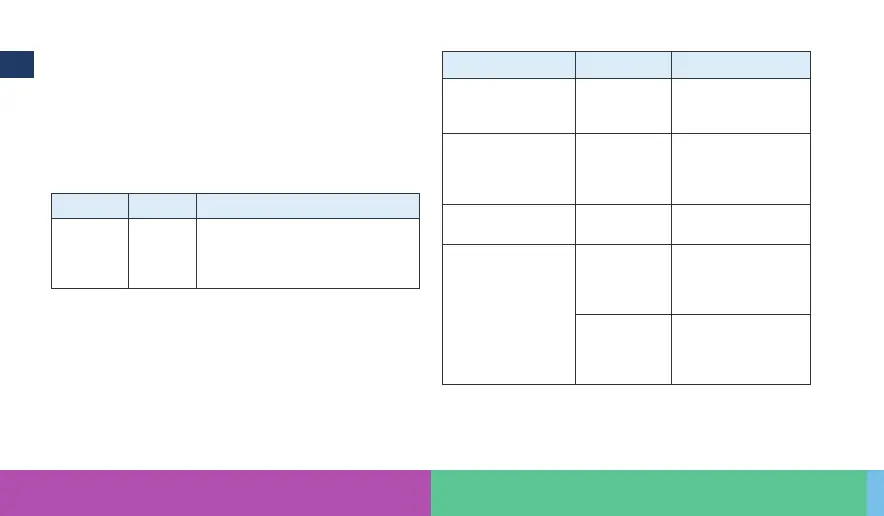
5.6 Troubleshooting
ΔQWKHIROORZLQJ\RXȴQGW\SLFDOZDUQLQJVRUPHVVDJHVWKDWDUHUHODWHG
WRWKHDSSRUKDUGZDUHRIWKHGHYLFHΔI\RXIDFHDQHYHQWWKDWLVQRW
listed here or a problem still exists, please contact the manufacturer.
(YHQWRUPHVVDJH Cause Actions required
1RFRQQHFWLRQIURP
the smartphone to
WKHGHYLFH
'HYLFHLV
VZLWFKHGR
6ZLWFKRQWKHGHYLFH
and restart the App
1RFRQQHFWLRQIURP
the smartphone to
WKHGHYLFH
%OXHWRRWK
in your
smartphone is
GHDFWLYDWHG
2SHQFRQQHFWLYLW\
VHWWLQJVDQGDFWLYDWH
%OXHWRRWK
Repeated short
blinking of right LED
%DWWHULHVDUH
low
&KDUJHWKHGHYLFH
'HYLFHLVQRW
responding
1R6WLPXODWLRQ
output
8QGHȴQHG
HUURU(0
disturbance
+ROGWKHRQVZLWFK
IRUVHFRQGV7KLV
triggers a hardware
reset.
8QGHȴQHG
HUURU(0
disturbance
&RQWDFW\RXUDXWKRU
ized dealer or the
manufacturer Healy
GmbH



 To Next Page
 Loading...