
 Need help?
Do you have a question about the Hear+Hi Acuity and is the answer not in the manual?
Guidance on attaching eartips and wearing earphones for optimal fit, seal, and sound quality.
Instructions on how to turn the device on and adjust audio volume using the device controls.
Information on charging the headset, including indicator lights and best practices for battery health.
Steps to download the Hear+Hi app and pair the headset with a mobile device via Bluetooth.
Explanation of different audio modes and the meaning of LED status lights for device operation.
Essential safety precautions for using the hearing amplification product and protecting hearing.
Recommendations for cleaning and caring for the headset to ensure performance and longevity.
Details on the one-year limited warranty, coverage, and how to obtain service for the product.
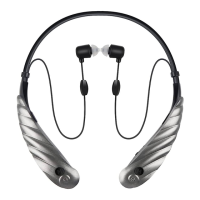
The Hear+Hi Acuity is a wireless stereo assistive hearing amplified earphone system designed to enhance hearing and provide a personalized audio experience. It functions as both an audio streaming device for calls and music, and a sophisticated hearing aid with advanced sound processing capabilities. The device is not intended for users under 18 years of age, and it is strongly recommended to consult a hearing healthcare professional for any hearing loss conditions, especially a licensed physician or ear specialist, before use.
The core function of the Acuity is to amplify and process sound to assist individuals with hearing loss. It utilizes advanced 8-Channel DSP (Digital Signal Processing) for precise amplification and wireless streaming, ensuring high-quality sound delivery. The device features dual microphones, which are crucial for capturing sound from the environment and for noise cancellation, contributing to clearer hearing in various settings.
A key feature is its personalized and customized hearing app, available on both iOS and Android platforms. This app allows users to perform a hearing test and adjust the device's volume modes according to their specific hearing requirements. This customization prevents listening at excessively loud volumes, which could damage hearing, and ensures optimal sound quality tailored to the individual. The app also provides access to other features, including Bluetooth connectivity.
The Acuity offers three pre-set listening modes to adapt to different environments:
Users can easily switch between these modes by cycling through a mode button located on either side of the device. Once the app is set up, the hearing test completed, and the user profile updated, these modes automatically adjust to the user's selections, providing the best possible sound quality at the right volume, configured to their personal requirements.
For connectivity, the Acuity uses Bluetooth to pair with smartphones. The pairing process involves turning on the device, pressing and holding the mode/pairing button until the LED indicator flashes blue and red, enabling Bluetooth on the mobile device, and then searching for and pairing with "Hear+Hi Acuity Stereo." A flashing purple LED indicates a successful Bluetooth connection with media playing.
The Acuity is designed for comfortable and effective wear. It comes with two sets of eartips in mini, small, medium, and large sizes. Users are encouraged to try different eartip options, as the size of the ear canal may not be the best guide. Often, a smaller eartip fits better by going deeper, or a larger one might provide more comfort and better occlusion. Proper eartip insertion is crucial for optimal sound quality, minimizing required volume, preventing leakage, and avoiding feedback (a whistling sound). Eartips should be aimed forward and up to match the angle of the ear canal, and different angles and sizes should be tried to maximize comfort and seal. The eartips attach to the earphone nozzle by gently pulling to cover it, avoiding excessive pulling to prevent tearing.
The depth of earphone insertion also affects sound quality and seal, so users should experiment with different depths to optimize their listening experience. The device is designed to be worn around the neck and under the shirt collar to prevent rubbing against objects and reduce friction noise.
The device is powered on by sliding the power button to the "On" position. Volume settings are adjustable using +/- buttons located on either side at the outer base of the device. However, a caution is issued that listening at high volumes may damage hearing.
The Acuity has a long battery life, providing approximately 10 hours of continuous use when fully charged. Charging takes about 3 hours. The device should be recharged before going to sleep nightly, regardless of battery status, and should not be completely discharged before recharging, as this can reduce battery life. When plugged into a power source, a solid red LED indicates charging, and a solid blue LED indicates a fully charged battery. A compatible USB adapter is required for charging.
Proper maintenance is essential for the longevity and performance of the Hear+Hi Acuity.
 General
| Microphone | Yes |
|---|---|
| Charging Time | 2 hours |
| Driver Size | 40mm |
| Frequency Response | 20Hz - 20kHz |
| Impedance | 32 Ohms |
| Cable Length | 1.2m |
| Ear Cushion Material | Protein Leather |
| Foldable | Yes |
| Type | Over-ear |
| Bluetooth | Bluetooth 5.0 |
| Connection | Bluetooth |
| Noise Isolation | Passive |

 To Next Page