Introduction
Important Safety Information
1. Know Your Monitor
2. Preparation
3. Using the Monitor
4. Error Messages and Troubleshooting
3723568-1C
C
D
B
A
E
H
G
F
J
K
L
I
M
N
O
START INFLATE DEFLATE COMPLETE
HEM-7122-AU_C_M04_180628.pdf
Automatic Blood
Pressure Monitor
Model BP100
Instruction Manual
Thank you for purchasing the BP100 Automatic Blood Pressure Monitor.
The BP100 is a compact, fully automatic blood pressure monitor, operating on the
oscillometric principle. It measures your blood pressure and pulse rate simply and
quickly.
Intended Use
This product is a digital monitor intended for use in measuring blood pressure and
pulse rate in adult patient population who can understand this instruction manual
with the arm circumference range printed on the arm cuff.
It is mainly designed for general household use.
Please follow this instruction manual thoroughly for your safety.
Please keep for future reference. For specific information about your own blood
pressure, CONSULT YOUR PHYSICIAN.
Contents:
Monitor, arm cuff, instruction manual, battery set
Monitor:
Arm cuff:
Display:
2.1 Battery Installation
1. Remove the battery cover.
2. Insert 4 “AA” batteries as
indicated in the battery
compartment.
3. Replace the battery cover.
Notes:
• When the depleted battery symbol ( ) appears on the display, turn the
monitor off and remove all the batteries. Replace with 4 new batteries at the
same time. Long life alkaline batteries are recommended.
• The measurement values continue to be stored in memory even after the
batteries are replaced.
• The supplied batteries may have a shorter life.
Disposal of used batteries should be carried out in accordance with the
national/local regulations for the disposal of batteries.
3. Secure closed with the
fabric fastener.
Notes:
• When you take a measurement on the right
arm, the air tube will be at the side of your
elbow. Be careful not to rest your arm on the
air tube.
• The blood pressure can differ between the right arm and the left arm, also
the measured blood pressure values can be different. Recommend to
always use the same arm for measurement. If the values between both
arms differ substantially, please check with your physician which arm to
use for your measurements.
3.2 How to Sit Correctly
To take a measurement, you need to be
relaxed and comfortably seated at
comfortable room temperature.
• Sit on a chair with your legs uncrossed and
your feet flat on the floor.
• Sit with your back and arm being supported.
• The arm cuff should be placed on your arm at
the same level as your heart.
3.3 Taking a Measurement
Notes:
• To stop a measurement, press the START/STOP button once to release
the air in the arm cuff.
• Remain still and do not talk while taking a measurement.
1. Press the START/STOP button.
The arm cuff will start to inflate automatically.
2. Remove the arm cuff.
3. Press the START/STOP button to turn the monitor off.
The monitor automatically stores the measurement result in its memory.
It will automatically turn off after 2 minutes.
Note: Wait 2-3 minutes before taking another measurement. Waiting between
measurements allows the arteries to return to the condition prior to
taking a measurement.
Always consult your physician. Self-diagnosis of measurement results and
self-treatment are dangerous.
3.4 Using the Memory Function
The monitor automatically stores the last measurement values (blood
pressure and pulse rate).
To View the Measurement Values Stored in Memory
1. Press and hold the START/STOP button
for more than 5 seconds.
The last measurement value is displayed along with
the memory symbol.
Note: If there are no measurements results stored in the
memory, the screen to the right is displayed.
2. Press the START/STOP button to turn the monitor off.
It will automatically turn off after 2 minutes.
To Delete the Values Stored in Memory
Press and hold the START/STOP button for
more than 15 seconds.
4.1 Error Messages
4.2 Troubleshooting
A. Display
B. START/STOP button
C. Battery compartment
D. Air jack
E. Arm cuff
(Arm circumference 22 - 32 cm)
F. Air plug
G. Air tube
H. Marker
If your systolic pressure is more than 210 mmHg
After the arm cuff starts to inflate, press and hold the START/STOP
button until the monitor inflates 30 to 40 mmHg higher than your
expected systolic pressure.
Notes:
• The monitor will not inflate above 299 mmHg.
• Do not apply more pressure than necessary.
I. Memory symbol
J. Systolic blood pressure
K. Diastolic blood pressure
L. Battery symbol (low/depleted)
M. Heartbeat symbol
(Flashes during measurement.)
N. Pulse display
O. Deflation symbol
Warning: Indicates a potentially hazardous situation which, if not avoided,
could result in death or serious injury.
The batteries are low.
Error Display
Problem Cause
Solution
Cause Solution
Recommend to replace the
batteries with new ones ahead
of time.
Refer to section 2.1.
Replace 4 batteries with new
ones at once.
Refer to section 2.1.
Insert the plug securely.
Refer to section 3.1.
Apply the arm cuff tighter.
Refer to section 3.1.
Replace the cuff with a new one.
Refer to section 5.3.
Repeat measurement. Remain
still and do not talk during
measurement.
Refer to section 3.3.
If “E2” appears repeatedly,
inflate the cuff manually until it is
30 to 40 mmHg above your
previous measurement result.
Refer to section 3.3.
Do not touch the arm cuff and/or
bend the air tube while taking a
measurement. Do not inflate the
arm cuff more than necessary.
Refer to section 3.3.
Repeat measurement. Remain
still and do not talk during
measurement.
Refer to section 3.3.
Remove any clothing interfering
with the arm cuff.
Refer to section 3.1.
Contact your local
representative.
The batteries are depleted.
Air plug disconnected.
Arm cuff is applied too loosely.
Air is leaking from the arm cuff.
Movement during measurement
and the arm cuff has not been
inflated sufficiently.
The arm cuff was inflated
exceeding the maximum
allowable pressure, and then
deflated automatically.
Movement during measurement.
Clothing is interfering with the
arm cuff.
The measurement
result is extremely high
(or low).
Arm cuff is applied too
loosely.
Apply the arm cuff tighter.
Refer to section 3.1.
Remain still and do not talk
during measurement.
Refer to section 3.3.
Remove any clothing
interfering with the arm cuff.
Refer to section 3.1.
Make sure that the air tube
is connected securely.
Refer to section 3.1.
Replace the arm cuff with a
new one.
Refer to section 5.3.
Apply the cuff correctly so
that it is firmly wrapped
around the arm.
Refer to section 3.1.
Inflate the cuff so that it is 30
to 40 mmHg above your
previous measurement
result.
Refer to section 3.3.
Replace the batteries with
new ones.
Refer to section 2.1.
Insert the batteries with the
correct (+/-) polarity.
Refer to section 2.1.
Movement or talking during
measurement.
Clothing is interfering with
the arm cuff.
The air connector is not
securely connected into the
air jack.
Air is leaking from the arm
cuff.
The arm cuff is loose.
The arm cuff has not been
inflated sufficiently.
The batteries are depleted.
The batteries have been
inserted incorrectly.
• Press the START/STOP button and repeat
measurement.
• Replace the batteries with new ones.
• If the problem continues, contact your local
representative.
Arm cuff pressure
does not rise.
Arm cuff deflates too
soon.
Cannot measure or the
results are too low or
too high.
Nothing happens
when you press the
buttons.
Other problems.
Device error.
3.1 Applying the Arm Cuff
Remove tight-fitting clothing or tight rolled up sleeve from your left upper arm.
Do not place the arm cuff over thick clothes.
1. Insert the air plug into the air jack
securely.
2. Wrap the arm cuff firmly in
place around your left upper
arm.
The bottom edge of the arm cuff
should be 1 to 2 cm above the elbow.
Air tube is on the inside of your arm
and aligned with your middle finger.
1 - 2 cm
(General Usage)
• DO NOT adjust medication based on measurement results from this blood
pressure monitor. Take medication as prescribed by your doctor. Only a doctor is
qualified to diagnose and treat High Blood Pressure.
• Consult your doctor before using this monitor for any of the following conditions:
common arrhythmias such as atrial or ventricular premature beats or atrial
fibrillation, arterial sclerosis, poor perfusion, diabetes, age, pregnancy,
pre-eclampsia, renal diseases.
Note that PATIENT motion, trembling, shivering may affect the measurement
reading.
• Do not use this monitor on the injured arm or the arm under medical treatment.
• Do not apply the arm cuff on the arm while being on an intravenous drip or blood
transfusion.
• Consult your doctor before using this monitor on the arm with an arterio-venous
(A-V) shunt.
• Do not use this monitor with other medical electrical (ME) equipment simultane-
ously. This may result in incorrect operation of the monitor and/or cause an
inaccurate reading.
• Do not use this monitor in the area the HF surgical equipment, MRI, or CT scanner
exists, or in the oxygen rich environment. This may result in incorrect operation of
the monitor and/or cause an inaccurate reading.
• The air tube may cause accidental strangulation in infants.
• Contains small parts that may cause a choking hazard if swallowed by infants.
• Stop using this monitor and consult your doctor if you experience skin irritation or
other troubles.
Caution: Indicates a potentially hazardous situation which, if not avoided, may
result in minor or moderate injury to the user or patient or damage to
the equipment or other property.
(General Usage)
• Always consult your doctor. Self-diagnosis of measurement results and
self-treatment are dangerous.
• Consult your doctor before using this monitor for any of the following conditions:
- If you have had a mastectomy.
- People with severe blood flow problems or blood disorders as cuff inflation can
cause bruising.
• Do not take measurements more than necessary. It may cause bruising due to
blood flow interference.
• If there are any abnormalities during the measurement, remove the arm cuff.
• Do not use this monitor on infants or persons who cannot express their intentions.
• Do not inflate the arm cuff more than necessary.
• Do not use this monitor for any purpose other than measuring blood pressure.
• Use only the approved arm cuff for this monitor. Use of other arm cuffs may result
in incorrect measurement results.
• During measurement, make sure that no mobile phone or any other electrical
devices that emit electromagnetic fields is within 30cm of this monitor. This may
result in incorrect operation of the monitor and/or cause an inaccurate reading.
• Do not disassemble the monitor or arm cuff. This may cause an inaccurate
reading.
• Do not use in a location with moisture, or a location where water may splash on
this monitor. This may damage this monitor.
• Do not use this monitor in a moving vehicle (car, airplane).
(Battery Usage)
• Do not insert the batteries with their polarities incorrectly aligned.
• Use only four “AA” alkaline or manganese batteries with this monitor. Do not use
other types of batteries. Do not use new and used batteries together.
• Remove the batteries if this monitor will not be used for 3 months or more.
• Use the battery within recommended period mentioned to it.
General Precautions
• Do not forcibly bend the arm cuff or bend the air tube excessively.
• Do not fold or kink the air tube while taking a measurement. This may cause
harmful injury by interrupting blood flow.
• To unplug the air plug, pull on the air plug at the connection with the monitor, not
the tube itself.
• Do not apply strong shocks and vibrations to or drop the monitor and arm cuff.
• Do not inflate the arm cuff when it is not wrapped around your arm.
• Read and follow the “Important information regarding Electro Magnetic Compatibil-
ity (EMC)” in the “6. Specifications”.
• Read and follow the “Correct Disposal of This Product” in the Technical Data
Section when disposing of this monitor and any used accessories or optional parts.
• Do not use this monitor outside the specified environment. It may cause an
inaccurate reading.
• Dispose of this monitor, components and optional accessories according to
applicable local regulations. Unlawful disposal may cause environmental pollution.
• Please check (for example, by observation of the limb concerned) if this monitor is
not causing a prolonged impairment of PATIENT blood circulation.
• If this monitor is stored at the maximum or minimum storage and transport
temperature and is moved to an environment with a temperature of 20°C, we
recommend waiting for approx. 2 hours before using the monitor.
Before Taking a Measurement
To help ensure an accurate reading, follow these directions:
1. Avoid bathing, drinking alcohol or caffeine, smoking, exercising and
eating for 30 minutes before taking a measurement.
2. Rest for at least 5 minutes before taking the measurement.
3. Stress raises blood pressure. Avoid taking measurements during
stressful times.
4. Measurements should be taken in a quiet place.
5. Remove tight-fitting clothing from your arm.
In case of any of the below problems occur during measurement, first check
that no other electrical device is within 30cm. If the problem persists, please
refer to the table below.
Regular self-check can assist your Healthcare
Professional to evaluate your blood pressure
trend.
Only your Healthcare Professional can interpret
your individual blood pressure readings.
A single measurement may not be sucient for
an accurate diagnosis. Many factors such as
physical activity, anxiety, or the time of day can
inuence your blood pressure. Thus it is best to
try and measure your blood pressure at the same
time each day to get an accurate indication of any
changes in blood pressure.
What is blood pressure?
Blood pressure is simply a measure of the
pressure of your blood in the arteries as your
heart is pumping it around your body. You may
have heard phrases like 118 over 78.
The rst gure (118) is called the systolic blood
pressure, while the second gure (78) is called the
diastolic blood pressure.
So what does that mean?
Systolic blood pressure
Systolic (siss-tol-ick) blood pressure is
a measure of the pressure as the heart pumps the
blood into the arteries when it beats.
The diastolic (die-a-stollic) pressure is the smaller
number. It is the pressure when the heart is at
rest, between beats.
Diastolic blood pressure
Interpreting readings
Blood pressure monitoring at home
Recording readings
High blood pressure classications
#
You can download our Heart Sure App or blood
pressure diaries online to track your readings
manually.
#
Adapted from Mancia et al. 2013 ESH/ESC Guidelines for the
management of arterial hypertension. Journal of Hypertension,
31(7),1281-1357
Should you require any further information
please do not hesitate to contact us
IN AUSTRALIA:
Telephone:
Website: www.omronhealthcare.com.au
IN NEW ZEALAND: J.A.DAVEY LTD
Telephone:
Website: www.omronhealthcare.co.nz
03/2016
Warranty Information
Blood Pressure Monitors
HEALTHCARE
PROFESSIONAL
ENVIRONMENT
HOME
ENVIRONMENT
SYSTOLIC
DIASTOLIC
≥ 140 mmHg
≥ 90 mmHg
≥ 135 mmHg
≥ 85 mmHg
0800 523 583
C/- Healthcare Logistics
1800 807 464
J.A.DAVEY PTY LTD

 Need help?
 General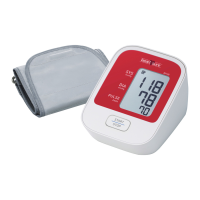

 To Next Page