TROUBLE SHOOTING:
9 • THE PRECISION INDUCTION COOKBOOK
OWNER’S MANUAL • 10
SETTING TIME:
Press the “Time” button. The “0” will flash in the far right corner of the display
panel. Press the “+” button until you reach the desired amount of time. For
example; for 5 minutes press “Time” once, then press “+” until you see 00:05
on the display. Next press “Start”. For 20 minutes, you press “Time” twice then
press the “+” until you see 00:20, then press “Start”. For 2 hours and 30
minutes, press “Time” twice, press “+” until you reach 3, then press “Time”,
press “+” until you reach 2 the display will show 02:30 then press “Start”.
• Remember the 0 that is blinking would be the digit you can adjust. The
maximum time is 99 hours and 59 minutes.
• Our display shows hours and minutes, not seconds.
PAUSE / CLEAR FUNCTION:
To PAUSE the cooking time, press the “Pause / Clear” button one time. This will
pause at the particular stage it is in. The temperature will stay in the display
panel but the “F” will be blinking. To resume, press “Start”.
To CLEAR the cooking mode or display during cooking, press the “Pause /
Clear” button twice. The screen will be fully cleared, a “0” will appear and the
unit will turn off.
PROGRAMMING FUNCTION (Stage Cooking):
• Press the “Prog” button.
• “Pro” will be in the display panel.
1. Press the desired set temperatures ranging from “Low” to “Max / Sear”. If you
need to increase or decrease the temperature press the “-” or “+” buttons.
2. Press the “Time” button 00:00 will be on the display and press the “-” or “+”
buttons until you reach the desired time. See above on “SETTING TIME” for
detailed information on how to enter minutes and hours.
•To add additional stages, repeat steps 1 and 2 and then press “Start” to start your
program. You can program up to 10 stages (delay is considered as one stage).
•If you need to change any part of the program press “Pause / Clear” button twice
and start over.
For example, if you want to boil for 5 minutes then reduce to simmer for 20
minutes; Press “Prog”, next press the “Max / Sear” button, press “Time” button
once, press “+” until you reach 5. Press “Low” next press “Time” twice then “+”
until you reach 20 then press “Start”.
NOTE: Maximum allowed cook time is 99 hours and 59 minutes.
DELAY FUNCTION:
The purpose of this function is for you to be able to have the program you set
above start at a later time.
To use this function, press “Prog”, then press the ”Time“ button. The “0” will
flash in the lower right corner of the display panel. Press the “+” button until you
reach the desired amount of time you wish to delay the oven to start. (For more
information, review SETTING TIME on the top of this page). Then press “Prog”
again to set cooking program. The amount of time you set for Delay is included
in the stages you program. To continue to the next stage, press “Low” to “Max /
Sear” indicating which temperature you want to have to start cooking. Continue
with #2 on “PROGRAMING FUNCTION”. Once you are ready for the
countdown to begin press “Start”.
When delay countdown reaches “0”, the oven will beep twice to signal the end.
After this the cooking time will start and the temperature will be displayed.
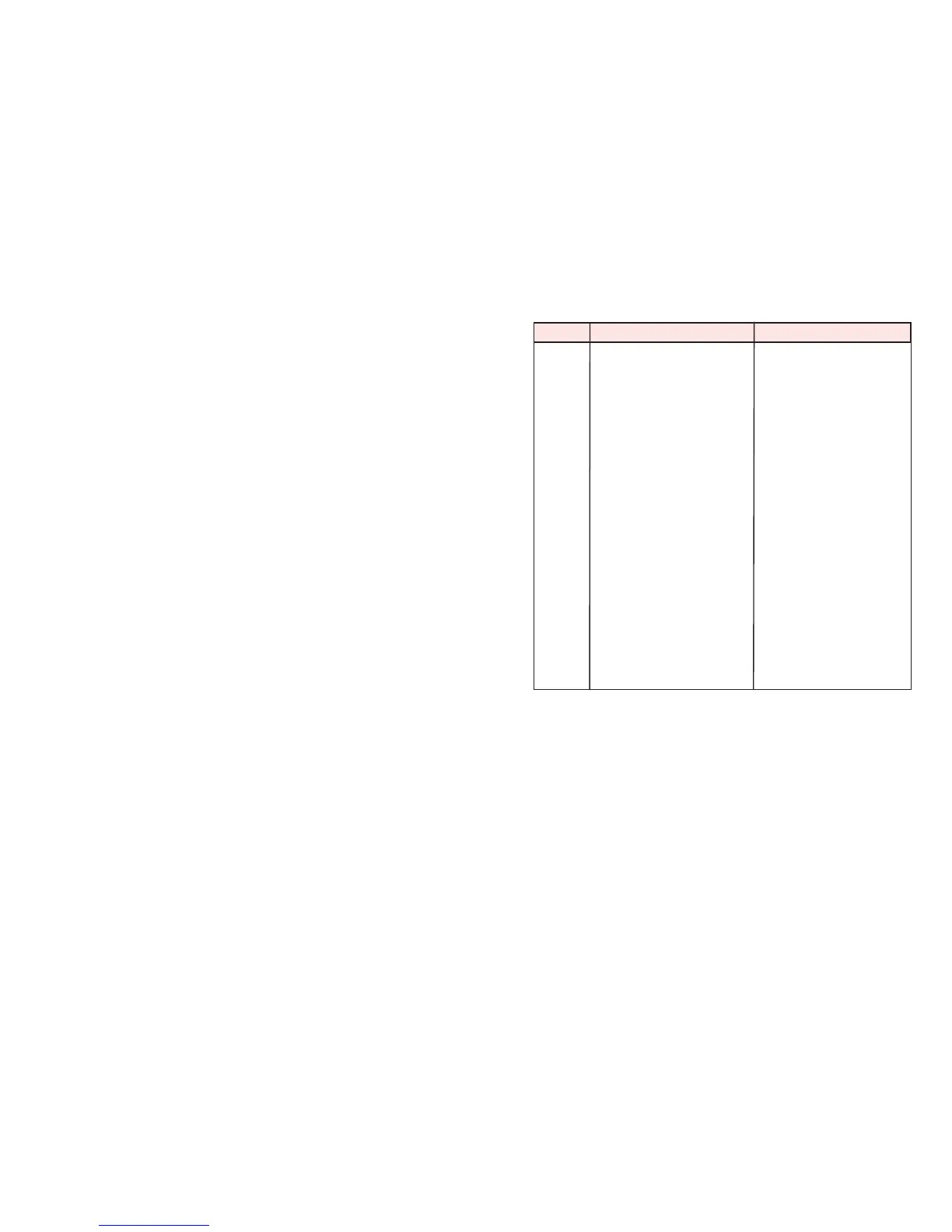
Display Problem Solution
E1 Pot is not secure Make sure cooktop is on a
flat surface and pot/pan is
Magnetic.
E2 IGBT connection Malfunction inside unit.
Contact Customer Service.
E3 Too low of voltage Minimum is 85 volts.
E4 Too high of voltage Maximum is 144 volts.
E5 NTC Short circuit Malfunction inside unit.
Contact Customer Service.
E6 NTC Open circuit Malfunction inside unit.
Contact Customer Service.
E7 IGBT overheating If IGBT temperature
or air ventilation is exceeds 230 Fº, any
obstructed operation will be stopped
and beeping will occur.
Press “Pause / Clear” twice
wait for the unit to cool.
E8 Overheating If unit exceeds 20º higher
than sear, unit will turn off.
FULL During program mode,
when the total timing
reaches to 99:99 limit, no
more stages can be
entered.
• When any of the above displays show on the LCD display the unit
will beep at least once.
• Fan will run for an additional 60 seconds after you press “Pause /
Clear” button once. Continue cooking by pressing the “Start” button
within 45 minutes.
• The unit will turn off after 45 minutes if no buttons (such as “Start”)
are pressed. When the unit shuts off, it will clear all previous cooking
history.
• When pressing the “Pause / Clear” button twice, the fan will run for an
additional 60 seconds. Unit will then turn off.
• When E1 occurs, it will beep every 2 seconds, until it detects a pot.
If the unit has not detected a pot after 1 minute, the unit will shut off
automatically.
• To fully correct errors E2, E5, E6, E7 and E8, you will need to
reconnect the power to have the error sign disappear.


 To Next Page
 Loading...