Owner’s Manual Room Air Remote Controller Heat Controller, Inc.
7
Timer operation
Press the TIMER button can initiate the
Auto-start and Auto-stop setting program
of the unit. The time can be set in range
of 0~24 hours.
To set the Auto-start/stop time.
1. Press the TIMER button, when the TIMER
ON indicator displayed on the LED window
of the air conditioner, it indicates the Auto
Start setting program is initiated. When the
TIMER OFF indicator displayed on the LED
window of the air conditioner, it indicates the
Auto Stop setting program is initiated.
2. Press or hold the Up( ) or Down( ) to
change the Auto time by 0.5 hour increments,
up to 10 hours, then at 1 hour increments up
to 24 hours. The control will count down the
time remaining until start/stop.
3. The selected time will register in 5 seconds
and the air conditioner will automatically
revert back to display the previous temper-
ature setting.
4. Turning the unit ON or OFF at any time
will cancel the Auto Start/stop function.
NOTE: To cancel the TIMER setting, push
the TIMER button and press or hold the Up
( ) or Down( ) until 0 hour is displayed
on the LCD window of the air conditioner.
2
1
2
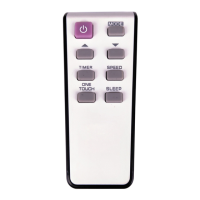
MODE
TIMER
SPEED
ONE
TOUCH
SLEEP
The TIMER button can initiate the Auto-start
and Auto-stop program of the unit. The time
can be set in range of 0~24 hours.
Press the TIMER button, when the TIMER
ON indicator is displayed on the LED
window of the air conditioner, it indicates
the Auto Start program is initiated. When
the TIMER OFF indicator is displayed on
the LED window of the air conditioner, it
indicates the Auto Stop program is initiated.


 To Next Page