
 Need help?
Do you have a question about the Hedefsan HD Eko 10 and is the answer not in the manual?
Defines the elevator drive type, such as single speed, double speed, or VVVF.
Sets the elevator command type, including simple, mixed, or collective commands.
Configures the open-close signal type for automatic doors.
Sets the open or closed position of the automatic door when waiting at a floor.
Sets the door position when the elevator is waiting at the park position.
Sets parameters for elevators with a single full automatic door.
Specifies the floor at which automatic doors A and B should open.
Sets the maximum number of elevator stops.
Configures the communication speed for the serial system connection.
Sets or deactivates the phase sequence protection.
Adjusts the sensitivity of the phase imbalance detection.
Chooses the PTC motor thermistor input setting.
Sets bypassing of the contact feedback error.
Activates position reset after a power blackout.
Sets the movement type for up and down limit switches in revision.
Sets floor numbers and display digits for indicators.
Sets the display output format for controller and SERI cards.
Sets the maximum number of calls registrable from within the cabin.
Sets the number of basement levels for elevator operation.
Defines elevator behavior and duration during fire stop activation.
Sets the floor where the elevator pauses operation with open doors.
Sets the waiting time before the elevator proceeds to the park stop.
Sets the cabin light delay time.
Sets the waiting time before going to other registrations while collecting.
Sets the time from automatic door opening to closing start.
Sets maximum wait time for door lock signal after door closure.
Sets the time for passing the door still open error.
Sets waiting time for photocell signal to close the automatic door.
Sets the maximum cruising time between two stops.
Sets the maximum slow cruising time from the target floor stopper.
Delays the fall of the main contactor for VVVF systems.
Sets the waiting time after the 130 circuit.
Sets maximum waiting time for the lock signal after door closure.
Tracks time until maintenance is due based on card operation.
Allows setting or changing the system password code.
Selects the type of elevator floor sensor.
Resets all current settings to their factory defaults.
Physical size of the unit.
Unit dimensions specified in millimeters.
Specifies the acceptable operating temperature range.
Details the IP rating for environmental protection.
Indicates the maximum permissible humidity level.
Specifies the requirements for network control inputs.
Voltage required for feeding the control system.
Details the power consumption of the unit.
Voltage specifications for security circuits.
Voltage specifications for control signal inputs.
Describes protection features for control signal outputs.
Highlights the 2-line LCD display and 4-button keyboard interface.
Enables communication for group and serial system connections.
Includes an integrated phase sequential motor protection circuit.
Manages input and output control for two automatic doors.
Features short-circuit protection for digital and signal outputs.
Allows indicator settings via menu (7-segment, Gray code).
Shows software version and serial number upon initial power-up.
Displays feed voltage and the current elevator floor.
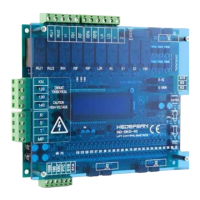
Diagram showing front panel components and dimensions.
Diagram showing side profile and dimensions.
 General
| Brand | Hedefsan |
|---|---|
| Model | HD Eko 10 |
| Category | Industrial Electrical |
| Language | English |

 To Next Page