EasyManua.ls Logo

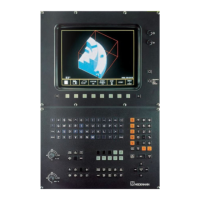
HEIDENHAIN TNC 425 - User Manual

HEIDENHAIN TNC 425
333 pages
Print Icon
To Next Page IconTo Next Page
Loading...
User's Manual
ISO Programming
TNC 426
TNC 425
TNC 415
B
TNC 407
Oktober 1995
Question and Answer IconNeed help?

Do you have a question about the HEIDENHAIN TNC 425 and is the answer not in the manual?

Summary

Controls on the TNC 426, TNC 425, TNC 415 B and TNC 407

TNC Guideline

Entering and testing part programs

Procedures for inputting and verifying part programs.

Machining the workpiece

Steps for executing the machining process.

How to use this manual

1 Introduction

1.2 Fundamentals of NC

Basic concepts and principles of Numerical Control (NC).

1.5 File Management on the TNC 426

Detailed guide to managing files on the TNC 426 hard disk.

2 Manual Operation and Setup

2.1 Moving the Machine Axes

Instructions for operating the machine axes manually.

2.3 Setting the Datum Without a 3 D Touch Probe

Method for establishing the workpiece datum without a touch probe.

2.4 3 D Touch Probes

Detailed explanation of 3D touch probe applications and usage.

2.5 Setting the Datum with a 3 D Touch Probe

Procedures for setting the datum using a 3D touch probe.

2.6 Measuring with a 3 D Touch Probe

Using the touch probe for measuring dimensions and angles.

2.7 Tilting the Working Plane

How to tilt the working plane for angled machining.

3 Test Run and Program Run

3.1 Test Run

Performing tests on programs without moving machine axes.

3.2 Program Run

Executing part programs in various modes.

4 Programming

4.1 Creating Part Programs

Steps for creating new part programs and understanding program layout.

4.2 Tools

Setting up and managing tool data, including tool tables.

4.3 Tool Compensation Values

Using tool length and radius compensation for accurate machining.

5 Programming Tool Movements

5.2 Contour Approach and Departure

Techniques for safely approaching and departing contours.

5.3 Path Functions

Overview of functions used to define tool paths.

5.4 Path Contours - Cartesian Coordinates

Programming contours using Cartesian coordinate system.

5.5 Path Contours - Polar Coordinates

Programming contours using polar coordinates.

6 Subprograms and Program Section Repeats

6.1 Subprograms

Creating and using subprograms for repetitive tasks.

6.2 Program Section Repeats

Repeating sections of a program using labels.

7 Programming with Q Parameters

7.1 Part Families - Q Parameters in Place of Numerical Values

Using Q parameters to program families of parts with variable dimensions.

7.2 Describing Contours Through Mathematical Functions

Defining contours using mathematical formulas and Q parameters.

7.4 If-Then Decisions with Q Parameters

Implementing conditional jumps based on Q parameter values.

7.8 Measuring with the 3 D Touch Probe During Program Run

Using the touch probe to measure during program execution and store data in Q parameters.

8 Cycles

8.2 Simple Fixed Cycles

Details on fundamental cycles like pecking, tapping, and milling.

8.3 SL Cycles (Group I)

Explanation of SL cycles for contour-oriented machining.

8.4 SL Cycles (Group II)

Advanced SL cycles for complex contour machining and surface finish.

8.5 Coordinate Transformations

Using cycles for datum shifts, mirroring, rotation, and scaling.

9 External Data Transfer

10 MOD Functions

11 Tables, Overviews and Diagrams

11.5 TNC Error Messages

Common error messages encountered during programming and operation.

Summary

Controls on the TNC 426, TNC 425, TNC 415 B and TNC 407

TNC Guideline

Entering and testing part programs

Procedures for inputting and verifying part programs.

Machining the workpiece

Steps for executing the machining process.

How to use this manual

1 Introduction

1.2 Fundamentals of NC

Basic concepts and principles of Numerical Control (NC).

1.5 File Management on the TNC 426

Detailed guide to managing files on the TNC 426 hard disk.

2 Manual Operation and Setup

2.1 Moving the Machine Axes

Instructions for operating the machine axes manually.

2.3 Setting the Datum Without a 3 D Touch Probe

Method for establishing the workpiece datum without a touch probe.

2.4 3 D Touch Probes

Detailed explanation of 3D touch probe applications and usage.

2.5 Setting the Datum with a 3 D Touch Probe

Procedures for setting the datum using a 3D touch probe.

2.6 Measuring with a 3 D Touch Probe

Using the touch probe for measuring dimensions and angles.

2.7 Tilting the Working Plane

How to tilt the working plane for angled machining.

3 Test Run and Program Run

3.1 Test Run

Performing tests on programs without moving machine axes.

3.2 Program Run

Executing part programs in various modes.

4 Programming

4.1 Creating Part Programs

Steps for creating new part programs and understanding program layout.

4.2 Tools

Setting up and managing tool data, including tool tables.

4.3 Tool Compensation Values

Using tool length and radius compensation for accurate machining.

5 Programming Tool Movements

5.2 Contour Approach and Departure

Techniques for safely approaching and departing contours.

5.3 Path Functions

Overview of functions used to define tool paths.

5.4 Path Contours - Cartesian Coordinates

Programming contours using Cartesian coordinate system.

5.5 Path Contours - Polar Coordinates

Programming contours using polar coordinates.

6 Subprograms and Program Section Repeats

6.1 Subprograms

Creating and using subprograms for repetitive tasks.

6.2 Program Section Repeats

Repeating sections of a program using labels.

7 Programming with Q Parameters

7.1 Part Families - Q Parameters in Place of Numerical Values

Using Q parameters to program families of parts with variable dimensions.

7.2 Describing Contours Through Mathematical Functions

Defining contours using mathematical formulas and Q parameters.

7.4 If-Then Decisions with Q Parameters

Implementing conditional jumps based on Q parameter values.

7.8 Measuring with the 3 D Touch Probe During Program Run

Using the touch probe to measure during program execution and store data in Q parameters.

8 Cycles

8.2 Simple Fixed Cycles

Details on fundamental cycles like pecking, tapping, and milling.

8.3 SL Cycles (Group I)

Explanation of SL cycles for contour-oriented machining.

8.4 SL Cycles (Group II)

Advanced SL cycles for complex contour machining and surface finish.

8.5 Coordinate Transformations

Using cycles for datum shifts, mirroring, rotation, and scaling.

9 External Data Transfer

10 MOD Functions

11 Tables, Overviews and Diagrams

11.5 TNC Error Messages

Common error messages encountered during programming and operation.

HEIDENHAIN TNC 425 Specifications

General IconGeneral
BrandHEIDENHAIN
ModelTNC 425
CategorySwitch
LanguageEnglish

Related product manuals