EasyManua.ls Logo

Heinner HAC-09OWF-BK - User Manual

Heinner HAC-09OWF-BK
61 pages
Print Icon
To Next Page IconTo Next Page
Loading...
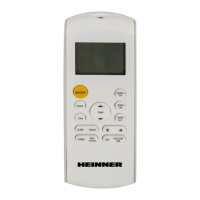
USER MANUAL FOR REMOTE CONTROLLER
For model HAC-09OWF-BK
HAC-12OWF-BK
HAC-12OWF-GD
HAC-18OWF-BK
www.heinner.ro
Question and Answer IconNeed help?

Do you have a question about the Heinner HAC-09OWF-BK and is the answer not in the manual?

Summary

INTRODUCTION

SPECIFICATIONS

INDICATORS ON LCD

Mode Display

Shows icons for operating modes like Auto, Cool, Dry, and Heat.

Fan Speed Indication

Illustrates fan speed levels: Low, Medium, High, and Auto.

BUTTONS FUNCTIONS

ON;OFF Button

Turns the air conditioner ON and OFF.

MODE Button

Changes the operating mode of the unit.

FAN Button

Selects the fan speed level.

SLEEP Button

Activates/disables the sleep function for comfort.

BUTTONS FUNCTIONS

SILENCE;FP Button

Activates/disables quiet operation and special FP mode.

TIMER ON;OFF Buttons

Sets automatic start and stop times for operation.

SWING;DIRECT;LED Buttons

Controls louver movement and display settings.

HOW TO USE THE BUTTONS

Auto Operation

Instructions for operating the unit in Auto mode.

Cooling;Heating;Fan Operation

Steps for Cool, Heat, and Fan modes.

Dehumidifying Operation

Procedure for operating in Dry mode.

HOW TO USE THE BUTTONS

Timer Operation

Details on setting auto-on and auto-off timer sequences.

HANDLING THE REMOTE CONTROLLER

Location of the Remote Controller

Guidance on optimal usage distance and placement.

Replacing Batteries

Instructions for replacing exhausted remote batteries.

Summary

INTRODUCTION

SPECIFICATIONS

INDICATORS ON LCD

Mode Display

Shows icons for operating modes like Auto, Cool, Dry, and Heat.

Fan Speed Indication

Illustrates fan speed levels: Low, Medium, High, and Auto.

BUTTONS FUNCTIONS

ON;OFF Button

Turns the air conditioner ON and OFF.

MODE Button

Changes the operating mode of the unit.

FAN Button

Selects the fan speed level.

SLEEP Button

Activates/disables the sleep function for comfort.

BUTTONS FUNCTIONS

SILENCE;FP Button

Activates/disables quiet operation and special FP mode.

TIMER ON;OFF Buttons

Sets automatic start and stop times for operation.

SWING;DIRECT;LED Buttons

Controls louver movement and display settings.

HOW TO USE THE BUTTONS

Auto Operation

Instructions for operating the unit in Auto mode.

Cooling;Heating;Fan Operation

Steps for Cool, Heat, and Fan modes.

Dehumidifying Operation

Procedure for operating in Dry mode.

HOW TO USE THE BUTTONS

Timer Operation

Details on setting auto-on and auto-off timer sequences.

HANDLING THE REMOTE CONTROLLER

Location of the Remote Controller

Guidance on optimal usage distance and placement.

Replacing Batteries

Instructions for replacing exhausted remote batteries.

Heinner HAC-09OWF-BK Specifications

General IconGeneral
BrandHeinner
ModelHAC-09OWF-BK
CategoryRemote Control
LanguageEnglish