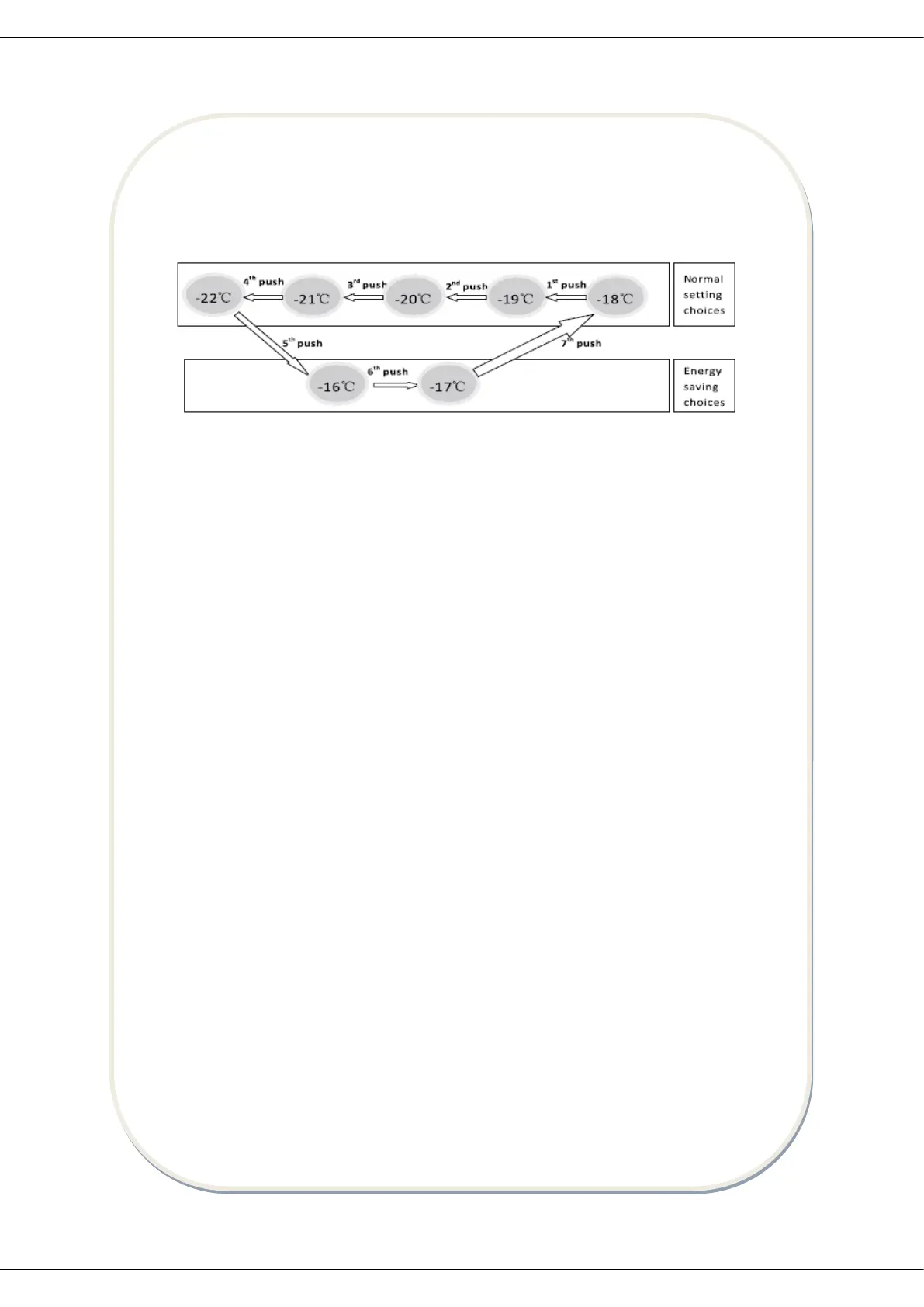
Temperature Setting
Push “setting" button, the LED number would be glistening, you could adjust the
temperature by pushing “setting” button. The setting is cycling to change from -16 to -22
After ℃ ℃. 5 seconds, the setting temperature is confirmed.
Lock
When push “mode” and “setting” buttons at the same time for 3 seconds, buttons will be
locked and the lamp of lock is lighted on. If you want to unlock the buttons, please push
“mode” and “setting” buttons at the same time for 3 seconds again.
Turn off
Push and hold “setting” button for 5 seconds and switch off the machine. If you want to
switch on the machine, please push and hold “setting” buttons for 5 seconds again.
Displayed temperature
Important! LED always displays the setting temperature, not real temperature.
Door Open Alarm
If miss to close door for five minutes, the door open alarm will give out alarm sound which
will be three times each 5 seconds and last 5 minutes and then stop 5 minutes and again
give out alarm sound till you close door.
High temperature alarm
After running for 3 hours and if the temperature is more than -8℃, t he LED will alternately
display “ht” and real temperature (”ht” means high temperature) and give out alarm sound
with frequency of 1Hz, till you push any button to stop.



 To Next Page