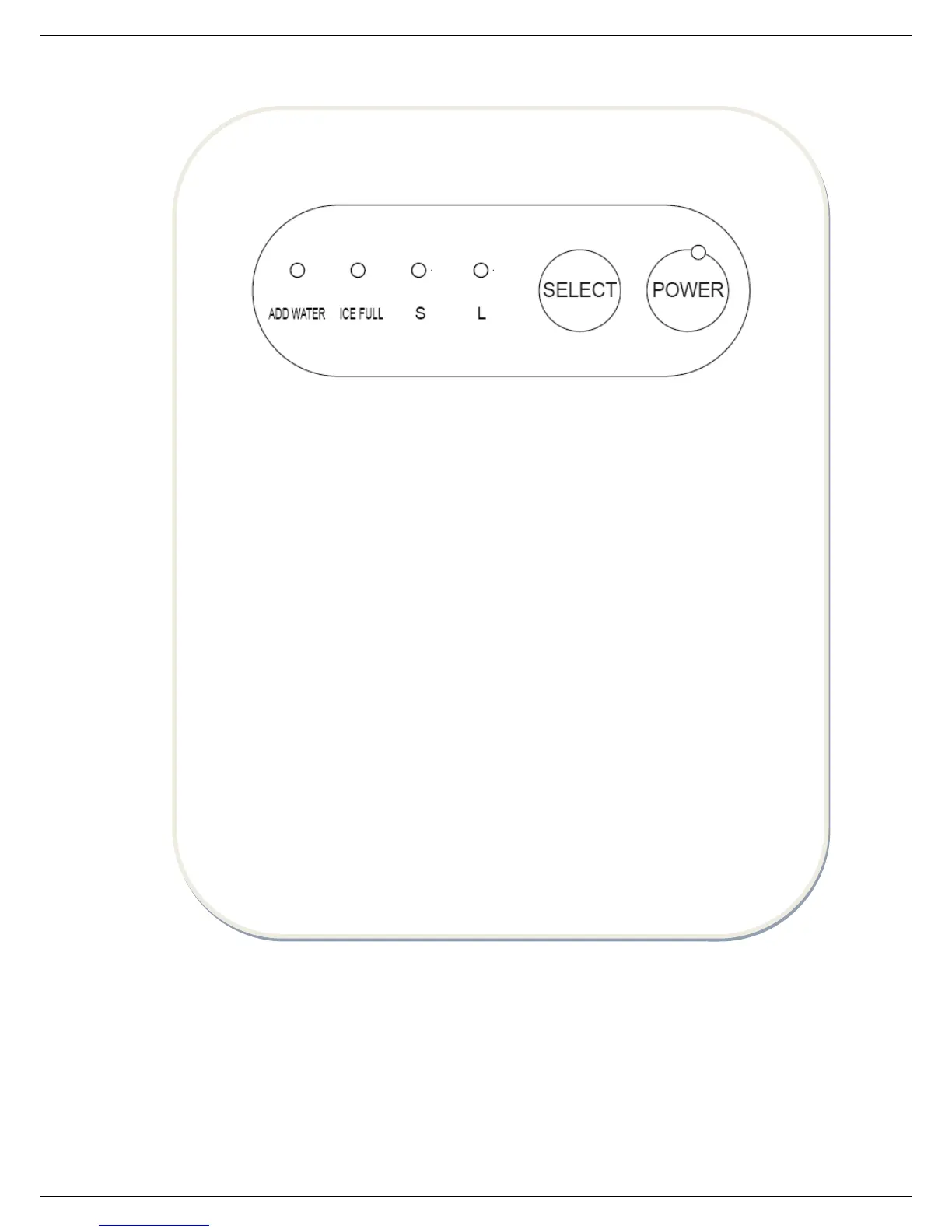
POWER - The indicator of POWER will flash after plugged in, and then the machine enters
standby state. It will start to work by pressing POWER button, accompanying indicator
lighting. During operation, pressing this button, the machine will return to standby state.
SELECT - This button is for selecting the size of ice. The default setting is large ice, if the
small one is needed, pressing this button is available. When you select the desired size,
corresponding indicator of S (small) or L (large) will be on. Press and hold "SELECT" button
for 3 seconds to activate pipeline self-clean process, which takes "pump water in for 30
seconds---water tank run to drain out water" as a circle, and this circle will run for 5 times.
Flashing of indicators of "S" and "L" will take place in turn until self-clean process is over
and the machine enters standby mode. Take away the plastic plug to drain water and then
whole process is finished.
ADD WATER - When the indicator of this button turns to red, it means insufficient water to
water reservoir, you need to add enough water and press POWER button to restart the
machine.
ICE FULL - When the ice reach to the max storage capacity, the indicator of this button will
flash, and the machine will stop working. What you need to do is pouring out the ice, if the
position of ice is lower than the position of ice bin full sensor, the machine will restart
automatically.


 To Next Page