Owners manual
Features of your Helio Cycle
• Instrument panel
o On/off switch
o Range indicator
o Charging inlet
o Charging status indicator
o Light switch
• Hand Brakes
• Throttle
• Motor
• Charging Plug
• Lights
• Cargo Rack
• Speedometer
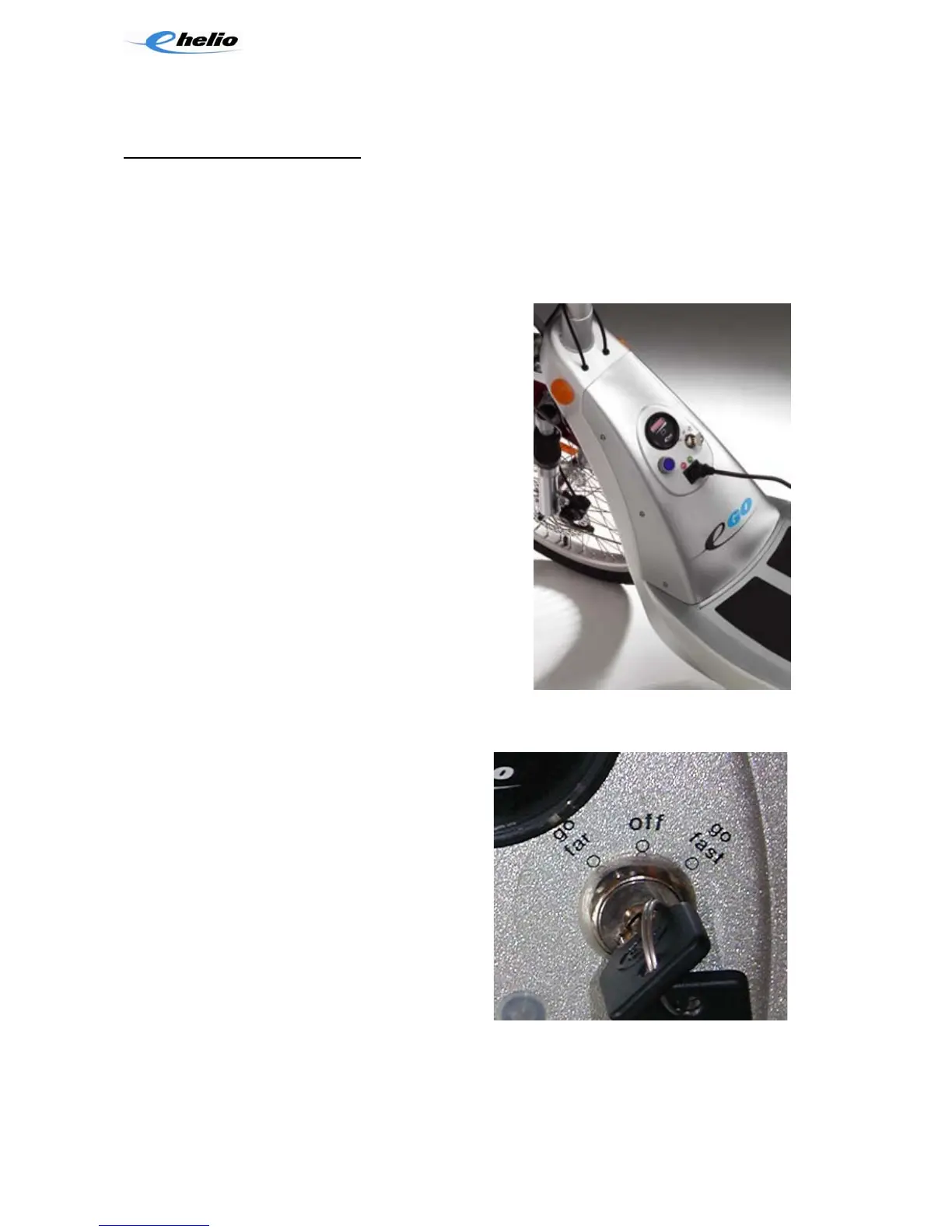
The Instrument Panel
The instrument panel has four main controls and
indicators: the on/off switch and performance
selector, the range indicator, the charger
receptacle and the charging status indicators. The
lights switch and electric horn button are on the left
handlebar grip.
The On/Off Switch and Performance Selector
The on/off switch and performance selector is a three position key-operated switch.
When you turn the switch on, three things happen:
• The panel instruments are activated
• The electronic propulsion circuitry is
activated
• The twist-grip throttle is activated’
• The tail/brake light is turned on (not on
the Helio)
Your Helio Cycle has two performance
modes: GO FAR and GO FAST. When the
key is pointing up, the starter switch is turned
off. When you turn the key to the left, the
Helio Cycle is activated in the GO FAR mode.
When you turn the key to the right, the Helio
Cycle is activated in the GO FAST mode. The GO FAR mode features a lower top
speed and slower acceleration and deceleration. The GO FAST mode provides a
higher top speed and faster acceleration and deceleration. Because the GO FAST
mode is a high-performance mode, we strongly recommend you learn to ride your
Page 18



 To Next Page