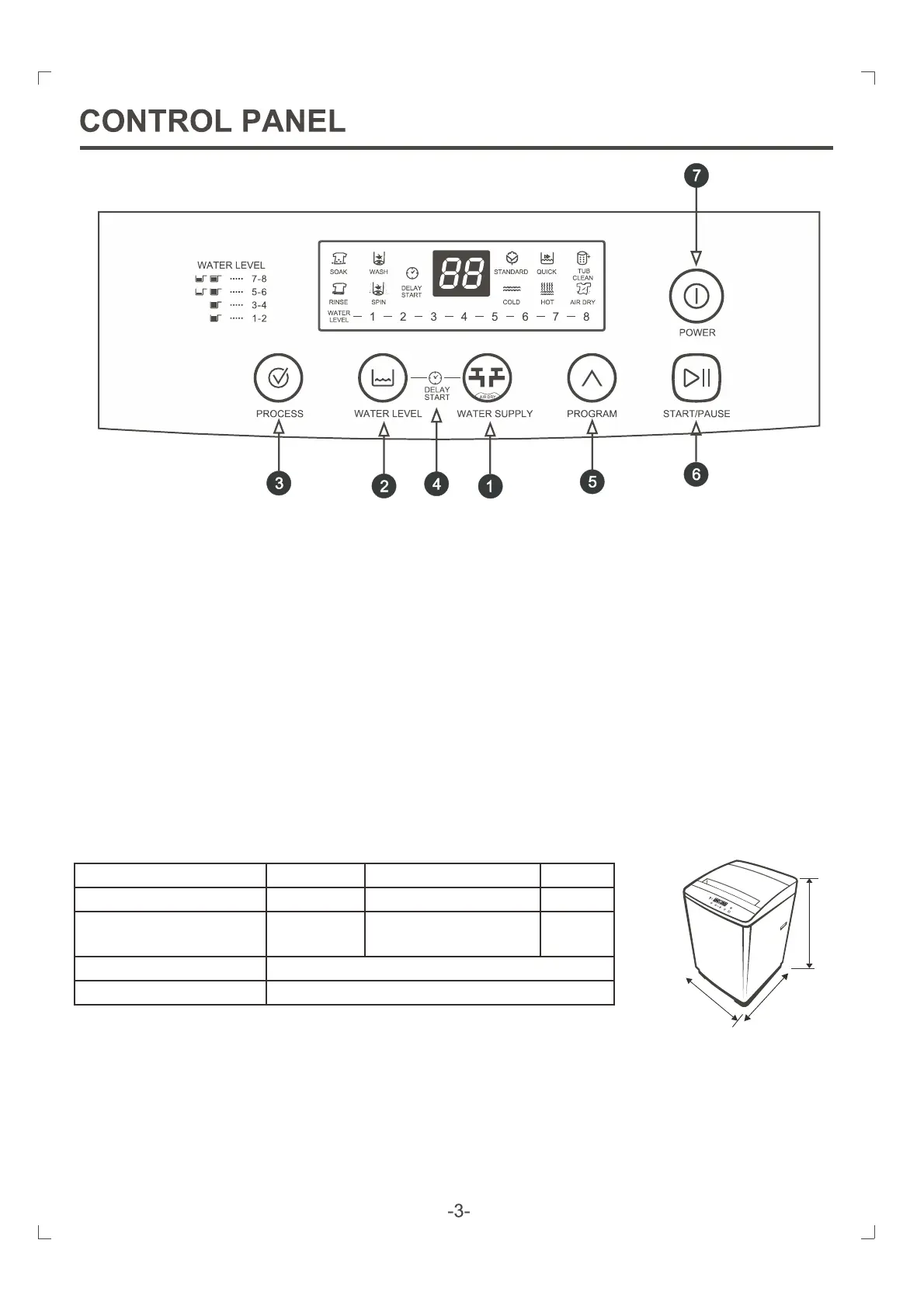
1. Water supply selector/Air dry:Press this button to select water temperature or the time of air dry
2. Water level button:Press this button to select water level.
3. Process button:Press this buttons to select the process you need.
4. Delay start Preset button Hold the water level of key, then press water supply can be set up into the (
reservation statustime of delay start.
5. Program button Press this buttons to select the program you need.
6. Start/Pause button Press this button to start/pause the washing machine.
7. Power button: Press this button to turn on/off the washing machine. Do not turn on the washing machine
again until 3 minutes later after it is turned off. The washing machine will turn off at once automatically
when the program finish, and it will turn off automatically if you do not press the start button to start the
machine within 10 minutes after press the power button.
SPECIFICATIONS
50HzRated frequency220-240V~Rated voltage
420WRated input power
34 KG
Net weight
8.0 KG
Rated wash capacity
0.03MPa-0.85MPa
Water pressure
570mmX580mmX985mmDimension
985 mm
570 mm
580mm
Rated spin capacity
8.0 KG


 To Next Page