
EasyManua.ls Logo

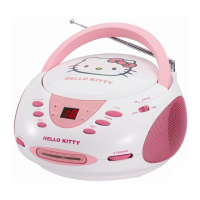
Hello Kitty KT2024A - User Manual

Hello Kitty KT2024A
12 pages
Print Icon
To Next Page IconTo Next Page
Loading...
z
CD Boombox with AM/FM Stereo Radio
OWNER’S MANUAL
KT2024A
©1976, 2009 SANRIO CO., LTD.
CAUTION: Electrically Operated Product Please use care
when plugging into AC outlet.

Questions and Answers

  • B
    bbartlettAug 8, 2025
    How to fix noise or distorted sound on Hello Kitty CD Player AM/FM?
    • S
      Stephen PrinceAug 8, 2025
      If the sound is noisy or distorted on AM or FM broadcast on your Hello Kitty CD Player, try retuning the AM or FM broadcast station. For FM, extend the FM telescopic antenna. For AM, reposition the unit until you get the best reception.
  • S
    Stacey BarnesAug 13, 2025
    Why is the sound distorted on my Hello Kitty KT2024A CD Player at high volume?
    • K
      Kari ParrishAug 13, 2025
      If your Hello Kitty CD Player's sound is distorted at a high volume, first, try lowering the volume to a comfortable level. If that doesn't solve the issue, the batteries might be low; replace them with new ones.
  • T
    tsmithAug 18, 2025
    Why is there no sound on AM or FM on my Hello Kitty KT2024A?
    • D
      douglasgibsonAug 18, 2025
      If you're not getting any AM or FM sound on your Hello Kitty CD Player, make sure the function switch is set to the “AM” or “FM” position. Also, check that the volume isn't set to the minimum and increase it if necessary.
  • J
    jasondavisAug 23, 2025
    What to do if my Hello Kitty CD Player skips while playing?
    • T
      Todd WigginsAug 23, 2025
      If your Hello Kitty CD player skips, the disc may be dirty or scratched. Try wiping the CD with a clean cloth or using a different disc.
  • J
    jennifercummingsAug 28, 2025
    Why won't my Hello Kitty CD Player play a CD?
    • L
      lowejonathanAug 28, 2025
      If your Hello Kitty CD player isn't playing, ensure that it is in CD function mode. Also, check that the CD is loaded correctly with the label side up. If you're using a self-compiled CD, the media might not be compatible, so try using better quality blank media. Finally, exhausted batteries can also cause this issue, so replace them.
  • H
    Harold KnightSep 2, 2025
    What to do if my Hello Kitty CD Player has intermittent sound?
    • R
      Rebecca BaileySep 2, 2025
      If you experience intermittent sound from your Hello Kitty CD player, the disc may be dirty or defective. Try cleaning or replacing it. Also, a dirty pick-up lens can cause this, so use a CD lens cleaning disc. Excessive shock or vibration can also lead to intermittent sound, so relocate the player.

Summary

Important Safety Instructions

General Safety Precautions

Essential guidelines for safe operation, handling, and maintenance to prevent hazards.

Product Safety and Precautions

Laser Safety Guidelines

Instructions for safe operation concerning the Class 1 laser product and beam exposure.

Location of Controls Overview

Component Identification Diagram

Identifies all physical buttons, ports, indicators, and display elements of the CD boombox.

Powering the Unit

Power Source Options

Details on using AC power or batteries, including types and installation.

Radio and CD Operation Basics

Advanced CD Functions

Auxiliary Input and Maintenance

Troubleshooting Guide

Common Issues and Solutions

Lists common issues with AM/FM radio and CD playback, with their causes and solutions.

Hello Kitty KT2024A Specifications

General IconGeneral
BrandHello Kitty
ModelKT2024A
CategoryCD Player
LanguageEnglish