6
EN
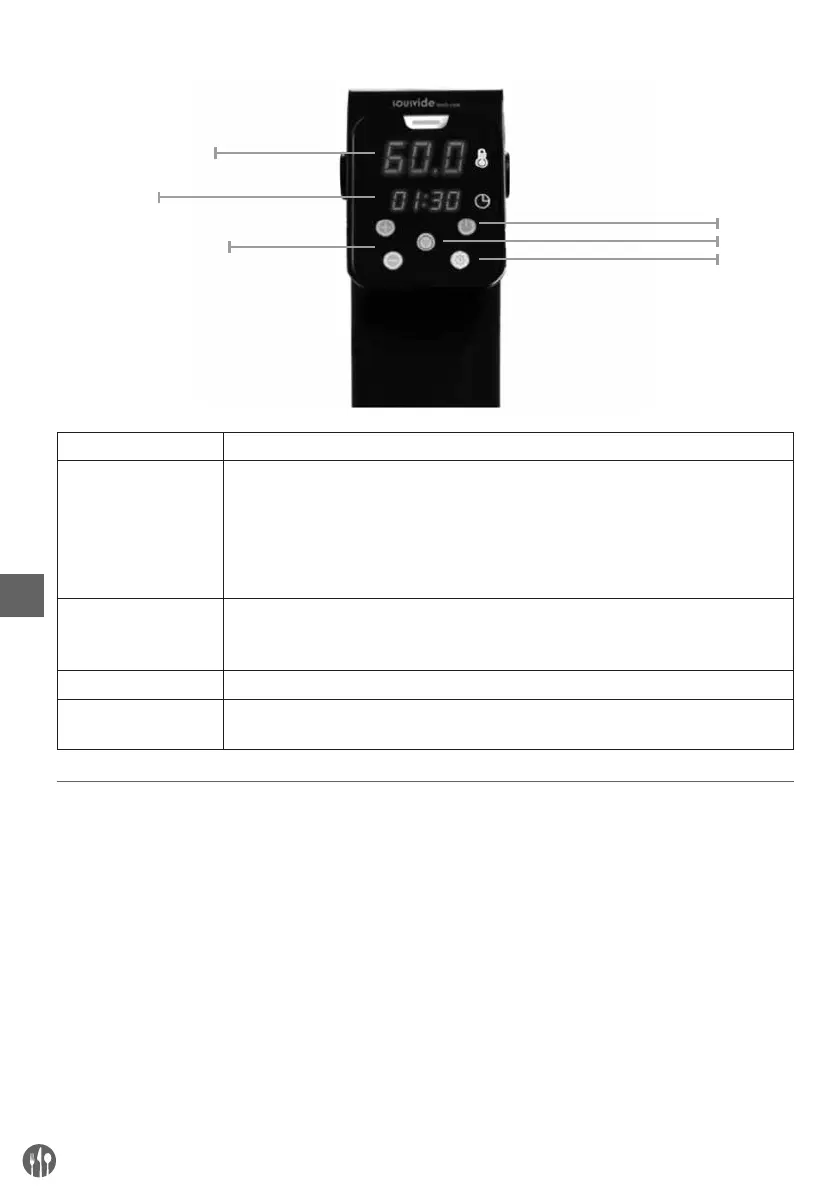
B). Control panel
Button Function
Start/Stop button Press once to switch the appliance on, press again to switch it off. Press and
hold for 3 seconds to choose between °C and °F. When you select the tempera-
ture and time of cooking, pressing the Start/Stop button will start the appliance.
NOTE: the temperature display flashes until the set temperature is reached.
When the set temperature is reached, the display stops flashing, and the alarm
is activated.
Settings button The Settings button flashes when the device is switched on. Switching between
functions is controlled by a single touch of the display in the following sequence:
Temperature setting - Hour settings - Minute settings
Wi-Fi button Use the button to connect the mobile device via the iVide App.
+ /- button Use the button to increase or decrease the temperature and time setting, after
selecting the appropriate function.
Preparations before using for the first time
• Remove all protective packaging and wrapping.
• Check to make sure the appliance is undamaged.
In case of incomplete delivery or damages, DO
NOT use the appliance and contact the supplier
(See == > Warranty).
• Clean the appliance before use (See == > Clean-
ing and Maintenance).
• Ensure the appliance is completely dry.
• Attach the appliance securely at the side of the
container.
• Do not operate the appliance near any heated
sources or flammable objects.
Note:
Due to manufacturing residues, the appliance may
emit a light odor during the first few uses. This is
normal and does not indicate any defect or hazard.
Temperature display
On / off
Settings
Wi-Fi
Time display
+/- Time / Temperature



 To Next Page