This document describes a Wireless Barcode Scanner, outlining its functions, technical specifications, usage features, and maintenance instructions.
The scanner supports multiple communication modes: Wireless 2.4G, Bluetooth, and USB. When connected via USB, it can operate in either USB-HID (USB Keyboard mode) or USB-COM (USB V-COM). The device automatically detects USB wired mode; otherwise, it defaults to wireless transmission.
Function Description:
The scanner offers three primary working modes: Immediate Mode, Inventory Mode, and Auto Memory Mode, which can be selected by scanning specific setting codes.
- Immediate Mode: In this mode, data is transmitted immediately. If the scanner exceeds the transmission distance or data transmission fails, all data will be lost. The device will emit three continuous alarm prompts and flash its blue light three times to indicate a transmission failure.
- Auto Memory Mode: This mode is designed for situations where the scanner might exceed the transmission distance. It automatically saves scanned data and provides a save sound prompt, with the blue light flashing once.
- Inventory Mode: Scanned data is stored directly in the scanner's memory. Upon successful save, the scanner emits a sound and the blue light flashes once. If the memory becomes full, three alarms will sound, and the blue light will flash three times.
Important Technical Specifications:
- Communication: Wireless 2.4G, Bluetooth, USB-HID, USB-COM.
- Operating Frequency: 2478MHz @ -5.22dBm.
- Manufacturer: HENEX IOT Technology (Guangzhou) Inc.
- Manufacturer Address: 3F Building 1NO.17 YunJun Road, Huangpu District 510530 Guangzhou China.
- Importer: Weaver Software Andrzej Lenkowski.
- Importer Address: as. Piastowskie 53, Sroda Wlkp Wielkopolska, 63-000, Poland.
- FCC Compliance: The device complies with Part 15 of the FCC Rules, ensuring it does not cause harmful interference and accepts any interference received. It is a Class B digital device.
- Battery: The battery output is displayed as a percentage.
- Firmware Version: V3.0.
Usage Features:
- Setting Functions: All device functions are configured by scanning specific setting codes.
- Return to Factory Default: A setting code is provided to reset the device to its factory default settings.
- Upload Statistics: Allows users to view the total amount of barcodes scanned.
- Upload All Data: A single scan of the "Upload all data" setting code will upload all stored data.
- Delete All Data: In Inventory Mode, scanning "Delete all data" will clear all stored data. If not in Inventory Mode, this action will trigger three alarm prompts.
- Pairing Receiver: The receiver can be paired in two ways:
- Scan Pair Code: In 2.4G wireless mode, scan the "Pair Receiver" setting code.
- Manual Pair: Press the button for approximately 15 seconds (until two beeps are heard) to enter pairing mode. The scanner light will flash quickly for about one minute. If pairing times out, the process must be restarted by rescanning the "Pair Receiver" code or long-pressing the button again.
After initiating pairing, plug the receiver into the USB port of the device. A sound within 1-10 seconds indicates successful pairing. If the scanner light is still flashing, it means it's still in pairing mode, and the receiver can be plugged in.
- Bluetooth HID Mode Functions:
- Virtual Keyboard Display and Hidden Settings: Specific settings for virtual keyboard behavior.
- Upload Speed Setting: Options for Fast, Medium speed (default), and Low speed data upload over Bluetooth.
- Sleep Time Setting:
- To enter sleep mode, press the button for about 8 seconds until one sound is heard, then release.
- Options include Not Sleep time, Enter sleep, 1 min (default), and 10 mins.
- Language Setting: Supports USA (default), Germany, French, UK, and Italy. Users needing more languages should consult the full user manual.
- Shake Mode Setting: Options to turn Shake Off or Shake On (default).
- USB Transmission Mode: Allows switching between USB-HID (default) and USB-COM modes. Note that both the scanner and receiver will change transmission after setting USB mode.
Maintenance Features:
- LED Indicator:
- Red Light: Indicates charging; turns off when fully charged.
- Blue Light:
- Flashes quickly when entering pairing mode.
- Solid when the button is not pressed; turns off when the button is pressed.
- Flashes once when data uploads successfully.
- Flashes three times during an alarm.
- Buzzer Description:
- 1-time long beep with high tone: Scanner on.
- 2-times beep with high-low tone: Scanner off, setting code scanned, or data saved.
- 1-time middle long beep with high tone: Scan code or receiver paired successfully.
- 3-times continuation short beep: Alarm prompt.
- FCC Compliance and Interference:
- The device is designed to provide reasonable protection against harmful interference in residential installations.
- If the equipment causes harmful interference to radio or television reception, users are advised to:
- Reorient or relocate the receiving antenna.
- Increase the separation between the equipment and receiver.
- Connect the equipment into an outlet on a circuit different from that to which the receiver is connected.
- Consult the dealer or an experienced radio/TV technician for help.
- Changes or modifications not expressly approved by the responsible party could void the user's authority to operate the equipment.
- FCC Radiation Exposure Statement: This equipment complies with FCC radiation exposure limits for an uncontrolled environment. The transmitter must not be co-located or operating in conjunction with any other antenna or transmitter.

 Need help?
 General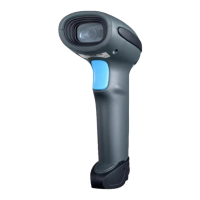

 To Next Page