EasyManua.ls Logo

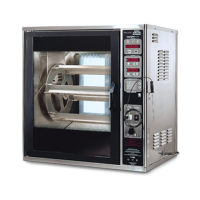
Henny Penny SCR-8 - User Manual

Henny Penny SCR-8
70 pages
Print Icon
To Next Page IconTo Next Page
Loading...

Table of Contents

Questions and Answers

  • E
    Emily RobertsAug 3, 2025
    What to do if meat separates from bone in Henny Penny SCR-8?
    • J
      John McintyreAug 3, 2025
      If the Henny Penny Kitchen Appliance cooks the product and the meat separates from the bone, check the cooking time and ensure you are using fresh product.
  • P
    Patricia WhiteAug 10, 2025
    Why is the product too dark when using Henny Penny SCR-8?
    • S
      Sarah Martin MDAug 10, 2025
      If the color of your product is too dark when using the Henny Penny Kitchen Appliance, check the probe position (it should be 1 1/2 inches into the cabinet). Also, verify the temperature setting in the program mode and replace the probe if it's defective.
  • E
    Edward RiveraAug 18, 2025
    Why is the product too light when using Henny Penny Kitchen Appliances?
    • C
      christinalevineAug 18, 2025
      If the product color is too light when using the Henny Penny Kitchen Appliance, check the following: 1. Probe position (1 1/2 inches into cabinet). 2. Temperature setting. 3. Ensure proper preheat time. 4. Select the correct product button. Also, replace the probe if it is defective.
  • N
    Nicholas BradshawAug 25, 2025
    How to prevent dry product with Henny Penny SCR-8?
    • B
      Barbara FrankAug 25, 2025
      If the product becomes dry when using the Henny Penny Kitchen Appliance, ensure you are using fresh product, reduce the cooking time, and reduce the cooking temperature.

Summary

Limited Warranty for Henny Penny Appliances

New Equipment Warranty

Details the warranty coverage for new Henny Penny appliances, including repair or replacement terms.

Replacement Parts Warranty

Outlines the warranty coverage for appliance replacement parts against defects in material or workmanship.

Extended Frypot Warranty

Specifies the extended warranty terms for the frypot component against manufacturing or workmanship issues.

Section 1. Introduction

1-4. Safety

Details important safety precautions and warnings for operating the rotisserie.

Section 2. Installation

2-6. Electrical Requirements

Specifies the electrical voltage, phase, and connection requirements for the rotisserie.

Section 3. Operation

3-2. Controls and Switches

Describes the function and purpose of each control button, switch, and indicator on the unit.

3-3. Installation of Discs, Rod and Spits

Details the step-by-step process for assembling and installing the rotisserie discs, rods, and spits.

3-7. Operation Mode

Explains how to select products, preheat, and start cooking cycles using the control panel.

3-12. Cleaning Procedures

Provides detailed instructions for cleaning various components of the rotisserie safely.

Section 4. Programming

4-2. Programming for Cook and Hold

Guides on setting up custom cooking cycles, including stages, temperatures, and hold times.

4-3. Special Program Mode (Level 2)

Explains how to access and configure advanced parameters like temperature units, language, and audio settings.

4-4. Tech Mode

Describes the Tech Mode, used for self-diagnostic capabilities and internal Henny Penny use.

Section 5. Cooking Procedures

5-2. Loading the Rotisserie

Provides instructions on how to properly load food onto spits or baskets for balanced cooking.

5-6. Basic Rules of Safe Food Preparation

Outlines essential food safety practices for handlers, including hygiene and cross-contamination prevention.

5-7. Minimum Temperature Requirements for Hot and Cold Food Storage

Specifies required temperatures for holding foods safely hot or cold, and for reheating.

5-8. Testing for Doneness

Provides guidelines and methods for checking food doneness using a meat thermometer.

5-9. Basic Cooking Procedures

Outlines the fundamental steps for selecting products, seasoning, loading, and starting the cooking cycle.

5-10. Cooking Guidelines

Offers specific cooking times and temperatures for various food items like whole chicken and ribs.

Section 6. Troubleshooting

6-2. Troubleshooting

Provides a table listing common problems, their causes, and recommended correction steps.

Section 7. Maintenance

Section 8. Parts Information

Henny Penny SCR-8 Specifications

General IconGeneral
BrandHenny Penny
ModelSCR-8
CategoryKitchen Appliances
LanguageEnglish

Related product manuals