Assembly and operating Instructions
Reproduction of this document in whole or part is forbidden.
Hera GmbH & Co. KG
Dieselstraße 9
32130 Enger / Germany
Hera GmbH & Co. KG
Dieselstraße 9
32130 Enger / Germany
Hera WiFi Light Control System
Reproduction of this document in whole or part is forbidden.
Assembly and operating Instructions
Hera WiFi Light Control System
Type 24V WiFi Controller 2 Dynamic Type 24V WiFi Controller 2 Dynamic24 V DC max. 75W 24 V DC max. 75W
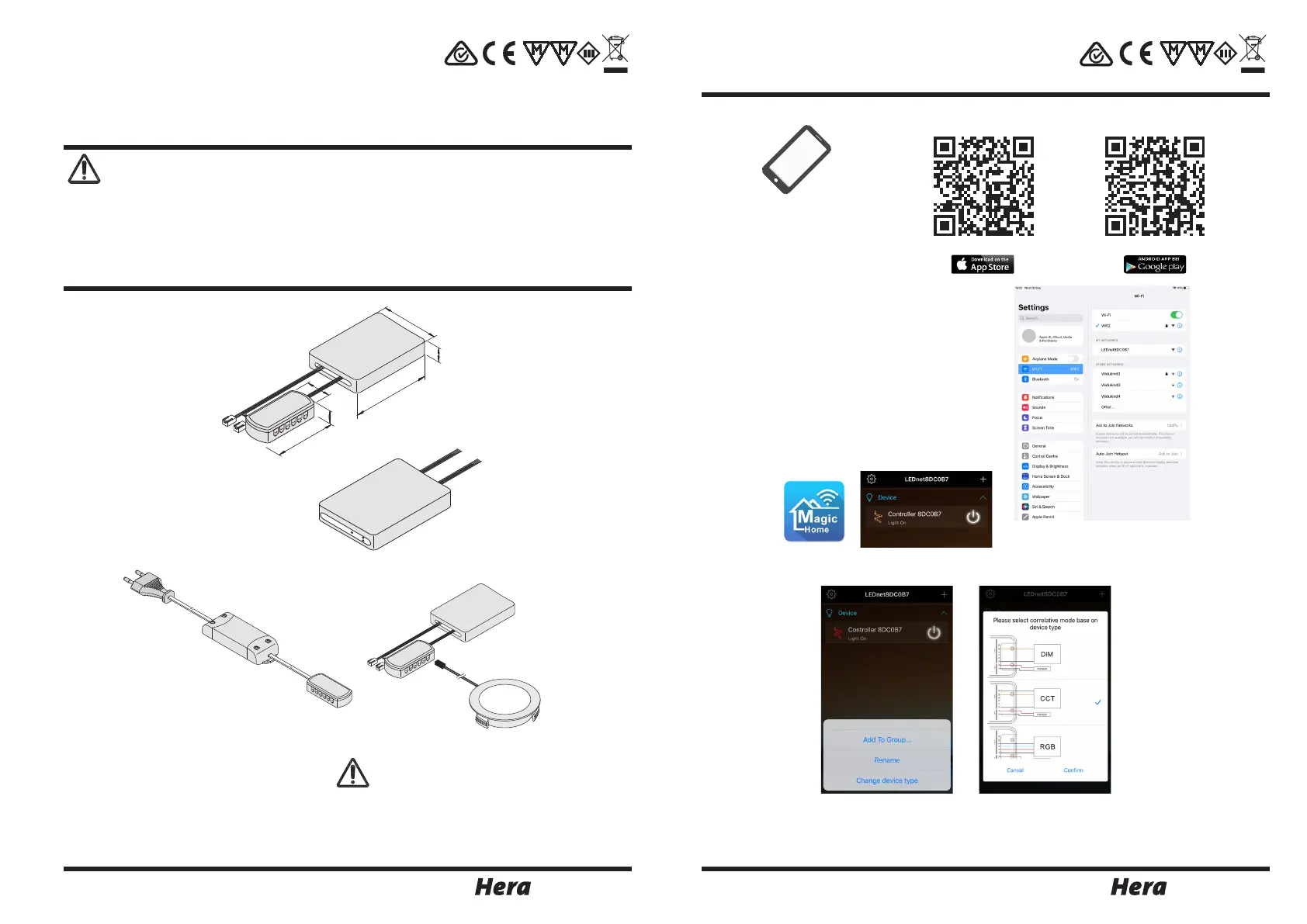
Assembly dimensions
22600250601 19.10.2021
Intended use
1. Disconnect from the mains supply before attempting to mount/ dismount the lighting fixture.
2. Faulty parts should only be replaced with original parts.
3. Always fully insert all plug connections.
4. Connection only to special LED - Converter Hera Type LED 24/...W with a constant output voltage
24 V DC and a maximum output power of 200 W.
5. Hera grants no warranty when other LED converters as the prescribed converters are used.
6. The total load may not exceed the nominal load of the converter.
7. The specified installation distances of the converter must be maintained.
WiFi Controller to connect to electronic safety isolating converter LED 24/...W for adjustable colour appearance
with Dynamic LED luminaires with iOS or Android smartphone or tablet with „Magic Home Pro“ App; this
product is for indoor use only.
both LED 24 plugs must be inserted in the 12-
way distributor of the converter
transformer 24V 5 - 75W
order separately
Assembly
1. Connect the LED converter to the mains.
2. Connect the WiFi Controller to the distributor of the converter.
3. Connect the Dynamic LED luminaires to the distributor of the WiFi Controller.
4. Download and Installation of the App „Magic Home Pro“
5. Search W-LAN with smartphone, choose LEDnetxxxxxx
6. Run App
7. Press and hold the desired control unit to select the control unit type „Dynamic“
above the item „Unit type“ and assign name.
The light of the connected LED luminaires can be controlled in the „Stand-Alone-Mode“. The remote distance is
max. 50 m indoor.
The WiFi Controller has a memory function of the performance before a disconnection from the mains. After
reestablish the mains connection the LED luminaires operate in the performance before the power failure.
system requirements:
iOS 10.0 or above
Android 6.0 or above
Download size 91 MB (iOS)
or 95 MB (Android)
Signalling Power Link
Red LED:
Working
Green LED: Networking
82
16
62
RST
Power
Link
RST
Power
Link
RST
Power
Link
31
16,5
70
RST
Power
Link
RST
Power
Link
8 sec
31
16,5
Apple Google
70
RST
Power
Link
82
16
62
RST
Power
Link
RST
Power
Link
RST
Power
Link
8 sec
31
16,5
Apple Google
70
RST
Power
Link
82
16
62
RST
Power
Link
RST
Power
Link
RST
Power
Link
8 sec
31
16,5
Apple Google
70
RST
Power
Link
82
16
62
RST
Power
Link
RST
Power
Link
RST
Power
Link
8 sec
31
16,5
Apple Google
70
RST
Power
Link


 To Next Page
 Loading...