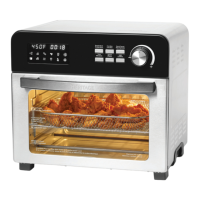
13. Temperature button
• After having selected the function,press the Temperature button to set the desired
temperature. The LCD screen displaying the temperature will blink (refer to
number 20), you may now adjust the temperature by turning the select dial (refer
to number 19). Turn the select dial to the left to reduce the temperature or to the
right to increase the temperature.
14. Function button
• Press the Function button and turn select dial until the desired cooking function
is displayed on the LCD screen, the selective cooking function will blink. Each
function is preprogrammed at a preset temperature and cooking time (adjustable).
15. Start/Cancel button
• Press to start or stop the oven after settings have been established.
16. Time button
• After having selected the function, press the Time button to set the desired
cooking time. The LCD screen displaying the cooking time will blink (refer to
number 21), you may now adjust the time by turning the select dial (refer to
number 19). Turn the select dial to the left to reduce the cooking time or to the
right to increase the cooking time.
17. Speed button
• Press the Speed button to choose between convection or air fryer functions.
The single-fan icon (refer to number 12) will illuminate when fan is operating at
low speed. The double-fan icon (refer to number 6) will illuminate when fan is
operating at high speed. For crispier results, use the air fryer function (double-fan).
18. Oven light button
• Press the Light button to turn on/off the light inside the air fryer convection oven.
19. Select dial
• Use to adjust time, temperature or cooking function. Turn select dial until the
desired setting is displayed on the LCD screen to the left. Each function is
preprogrammed at a preset temperature and cooking time (adjustable).
20. Temperature display
• Digital display for indicating cooking temperature.
21. Time display
• Digital display indicating remaining cooking time.
BEFORE FIRST USE
(Read the instructions before first use)
NOTE: During first use of the appliance, smoke and/or a slight odour may occur from the
appliance. This is normal and will quickly disappear. It will not reoccur after appliances has
been used a few more times.
1. Remove and discard any packaging, sticker, or promotional labels/materials before
first use.
2. Remove and clean the air fryer basket, crumb tray, oven rack and baking pan in warm
soapy water using a non abrasive sponge and dry thoroughly.
5


 To Next Page
 Loading...